Answering the top buyer question: what are the best 120mm LED fans for quiet operation, strong airflow, and vivid ARGB lighting? This guide highlights five suitable options, each chosen for a specific use-case—from silent builds to RGB-heavy gaming rigs. The selection helps builders pick fans by best-for scenarios, such as “best for quiet cooling,” “best for ARGB impact,” or “best overall value.” A quick summary table follows to compare core specs at a glance.
| Product | Best For | Key Benefit |
|---|---|---|
| Thermalright TL-C12C-S (5 Pack) | Silent, ARGB builds | Quality S-FDB bearings, PWM control, vibrant ARGB |
| APEVIA CO312L-BL Cosmos | Budget blue LED fans | 16 blue LEDs, solid airflow |
| DARKROCK F120 3in1 | High visual impact | Infinity mirror design, ARGB on blades and frame |
| upHere F03 | Colorful, versatile cooling | Five-color option, strong heat dissipation |
| DS RGB Fans 6 Pack | Full RGB lighting kit | Eight static RGB LEDs per fan for full build lighting |
Thermalright TL-C12C-S X3 120mm ARGB Case Fan

The Thermalright TL-C12C-S is a 120mm ARGB PWM cooling fan designed for cases, radiators, and CPU coolers. It features a 4-pin PWM interface for motherboard-driven speed control, with a maximum speed of up to 1550 RPM. The included S-FDB bearing reduces blade vibration for lower noise and longer life. The ARGB blades deliver high-brightness, atomized lighting with up to 17 lighting modes, synchronized via motherboard software. Best for builders seeking quiet operation with customizable lighting and reliable airflow.
- Best for: Quiet cooling with visible ARGB effects
- Limitations: Five-pack quantity may exceed needs for small builds
APEVIA CO312L-BL Cosmos 120mm Blue LED Case Fan
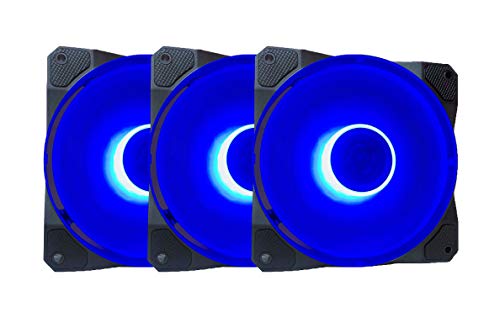
The Apevia CO312L-BL Cosmos combines blue LEDs with a black frame and nine-blade design, delivering steady airflow at 1350 RPM with a rated airflow around 57.67 CFM. This 120mm fan uses a 4-pin Molex plus 3-pin motherboard connection, making it compatible with older and newer builds alike. Best for gamers seeking bright blue lighting without sacrificing airflow. A caution: blue LED intensity may be less customizable than RGB-addressable options.
- Best for: Budget-conscious builds with strong visual LED presence
- Limitations: Fixed blue color, not RGB
DARKROCK F120 3in1 Infinity Mirror ARGB 120mm Fan

The DARKROCK F120 3in1 series features an Infinity Mirror design that creates multi-layered lighting visuals. The ARGB lighting is present on both the blades and the frame, delivering a striking aesthetic. With nine blades and PWM control, fan speed ranges from 800 to 1600 RPM (±10%), enabling strong cooling performance for demanding systems. Best for builds where ARGB lighting is a centerpiece. Limitation: Infinity mirror visuals can be highly dependent on lighting placement and software compatibility.
- Best for: Visual-heavy builds that prioritize lighting depth
- Limitations: Requires compatible ARGB software for full effect
upHere 120mm LED Silent Fan F03

The upHere F03 is a versatile 120mm LED fan with five color options on a single unit. It emphasizes high-efficiency heat dissipation with low noise, employing 11 “bionic shark fin” blades and a strategically designed frame to improve airflow while reducing noise. Standard 12 cm sizing ensures compatibility with most chassis and radiators. Best for users who want a single fan to deliver varied color accents and solid cooling. Caution: Polishing and edge treatments are designed to reduce noise, but real-world noise can vary with case acoustics.
- Best for: Colorful builds with versatile cooling needs
- Limitations: Multicolor effect depends on power and controller usage
DS RGB Fans, 120mm 6 Pack

The DS RGB Fans DK Series offers six 120mm fans with eight ultra-bright static RGB LEDs per fan, providing full-spectrum lighting for white or black PC builds. They are tuned for low-noise operation without sacrificing performance and are compatible with standard 120mm chassis configurations. Best for users seeking a comprehensive RGB kit in a value-friendly package. Caution: Static RGB lighting means no color-changing effects unless paired with appropriate software or controller hardware.
- Best for: RGB-centric ensemble builds on a budget
- Limitations: Static RGB rather than addressable lighting
Buying Guide: Choosing The Right 120mm LED Fan
- Noise vs. airflow: If you prioritize quiet operation, focus on fans with low RPM spread and high-quality bearings (like S-FDB). For aggressive cooling, higher RPM options provide more airflow but can increase noise.
- ARGB vs. RGB: If you want advanced lighting control, choose ARGB fans that synchronize with motherboard software. For simpler setups, static RGB or single-color LEDs may suffice.
- Bearing type: S-FDB bearings reduce blade wobble and noise over long life. Conventional sleeve bearings may be quieter at low RPM but wear faster under heavy use.
- Controller compatibility: PWM support enables motherboard-based speed control. Ensure the fan’s connector (4-pin PWM, 3-pin, or Molex) matches your build’s headers and power supply.
- Color and aesthetics: If lighting is a focal point, consider whether you want multi-color modes, fixed colors, or infinity/mirror lighting effects.
- Bundle considerations: Larger packs (e.g., 5-pack or 6-pack) are cost-effective for full builds but may be unnecessary if you’re upgrading a single system.
FAQ
- What is PWM control and why does it matter? It allows automatic speed adjustment based on temperature, improving cooling and reducing noise.
- Do ARGB fans require motherboard software? Yes, to unlock full lighting customization, you typically need ARGB-compatible software provided by the motherboard vendor.
- Are 120mm fans universally compatible with cases? Most cases support standard 120mm mounts, but always verify mounting holes and clearance for radiators or tall heatsinks.
- Is a multi-pack better for a new build? Yes, it’s usually more cost-effective to purchase a pack when building multiple fans for case fans and radiators.
- What should I consider for sound quality? Look for bearings like S-FDB, low blade wobble, and a stable frame to minimize vibrations at higher RPMs.
- Can RGB lighting affect performance? Lighting uses a small amount of power, but it does not significantly impact cooling performance unless the fans are under extreme load.