The following LCD screens are compact, high-contrast displays designed to augment PC builds, system monitoring, and space-conscious setups. This guide highlights five options that blend vivid visuals, easy integration, and reliable performance for American readers. Each entry includes key features, mounting flexibility, and compatibility notes to help you compare at a glance.
| Product | Brand | Key Strength | Resolution |
|---|---|---|---|
| Lian Li SM088X Black | Lian Li | ARGB frame, customizable display | 1920×480 |
| Lian Li SM088W White | Lian Li | 60Hz IPS panel, bright color | 1920×480 |
| AISHICHEN 11.26″ Mini Monitor | AISHICHEN | PC temperature monitoring, versatile inputs | 1920×440 |
| VSDISPLAY 12.6″ IPS LCD Screen | VSDISPLAY | Large secondary display, 178° viewing | 1920×515 |
| WOWNOVA 9.2″ LCD Temp Monitor | WOWNOVA | 1-click setup, dynamic themes | 800×480 |
Note: This article presents objective product information and does not include pricing. Links direct to Amazon product pages for convenience and accuracy.
Lian Li 8.8″ Universal Screen Black (SM088X)

The SM088X Black variant from Lian Li offers an 8.8-inch LCD with a customizable ARGB frame and a PC temperature display panel. Installation guidance emphasizes using the correct Screen Stand screws and avoiding longer screws to ensure proper mounting. The device supports dynamic control via L-Connect 3 software, enabling preset themes and modular information display. Users can upload videos or photos to personalize the screen’s content, aligning visuals with a build’s aesthetic or performance monitoring needs. This model targets users seeking a compact, visually engaging secondary display with flexible software support for PC temperature and content display.
Lian Li 8.8″ Universal Screen White (SM088W)

The SM088W White edition features a 60Hz IPS LCD with a 1920×480 resolution and a brightness of 500 nits, designed for vibrant color and clear content. Like the black variant, it supports L-Connect 3 for dynamic screen control, enabling customization of display themes and content. Installation instructions call for adhering to the specified screws to ensure stable mounting, while software support helps tailor the display to show system telemetry, media, or personalized visuals alongside a PC build.
AISHICHEN 11.26″ Mini Monitor FHD
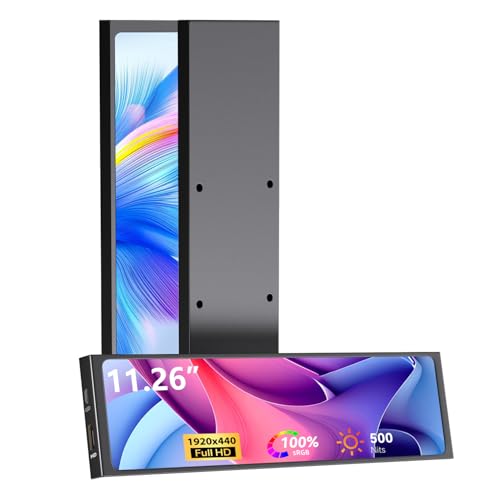
The AISHICHEN 11.26″ Mini Monitor integrates a Full HD 1920×440 IPS panel with HDMI and Type-C inputs, suitable for CPU/GPU temperature monitoring and broader PC case diagnostics. It is designed to support Aida64, enabling real-time hardware tracking within PC builds or Raspberry Pi projects. The ultra-slim, full-metal chassis emphasizes heat dissipation while maintaining aesthetic appeal. It targets users needing a larger yet compact secondary display for monitoring temperatures, clock speeds, and utilization metrics in professional or enthusiast setups.
VSDISPLAY 12.6 Inch IPS LCD Screen

This 12.6-inch DIY kit from VSDISPLAY provides a 1920×515 IPS display with 400 cd/m2 brightness and a 178° full viewing angle. It’s designed as a secondary monitor for PC cases, with easy installation in Y60 or similar chassis configurations. The kit includes power and signal cables, making it a straightforward upgrade for users seeking a larger secondary display to monitor system stats, video feeds, or auxiliary content without sacrificing space inside the case.
VSDISPLAY 8 Inch Small Mini LCD Monitor

The 8-inch VSDISPLAY mini monitor emphasizes portability and versatility for PC case DIY builds. Its compact IPS panel provides wide viewing angles and clear image display, with broad compatibility for use as a secondary display in DIY projects, laptops, or desktop setups. The product notes suggest potential usage for monitoring data via third-party software, positioning it as a flexible option for builders who want a small yet informative screen inside or near the PC case.
VSDISPLAY 14.5 Inch White LCD Monitor

The 14.5-inch 2K strip-style monitor from VSDISPLAY delivers 2560×720 resolution, USB-C input, and a 350 cd/m2 brightness. It’s positioned as a DIY PC case companion for extended displays that can monitor GPU/CPU status, or serve as an auxiliary display within the chassis or on the desk. Its longer form factor supports creative installations, including alignment with fan mounting or case-side panel layouts for enhanced visibility of system information.
WOWNOVA 5″ Computer Temp Monitor

The WOWNOVA 5-inch temperature monitor includes self-developed software and a dynamic theme library, enabling a compact secondary display for CPU/GPU/RAM/HDD metrics. It uses a USB-C power connection and an aluminum housing, suitable for internal mounting in PC builds or as a portable, internal monitor. Its emphasis on ease of setup and customizable visuals makes it a practical option for budget-conscious builders seeking basic yet informative system monitoring.
Buying Guide
- Display size and resolution: Larger screens like 12.6″ and 14.5″ provide more readable telemetry, while 8.8″ and 5″ models favor compact builds or internal mounting. Resolution matters for clarity when displaying small graphs or text.
- Panel type and brightness: IPS panels offer wide viewing angles and accurate color; brightness levels around 400–500 nits help with visibility in well-lit rooms.
- Software ecosystem: Some models rely on L-Connect 3 or dedicated software for dynamic themes and data overlays. Consider whether the software is actively supported and easy to use.
- Input and power options: Look for HDMI, USB-C, or Type-C inputs and USB-powered designs for simple integration inside cases without extra power cables.
- Mounting compatibility: Ensure mounting screws and frames align with your case or monitor arm. Follow installation guides to avoid loosening or misalignment.
- Use case: Choose a display primarily for system monitoring (Aida64 compatibility, temperature readouts) or for aesthetic content (custom ARGB frames, video thumbnails) based on your priorities.
- Durability and cooling: Metal housings and efficient heat dissipation help prevent overheating in enclosed PC builds, particularly when displays are mounted inside the chassis.
- Compatibility with existing peripherals: If you plan to display software dashboards or telemetry, verify compatibility with your monitoring tools and operating system.