Parents and caregivers increasingly turn to LCD drawing tablets to combine screen-free creativity with learning. This guide highlights five top options that balance durability, eye-friendly screens, and educational potential. Each entry includes a quick look at features to help you compare at a glance, followed by detailed sections with specs and usage notes.
| Product | Brand | Key Feature |
|---|---|---|
| KOKODI LCD Writing Tablet | KOKODI | Eye protection, 10-inch screen, long-life battery |
| Teriph LCD Writing Tablet | Teriph | 8.5-inch color LCD, low-energy, durable shell |
| Genialba LCD Writing Tablet | Genialba | 8.5-inch color screen, 6-month battery |
| TECJOE 4 Pack LCD Writing Tablet | TECJOE | Four tablets, portable, pressure-sensitive |
| Kinayue LCD Writing Tablet | Kinayue | 16-inch large screen, rechargeable USB |
KOKODI LCD Writing Tablet
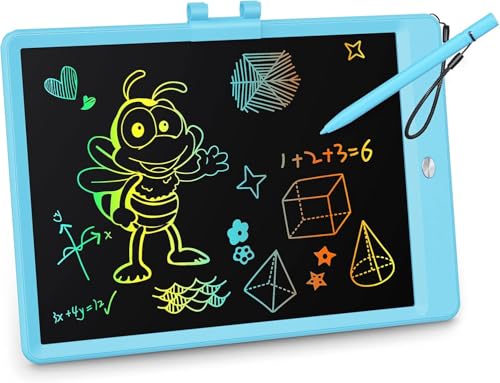
KOKODI presents an eye-protective LCD writing tablet with a 10-inch colorful screen designed to reduce radiation and glare. It uses pressure-sensitive technology to produce varied line thickness and supports long battery life with a replaceable battery, making it suitable for extended learning sessions and doodling. A locking mechanism helps prevent accidental erasures, and the device emphasizes safety with a secure battery compartment.
Features highlight quick access to write, erase, and save functions, with simple operation ideal for kids ages 3 and up. The included stylus integrates neatly with the board to reduce loss, and the device emphasizes durability and ease of use for classroom or home learning activities.
Teriph LCD Writing Tablet

Teriph’s 8.5-inch Teriph LCD writing tablet focuses on vibrant color and low-energy consumption, with no backlight or blue light to protect eyesight. The device uses an energy-efficient screen and a sturdy ABS shell, designed for frequent use by kids. It includes a lock function to prevent accidental erasure and a one-second erase action when the button is pressed, supporting quick transitions between activities.
Durability and safety are emphasized, with a battery design that supports cycles and a battery placement that minimizes child access. The tablet serves as a versatile educational tool for drawing, spelling, math, notes, and interactive play in homes or classrooms.
Genialba LCD Writing Tablet

Genialba offers an 8.5-inch colorful LCD drawing tablet designed for kids aged 3-8 years. The device emphasizes eye safety with a non-glare, radiation-free screen and a long-lasting battery capable of about 100,000 writings. It’s engineered for easy one-key erase and a lock feature to prevent accidental clearing, making it a practical tool for preschool and early elementary learning activities.
As an economical and eco-friendly option, it helps reduce paper waste while supporting creative play, storytelling, and basic early-learning tasks such as tracing and drawing shapes.
TECJOE 4 Pack LCD Writing Tablet

TECJOE’s 4-pack provides a shared, mess-free drawing experience ideal for families or classrooms. Each 8.5-inch tablet features a pressure-sensitive LCD screen that supports varied line thicknesses and a long-lasting, replaceable battery. The ultra-slim, lightweight design makes these tablets highly portable for travel or car trips, and the set enables siblings to draw, learn, and play without interruptions or mess.
Designed for durable use with everyday doodling, the TECJOE tablets are suited for learning activities like tracing, spelling, and simple math, while offering quiet, focused play away from traditional drawing materials.
Kinayue LCD Writing Tablet

Kinayue’s 16-inch LCD writing tablet offers a large, bright screen for expansive drawing and learning activities. It uses an upgraded USB rechargeable battery designed to extend use to months per charge, reducing the need for disposable batteries. The screen is backlit with no blue light, aiming to protect eyesight during long study sessions, and the device emphasizes a smooth drawing experience with bright colors for more vivid artwork.
With a focus on travel convenience and extended creative sessions, this tablet supports drawing, doodling, and note-taking on long trips or home learning setups, making it a robust center for children’s visual exploration.
Buying Guide: Key Purchase Considerations
- Screen size and brightness: Larger screens like 10-16 inches offer more space for complex drawings but are less portable. Look for non-glare, eye-protective LCDs with color clarity that suits kids’ eyes.
- Durability and materials: ABS shells, rounded edges, and secure battery compartments reduce the risk of damage and ensure safe use by young children.
- Power and longevity: Reusable digital tablets rely on batteries or USB charging. Consider devices with long-lasting internal batteries (months between charges) versus those that require frequent battery changes.
- Erase and lock features: A reliable erase function makes quick resets easy. A lock or save feature helps preserve important notes before erasing, which can be helpful for learning activities.
- Portability and age suitability: 8.5-inch to 10-inch tablets strike a balance between portability and usability for early learners; larger screens like 16 inches suit home desks or travel when space allows.
- Educational value: Look for reports of versatility—drawing, spelling, math, notes—and multi-user suitability for families with siblings.
- Safety: No backlight glare, no blue light, and non-toxic materials are important for long study sessions and younger children.
- Eco-friendly considerations: Reusability reduces paper waste; some models emphasize long-life batteries to minimize replacements.
Across these options, consumers should consider how the tablet fits their child’s learning goals—whether it’s creative drawing, practice with letters and numbers, or keeping hands busy during travel. The summarized choices above present a range of sizes, power options, and features to support screen-free learning without sacrificing engagement.