If you’re shopping for a Layer 3 switch, you want devices that can handle routing, VLANs, QoS, and growing uplink needs without complicating management. The selections below target common buyer needs: office networks needing multi-gig connections, PoE for devices, easy management, and scalable uplinks. This guide highlights five solid choices and explains who should choose each one. A quick summary table is included for side-by-side reference.
| Product | Best For | Why It Stands Out |
|---|---|---|
| Cisco WS-C3850-48P-S Catalyst 3850 | Small business with PoE needs | Layer 3 routing, PoE+, 48 ports; reneweds offer value with Cisco reliability |
| USW-Pro-Max-16-PoE 16-Port Layer 2/3 | Mixed PoE devices and edge routing | 4× 2.5G PoE++, 12× GbE PoE+ and 2× 10G SFP+ uplinks |
| 8-Port 10Gb SFP+ Layer 3 Managed Switch | Power users needing 10G | 10G uplinks and Layer 3 features with easy web management |
| Grandstream GWN7811 | Compact Layer 3 switch for small offices | 8x GbE with 2x SFP+; managed Layer 3 capabilities |
| Ubiquiti Pro Max Layer 3 Switch | High-speed, versatile deployments | 16-port Layer 3 with 2.5G and L3 features; flexible mounting |
Cisco WS-C3850-48P-S Catalyst 3850

Product type: Layer 3 managed switch with PoE+. Best for buyers who need PoE-enabled ports for access points, IP cameras, or VoIP phones, plus robust routing features. The 48-port configuration provides ample edge capacity for small offices or tight-knit branches. This is a renewed unit, which can offer cost savings with Cisco reliability for growing networks. Consider this if you prefer a trusted enterprise brand and require PoE power in a single chassis. A potential limitation is renewal-era hardware that may lack the latest software features or warranties.
USW-Pro-Max-16-PoE 16-Port Layer 2/3
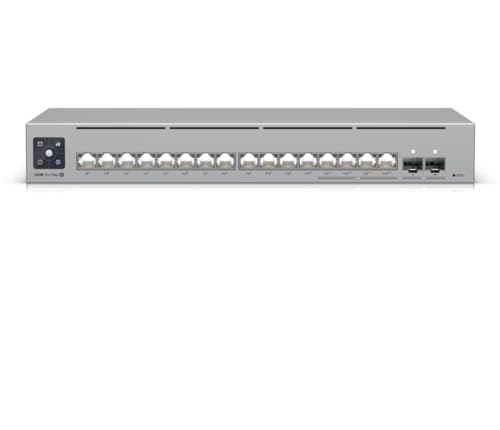
Product type: Layer 2/3 PoE+ switch with multi-gigabit speeds. Best for networks that require strong PoE support and flexible routing capabilities. It includes four 2.5 GbE PoE++ ports for high-wPower devices and two 10G SFP+ uplinks for fiber expansion. Choose this when you anticipate needing more power for edge devices and want future-proof uplinks. Limitation: even with 16 ports, larger deployments might require additional switches or higher port density at the distribution layer.
8-Port 10Gb SFP+ Layer 3 Managed Switch

Product type: Compact 8-port Layer 3 switch with 10G SFP+ uplinks. Best for power users who need high-speed interconnects between servers, storage, or a small data center. It supports VLAN, QoS, LACP, and routing protocols such as OSPF, BGP, enabling scalable network segmentation. Best for users who want a small footprint without sacrificing Layer 3 routing capability. A limitation is that it may omit SFP+ modules, which could require separate purchases to reach full 10G capability.
Grandstream GWN7811 | 8-Port Layer 3

Product type: 8-port Gigabit Layer 3 managed switch. Best for compact offices needing basic routing, VLAN, and QoS with a clean management interface. The 8-port design keeps things simple while still delivering Layer 3 capabilities. Suitable for small spaces where expanding to many devices is not required. Limitation: fewer ports may limit future expansion and multi-device PoE support is not indicated in the data provided.
Ubiquiti Pro Max Layer 3 Switch

Product type: 16-port Layer 3 switch with 2.5 GbE and versatile mounting. Best for IT environments that need faster edge connectivity and flexible installation options. Features include Etherlighting ports for easy location and status indication, plus four 2.5 GbE ports. Choose this if you value clear port status visibility and multi-gig performance. Limitation: details on supported routing protocols are not fully spelled out; verify compatibility with your network design before deployment.
Grandstream GWN7822P | 24-Port 2.5G

Product type: 24-port multi-Gigabit Layer 3 managed PoE+ switch. Best for larger small offices needing abundant 2.5G ports and PoE++ support across a busy edge. 24 ports provide ample headroom for devices like cameras, APs, and workstations, plus IPv6 and IPv4 readiness. A caution is to confirm power budget and PoE requirements if you plan extensive PoE deployment.
Buying Guide: Layer 3 Switches for the Modern Office
What to consider when selecting a Layer 3 switch:
- Port density and speed: Assess how many devices need VLAN segmentation or routing and whether you need 1G, 2.5G, or 10G uplinks. If you anticipate growth, choose a switch with scalable uplinks (SFP+/RJ45) and PoE if you power phones, cameras, or wireless APs.
- PoE needs: For offices with wireless access points, cameras, or IP phones, ensure PoE or PoE+ capability aligns with power budgets. Consider PoE++ for high-power devices.
- Layer 3 features: Verify supported routing protocols (OSPF, BGP), ACLs, QoS, VLANs, and LACP for link aggregation. Some switches emphasize web UI for easy configuration; others may rely on CLI for advanced setups.
- Management experience: Businesses value intuitive interfaces and reliable remote management. Look for a web UI, mobile app support, cloud management options, and SNMP compatibility.
- Form factor and installation: Desktop vs. rack-mountable designs; consider mounting flexibility if space is constrained. Cooling and fanless options may matter in quiet environments.
- Warranty and renewal status: Refurbished or renewed devices can save costs but confirm return policies, firmware updates, and support terms.
FAQ
- What is a Layer 3 switch?
A Layer 3 switch can perform switching at Layer 2 and routing at Layer 3, enabling VLAN-based segmentation and inter-VLAN routing without a separate router.
- Do I need PoE on a Layer 3 switch?
PoE is useful if you power devices like IP phones or access points directly from the switch. If not, a non-PoE model may reduce power consumption and heat.
- What uplink speeds should I look for?
For growing networks, aim for 2.5G or 10G uplinks to minimize bottlenecks between distribution and core devices.
- Is a refurbished switch a good choice?
Refurbished or renewed units can offer substantial savings, but verify return policies, firmware support, and vendor credibility.
- How many ports do I need?
Count edge devices (PCs, IP phones, cameras, APs) and plan for growth. Add a few spare ports for future expansion to avoid extra gear soon after deployment.