Choosing the right laser pointer presenter can elevate any briefing, lecture, or workshop. This guide highlights five reliable models offering clear laser pointers, intuitive controls, and solid wireless ranges to keep you moving freely. Each pick is evaluated on compatibility, ease of use, and portability to help American professionals select a device that fits their setup.
| Product | Brand | Key Benefit | Wireless Range |
|---|---|---|---|
| Logitech Wireless Presenter R400 | Logitech | Classic in-pointer, simple controls | Up to 50 ft |
| Logitech Wireless Presenter R800 | Logitech | Green laser, longer range | Up to 100 ft |
| ELISWEEN Presentation Clicker | ELISWEEN | USB-C compatibility, ergonomic | Long-range wireless |
| DinoFire USB-C Wireless Presenter | DinoFire | USB-A & USB-C, bright pointer | 98-165 ft |
| CLIKBUTM Wireless Presenter | CLIKBUTM | Ergonomic, universal compatibility | Very long range |
Logitech Wireless Presenter R400

The Logitech R400 combines a built-in red laser pointer with intuitive touch keys for slideshow control. It supports a typical Presenter mode and uses AAA batteries, recommended for reliable, long-lasting power. The device is designed to serve as both a presentation pointer and a PowerPoint clicker, enabling the presenter to move around the room with freedom. A Class 2 red laser provides adequate visibility on most backgrounds, and the up-to-50-foot wireless range supports mid-sized rooms without frequent recharging or re-pairing.
Wireless Presenter DinoFire (Black)

The DinoFire model features a plug-and-play USB receiver and a bright red pointer with an impressive range. It supports Page Forward/Backward, Volume Control, Hyperlink, and Screen mode toggling, making it a practical tool for everyday presentations. The 2.4GHz download-free setup means fewer compatibility hassles, and its 100-foot range helps presenters navigate large rooms and conference halls while keeping slides in smooth sequence.
ELISWEEN Presentation Clicker

The ELISWEEN clicker emphasizes USB Type-C compatibility alongside traditional USB-A, simplifying setup across devices from Mac to Windows. It offers full control features such as Volume Control, Windows switching, and screen modes, with an ergonomic design that keeps buttons within easy reach. The device supports a diverse range of software—PowerPoint, Keynote, Google Slides—and includes a built-in magnet for securing the dongle when not in use. A bright red light assists in highlighting crucial points during demonstrations.
CLIKBUTM Wireless Presenter Remote
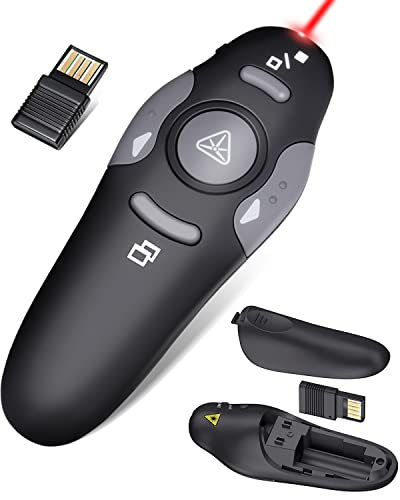
The CLIKBUTM model focuses on an ergonomic design and practical button layout for comfortable long sessions. It supports a broad range of systems and software, including Windows, Mac OS, Linux, Keynote, Google Slides, and PowerPoint. The remote stores its USB dongle in the battery compartment, making transport straightforward, and it provides a reliable long-range wireless connection for large rooms. A bright red laser pointer helps emphasize key points during any presentation while keeping distractions to a minimum.
Buying Guide
- Laser pointer color and visibility: Red vs. green lasers affect visibility in bright rooms. Green lasers are generally easier to see in daylight but may require higher power for equivalent range.
- Wireless range: Consider room size and seating arrangements. Models offering 50–100 feet are suitable for typical conference rooms; larger venues may benefit from extended ranges up to 165 feet or more.
- Connectivity and compatibility: USB dongles, USB-C compatibility, and driver-free setups simplify use across Windows, macOS, and Linux. Look for models with plug-and-play features and dual-port support when possible.
- Battery life and power: AAA batteries are common; rechargeable options may reduce long-term costs. Check battery availability and expected replacement intervals in your use case.
- Ergonomics and button layout: A comfortable grip and intuitive button placement reduce presenter fatigue. One-button-per-function designs can minimize on-the-fly confusion during a demo.
- Additional features: Volume control, hyperlink buttons, full/black screen modes, and Windows/macOS switching can streamline complex presentations. Consider whether you need Keynote or PowerPoint compatibility specifically.
- Portability and storage: A compact device with a hidden USB dongle store helps prevent misplacement during travel and sessions.
- Reliability and latency: Look for devices with stable, low-latency connections to avoid lag between input and slide changes, especially in larger rooms or online-offline hybrid setups.
When selecting a laser pointer presenter, align the device with your typical presentation environment. For classroom or small meeting rooms, a 50-foot range with a straightforward clicker is often sufficient. In larger venues or lecture halls, prioritize green or bright red pointers with longer wireless reach and robust build quality. If you frequently switch devices, prioritize USB-C compatibility or dual-port dongles. Finally, consider which software ecosystems you rely on most—PowerPoint, Keynote, or Google Slides—and verify that the device supports those platforms without requiring complex setup.