Whether you’re a hobbyist, a maker, or a small business owner, a laser engraver and cutter can elevate your projects. This guide highlights five top options that balance power, precision, and versatility. Each product is described with who it’s best for, along with practical buying considerations to help you choose confidently. The following table provides quick comparisons of key specs and intended uses to help you decide at a glance.
| Product | Laser Power | Bed / Work Area | Best For |
|---|---|---|---|
| ACMER S1 (6000mW) | 6W | 130×130 mm | |
| Creality Laser Engraver 10W | 10W | 17″ x 16″ (approx.) | |
| xTool S1 (40W) | 40W | Bed wide enough for large items | |
| xTool F2 (5W IR & 15W Diode) | 20W total (dual) | Desktop footprint | |
| ACMER S1 (2500mW) | 2.5W | 130×130 mm |
ACMER S1 Laser Engraver 6W — 130×130 Mm

Best for detailed work on small items, this model packs 6000mW of diode power with a 0.04mm laser spot for high-precision engraving. It uses AcmerTool software by default and supports other popular programs, offering flexible workflows for creators who value software options. The machine delivers up to 10,000 mm/min engraving speed with repeatable positioning accuracy of 0.01 mm, suitable for wood, bamboo, leather, plastic, PCB, and ceramics. Ideal for DIY crafts and small business prototypes that demand sharp detail in a compact footprint.
Who it’s for: hobbyists and micro-project makers who need accurate work within a 130×130 mm area and prefer integrated AcmerTool workflow. Why selected: best balance of power, accuracy, and a compact bed for small, intricate designs. Caution: ensure adequate ventilation for materials that release fumes during engraving and cutting.
Creality Laser Engraver 10W — 17″ x 16″ Bed
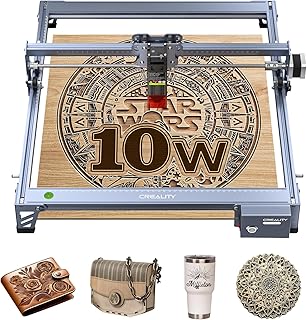
The Creality 10W system emphasizes speed and precision for medium to larger projects. With a 10W output and a 0.06×0.06 mm focal spot, it claims capability to cut 5 mm basswood or 3 mm black acrylic in a single pass, and a cutting speed up to 10,000 mm/min. The aluminum alloy frame and robust guide rails support accurate engraving with tight repositioning tolerances. It also features an anti-UV eye protection filter on the cutting module for safer operation.
Who it’s for: builders and designers who need a reliable workhorse for wood and acrylic, plus decent capability on other materials. Why selected: best for users who want a proven, larger-capacity desktop laser with strong cutting power. Caution: ensure proper ventilation for fumes when cutting plastics and dark materials.
xTool S1 40W Laser Cutter & Engraver

Designed for high productivity, the xTool S1 pairs 40W power with a large bed for bigger projects, such as signs or batch items like dog tags. It emphasizes precision via Pin-point Positioning technology. AutoPassthrough allows longer items to be processed, and the included software supports easy parameter presets and a library of projects. It is ready to use out of the box and supports complex materials, including curved surfaces with 3D engraving capabilities.
Who it’s for: professionals and serious hobbyists undertaking larger, multi-piece projects. Why selected: best combination of power, bed size, and advanced positioning for batch workflows. Caution: higher price point may be a consideration for casual users; ensure you have adequate workspace and ventilation for heavy-duty use.
xTool F2 5W IR & 15W Diode Dual Laser Engraver

The xTool F2 combines a 5W infrared laser for depth marking on metal with a 15W diode for fast engraving and cutting on a wide material set. A built-in 50MP camera aids alignment, while motion accuracy reaches 0.00199 inches. At speeds up to 6000 mm/s, it’s positioned for rapid turnarounds on small to mid-sized items. The Slide Extension supports batch processing for items such as coasters and phone cases, making it suitable for small-run production.
Who it’s for: creators who need color marking on metal and fast, high-detail engraving on non-metal surfaces. Why selected: best for dual-material versatility and on-demand batch work. Caution: dual lasers may require careful safety handling and alignment checks during setup.
ACMER S1 Laser Engraver 2.5W — Compact Entry Model

This lower-power variant focuses on core engraving tasks in a compact 130×130 mm area. It uses AcmerTool software and delivers 2500mW with a 0.01 mm repeatable positioning accuracy, supporting a range of common materials for DIY crafts and light professional projects. Ideal for beginners looking to learn laser engraving basics without committing to higher-powered equipment.
Who it’s for: beginners and students exploring laser engraving with minimal footprint. Why selected: best entry option for those prioritizing simplicity and affordability. Caution: lower power means thinner materials and less capability for deeper cuts or thicker boards.
Buying Guide
- Power versus material thickness: Higher wattage enables deeper cuts and faster processing on thicker materials. If you plan to cut through wood or acrylic in a single pass, prioritize 10W and above.
- Bed size and project scale: A larger bed suits bigger signs and batches; a compact bed is easier to fit on a desk but limits item size.
- Focal quality and accuracy: A small focal spot (in mm) generally yields finer detail. Look for machines offering sub-0.1 mm focus and repeatable positioning accuracy.
- Software ecosystem: Free or bundled software (like AcmerTool or XCS) helps a smoother start. Consider whether you need AI-assisted design or material presets.
- Safety features: UV filtering, enclosure design, and air filtration contribute to safer operation. Ensure adequate ventilation for fumes, especially with plastics.
- Material compatibility: Verify support for the materials you use (wood, leather, plastic, metal, ceramics). Dual-laser setups expand capability on metal and deeper engravings.
- Expansion and support: Look for models with accessible spare parts, clear parameter libraries, and responsive customer support for setup and troubleshooting.
FAQ
- What is a laser engraver vs. laser cutter? An engraver primarily etches or marks surfaces, while a cutter uses higher power to traverse through materials, creating cuts.
- Do I need a professional setup to start? Most models here are designed for beginners to mid-level users with out-of-the-box software and basic assembly. Some assembly may be required for larger beds.
- Is laser engraving safe for home use? Yes, with proper ventilation, eye protection, and enclosed operation where possible. Follow manufacturer safety guidelines.
- Can these devices engrave on metal? Some models offer metal marking via higher power or specialized lasers (e.g., dual-laser F2). Check each model’s material list.
- What maintenance is needed? Periodic alignment checks, lens cleaning, and keeping the work area free of dust help maintain accuracy and performance.
- Which model is best for beginners? The entry-level ACMER S1 2500mW or similar compact units are typically easier to start with before upgrading to higher-power systems.