Finding a laptop vacuum cooler can dramatically improve thermals for gaming rigs, workstations, and portable setups. This guide selects five top options that combine aggressive cooling with intelligent control. It helps buyers choose based on speed, temperature sensing, portability, and noise. Ideal buyers include competitive gamers, students on the go, and professionals running demanding applications.
Summary table of chosen products:
| Product | Brand | Key Benefit | Best For |
|---|---|---|---|
| KLIM Tempest Laptop Cooler | KLIM | 4000 RPM vacuum airflow with auto/manual modes | Rapid cooling with temperature-based speed control |
| IETS GT202UB Vacuum Laptop Fan | IETS | Smart temp detection across a 2600-5000 RPM range | Precise cooling for varied workload |
| Elfzone Laptop Cooler | Elfzone | High-performance dual-ball fan with manual control | Strong, adjustable cooling on a budget |
| Ejoyous Laptop Cooler | Ejoyous | Compact design with adjustable speed | Portable cooling with simple controls |
| OImaster Laptop Cooler | OImaster | Three-speed cross-flow turbine for heat dissipation | Versatile use across devices and travel |
KLIM Tempest Laptop Cooler With Vacuum Fan

Overview: This KLIM Tempest model offers a high-powered motor that spins at 4000 RPM to push large volumes of air through the laptop, cooling it quickly. It includes temperature detection and dual operating modes—Automatic mode that selects the best speed based on the laptop’s temperature, and Manual mode with 13 available levels. Best for gamers and power users who want rapid, automated cooling with the option to fine-tune fan speed.
Who it’s best for: Users who want fast, hands-off cooling with the flexibility to override settings for intense sessions. It’s also well suited for laptops with side or rear exhausts and includes installation aids like rubber sleeves and foam pads for a snug fit. A potential limitation: users must read the manual to achieve the optimal fit with their laptop’s exhaust design.
Why selected: The combination of high RPM, automatic temperature-based control, and manual override offers robust cooling performance with adaptable operation. It’s a strong all-around pick for both casual and heavy-duty workloads.
IETS GT202UB Vacuum Laptop Fan Cooler
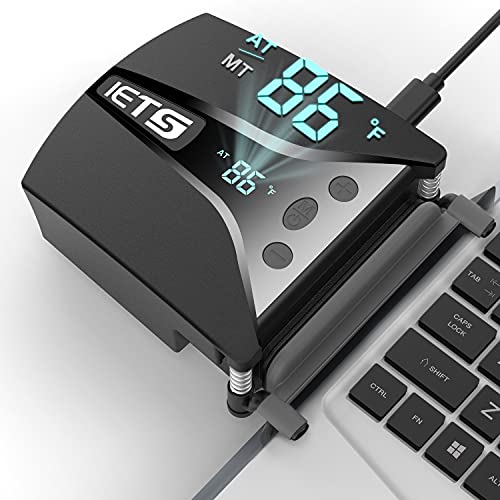
Overview: The IETS GT202UB emphasizes three core design elements—three core components that accelerate cooling: a high-speed blower with 2600-5000 RPM, a tight silicon shroud, and a low-resistance air duct. It features smart temperature detection that automatically adjusts fan speed, improving efficiency. A retractable clip arm helps keep the cooler attached as you move.
Who it’s best for: Buyers who want a scalable speed range and automatic adjustment for different usage scenarios, from light work to gaming bursts. The retractable clip arm supports easy attachment and mobility. Limitation: some users may prefer a broader market-wide compatibility due to varying laptop exhaust configurations.
Why selected: Its tri-core design and wide RPM range offer versatile cooling and strong performance in a compact form, making it a good match for mid- to high-end gaming laptops.
Elfzone Laptop Cooler With Vacuum Fan
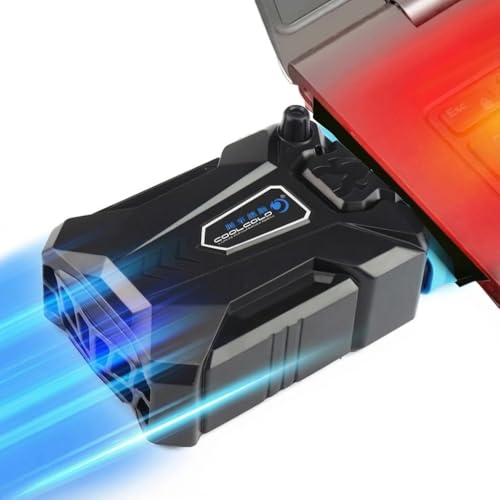
Overview: Elfzone pairs a manual mode with a robust 4000 RPM vacuum fan and a display for monitoring. Key features include a high-performance dual-ball fan, strong airflow, and quiet operation. The design emphasizes durability and a secure grip, ensuring stable cooling during movement.
Who it’s best for: Buyers who want a reliable, high-RPM cooling pad with a straightforward manual control and clear feedback via the display. It suits users who need dependable cooling during extended gaming or rendering sessions. Limitation: performance emphasis on raw airflow may come with trade-offs in energy efficiency for lighter tasks.
Why selected: This option balances aggressive cooling with user-friendly operation, making it a practical pick for those who want predictable performance with tactile control.
Ejoyous Laptop Cooler With Vacuum Fan
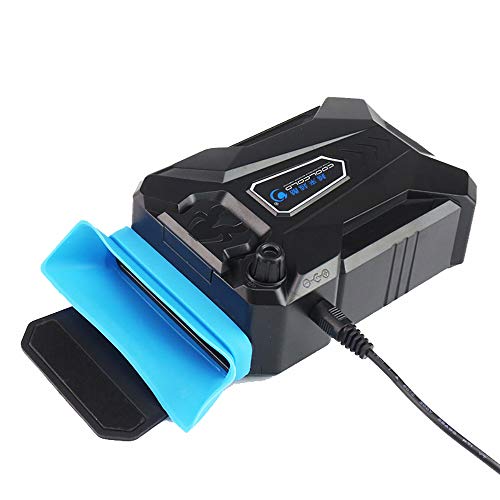
Overview: The Ejoyous cooler emphasizes a compact, portable design with a vacuum-assisted fan and silent operation. It’s described as stylish and effective at drawing heat away from the laptop while remaining easy to carry.
Who it’s best for: Buyers who prioritize portability and a simple, low-noise cooling solution for ultrabooks or compact gaming laptops. Limitation: the description highlights minimal adjustable features, which may be less ideal for power users who want fine-grained speed control.
Why selected: For travelers and students, the combination of portability and effective cooling in a compact form factor makes this a sensible choice when space and weight matter.
OImaster Laptop Cooler With Adjustable Stand

Overview: The OImaster cooler showcases an adjustable stand and a cross-flow turbine cooling fan. It offers three speed levels and positions that save space while delivering effective heat dissipation, making it suitable for desktops, laptops, tablets, and even phones when used in a compatible setup.
Who it’s best for: Buyers who want a flexible stand angle and multiple speed settings for varied tasks, including gaming and work sessions. Limitation: its primary strength is versatility, which may come at the expense of maximizing raw cooling power in extreme workloads.
Buying Guide: Key Considerations For Laptop Vacuum Coolers
- Cooling Power vs. Noise: Higher RPMs provide quicker cooling but may produce more noise. Consider where you’ll use the device—quiet environments benefit from moderate speeds or better acoustic design.
- Smart Temperature Control: Look for models with automatic speed adjustment based on exhaust temperature. This helps maintain safe temperatures without constant manual tweaking.
- Compatibility: Check exhaust direction of your laptop (side or rear) and ensure the cooler ships with compatible mounting options or spacers. Some units include rubber sleeves or adjustable clamps.
- Portability: If you travel often, prioritize light-weight, compact designs with simple setup. Some models can double as stand-alone cooling devices for tablets or small devices.
- Adjustment And Stability: A retractable or adjustable stand, anti-slip grips, and secure attachment mechanisms prevent shifting during intense use.
- Display And Feedback: An LCD or display readout helps monitor fan speed and temperature, aiding in precise control and consistency.
- Build Quality And Durability: Dual-ball bearings and rugged housings generally yield longer life in mobile setups and frequent transport.
- Power Source: USB-powered units are common; verify power requirements and whether they impact laptop battery use under load.
Quick Comparison Of Top Picks
- Best for automated, high-speed cooling: KLIM Tempest with Auto/Manual modes, 4000 RPM.
- Best for wide RPM range with smart sensing: IETS GT202UB with 2600-5000 RPM and temperature-based control.
- Best value with strong airflow: Elfzone Laptop Cooler with display and 4000 RPM.
- Best portable option: Ejoyous, compact with vacuum fan and simple controls.
- Best adjustable stand option: OImaster with cross-flow turbine and three-speed modes.
Frequently Asked Questions
- Do laptop vacuum coolers really improve performance? Yes, by increasing airflow over heat-prone areas, they can reduce surface temperatures and help sustain performance during heavy workloads.
- Are these devices universal for all laptops? Most are designed for laptops with rear or side exhausts, but compatibility varies. Always check the product’s compatibility notes.
- Is automatic cooling mode better than manual? Automatic mode adapts to temperature, which is useful for ongoing tasks. Manual mode is preferable when you want precise control for specific workloads.
- Will a cooler cause noise? Some units can be noisy at high RPMs. If silence is important, choose models with quieter fans or lower maximum RPMs and better acoustic design.
- Can I use these on tablets or mobile devices? Some devices are designed for multi-use or compact devices, but many are tailored for laptops. Check the product description for device compatibility.
- How should I maintain these coolers? Regularly remove dust from vents, wipe the surface, and ensure mounting components remain secure to maintain optimal airflow.