If you’re seeking maximum cooling for gaming laptops or high-performance notebooks, a vacuum-style or high-velocity laptop cooler can dramatically improve temperatures. This article highlights top options that use vacuum or high-airflow designs to pull heat away from the chassis. It is ideal for power users, gamers, and professionals who push their laptops hard. Below you’ll find clear, buy-ready comparisons, who each product is best for, and practical buying tips.
Quick Product Comparison
- IETS GT202UB vacuum laptop fan cooler with temperature display — best for compact, automatic speed control
- KLIM Tempest Laptop Cooler with Vacuum Fan — best for users who want automatic temperature-based adjustments
- Elfzone Laptop Cooler with Vacuum Fan — best for portability and a robust manual control option
- Ejoyous Laptop Cooler with Vacuum Fan — best for compact, stylish, USB-powered cooling
- IETS GT300 Double Blower Laptop Cooling Pad — best for dual-blower cooling and dust filtration
IETS GT202UB Vacuum Laptop Fan Cooler
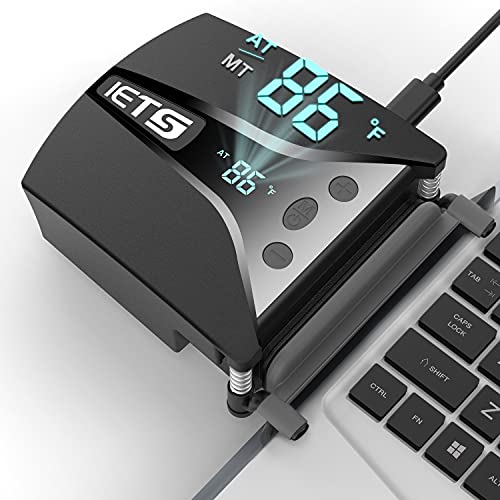
The IETS GT202UB is designed for rapid cooling with a three-core approach: a high-speed blower (2600-5000 RPM), a tight silicon shroud available in three sizes, and a low-resistance air duct. This combination creates a strong vacuum-like cooling effect for gaming laptops. A built-in temperature display helps monitor heat and enables automatic speed adjustment to balance cooling with efficiency.
Who it’s best for: gamers and power users who want automatic fan-speed management tied to real-time temperatures and a flexible fit with multiple shroud sizes. This model suits compact setups where space is at a premium but airflow remains critical. A potential limitation: the vacuum effect can be less effective on very thick laptops if the shroud size isn’t properly matched.
Selected for: strong automatic cooling response, compact footprint, and a clear temperature readout that aids in quick decision-making during sessions.
KLIM Tempest Laptop Cooler With Vacuum Fan

The KLIM Tempest combines a high-flow 4000 RPM motor with temperature detection and multiple operating modes. Automatic mode adjusts speed based on laptop temperature, while Manual mode offers 13 speed levels for precise user control. It’s designed for laptops that exhaust heat through the side or rear panels and includes mounting aids to improve fit on different devices.
Who it’s best for: users who want effortless cooling with smart auto-adjustment and the option to dial in exact speeds. It’s especially strong for long gaming sessions or rendering tasks that generate heat steadily. Limitation: manual mode requires familiarity with the device’s fit and exhaust configuration for the best results.
Elfzone Laptop Cooler With Vacuum Fan
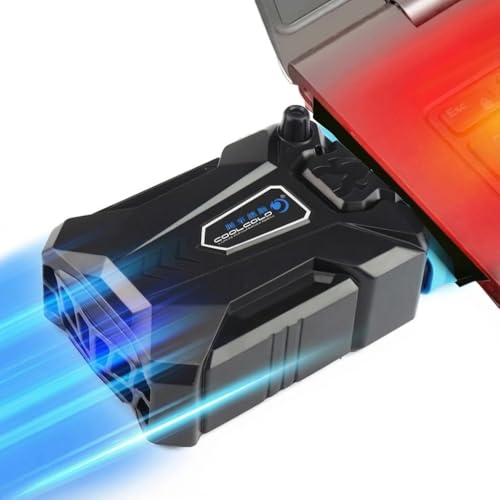
The Elfzone cooler emphasizes a strong turbo-like airflow with a display readout and a manually adjustable control for fan speed. Its design centers on stable, quiet operation and solid airflow into the laptop’s intake. It uses a dual-ball bearing fan to sustain cooling without introducing excessive noise, and its anti-slip design helps keep the setup steady during movement.
Who it’s best for: users who want a visually simple, portable option with a reliable manual control and strong airflow. It’s a good pick for travelers or students who need a compact cooler that still delivers robust cooling. Caution: the manual speed range may be more limited than multi-speed models, so high-demand sessions may require careful adjustment.
Ejoyous Laptop Cooler With Vacuum Fan
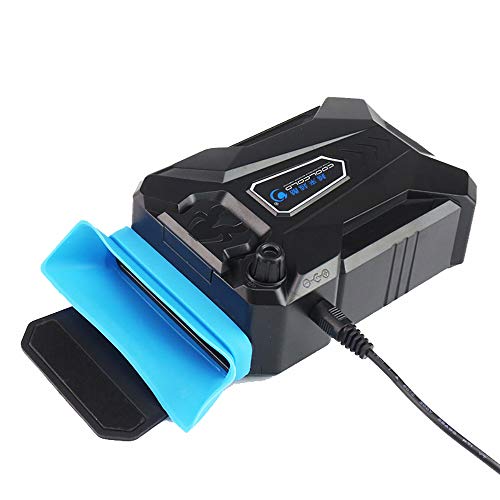
The Ejoyous cooler emphasizes compact portability with a USB-powered design and a vacuum-style air path to maximize cooling efficiency in a small footprint. It’s a slim option that prioritizes heat extraction while keeping a minimal desk profile. The design supports a stylish appearance alongside practical cooling performance for light-to-moderate gaming or office tasks.
Who it’s best for: buyers seeking a compact, USB-powered cooler for everyday use, ultrabooks, or travel-friendly setups. A limitation: its compact size may yield less aggressive cooling on very hot gaming laptops compared with larger or dual-blower models.
IETS GT300 Double Blower Laptop Cooling Pad
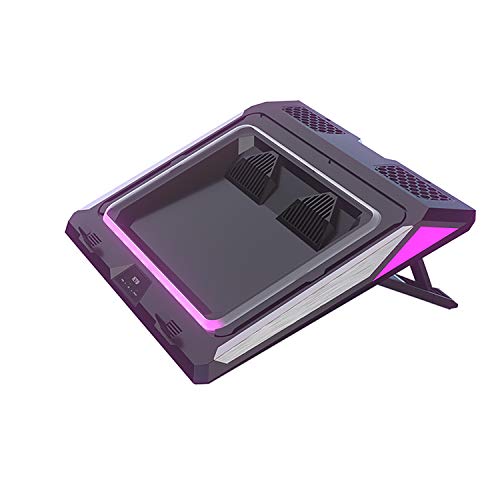
The GT300 uses two blowers to deliver enhanced airflow and features a sealing rubber ring to maximize cooling and a dust-filter system. It includes seven-color lighting and multiple lighting modes, along with an adjustable mount stand. The design aims to offer strong cooling for larger 14- to 17-inch gaming laptops while helping to minimize dust buildup inside the chassis.
Who it’s best for: gamers and power users who want the strongest cooling throughput and built-in dust management. It’s particularly effective for longer gaming sessions on larger laptops. Caution: lighting and extra features may add complexity for users preferring a simple plug-and-play device.
Buying Guide
Key considerations help ensure you choose the right vacuum-style or high-airflow laptop cooler. Use these practical questions to compare options.
What laptop size and exhaust design does the cooler support?
Look for models explicitly compatible with the size range of your device, and check whether the cooler targets side, rear, or bottom exhausts. Some coolers come with adjustable mounts or shrouds to fit different laptops, while others are optimized for specific chassis widths.
How important is automatic temperature-based control?
Automatic modes adjust fan speed in response to measured temperatures. This can reduce noise and optimize cooling during intense tasks. If you work in quiet environments, automatic control can be a major advantage.
Is a display or lights important to you?
Displays show real-time temperature or fan speed, which can aid monitoring during gaming or rendering. RGB lighting and multi-color LEDs are mostly aesthetic, but some users prefer them for a customizable setup or desk ambience.
What about dust filtration and maintenance?
Poor air filtration lets dust accumulate inside the laptop. Models with built-in filters can extend your laptop’s life by reducing dust ingress. Consider how easy it is to clean or replace the filters.
Portability vs. maximum cooling?
Slim, USB-powered options excel for travel and light use, but may deliver less aggressive cooling than larger, dual-blower setups. Decide whether you prioritize portability or top-tier cooling performance for heavier workloads.
Installation and fit considerations
Some coolers require specific height adjustments or mounting accessories to align with your laptop’s vents. Ensure you have the correct compatibility information before buying.
Maintenance and durability
Consider build quality and noise levels. Dual-blower or turbo-style fans may create more noise under load, while higher-quality bearings can improve durability and longevity.
Frequently Asked Questions
- What is a vacuum laptop cooler? It is a cooling accessory that creates a strong airflow path to pull heat away from the laptop, often using high-speed fans and streamlined shrouds to maximize intake and exhaust.
- Will a vacuum-style cooler fit my laptop? Most models specify compatible sizes and exhaust types. Check the product’s size range and mounting options to ensure a proper fit with your device.
- Is automatic speed control worth it? Yes, if you want the cooler to respond to temperature changes without manual adjustments, reducing heat spikes and noise during long sessions.
- Do these coolers require external power? Some models are USB-powered, while others use dedicated power adapters. Always verify the power source requirements in the product details.
- Can a cooler improve gaming performance? By reducing throttle-caused thermal throttling, a good cooling pad can help maintain higher clock speeds and steadier performance during gaming.
- What maintenance is needed? Regularly clean dust filters and ensure fans operate smoothly. Replace or clean filters as needed to maintain airflow.