Finding a reliable label printer that works smoothly with macOS is essential for small businesses, online sellers, and busy households. The following selections highlight Bluetooth and USB-enabled models that pair well with Mac systems while offering fast, clean, and economical labeling for 4×6 shipping labels and beyond. Each option supports multiple platforms and popular marketplaces, helping you streamline fulfillment, shipping, and inventory tasks without ink or frequent maintenance.
Summary of selected products:
- LabelRange Bluetooth Thermal Label Printer — 4×6 shipping labels, full Bluetooth compatibility, iOS/Android apps for label design.
- Nelko Bluetooth Thermal Shipping Label Printer — 1.54″ to 4.1″ label widths, high-speed thermal printing, USB and Bluetooth options.
- JADENS Bluetooth Thermal Shipping Label Printer — 1.57″ to 4.1″ label widths, 203 DPI, USB and Bluetooth with app support.
- KNAON Bluetooth Thermal Shipping Label Printer — 1.57″ to 4.0″ widths, extensive template library, USB and Bluetooth via app.
- Rollo USB Shipping Label Printer — 4×6 ready, USB connection, high speed, ideal with macOS and Windows ecosystems.
LabelRange: Bluetooth Thermal Label Printer For Mac

The LabelRange model is a compact, full Bluetooth printer designed for a wide array of devices, including Mac (version 11.5 and newer), Windows, iOS, Android, Linux, and Chrome OS. It handles label widths from 1 inch up to 4.4 inches, making it suitable for 4×6 shipping labels and smaller formats such as product, address, and barcode labels. With thermal printing, there are no ink cartridges to replace, reducing ongoing costs. The device emphasizes fast printing and high accuracy, which can improve warehouse throughput and order accuracy. A dedicated “Label Expert” app on iOS and Android enables easy label creation and editing, plus PDF imports and easy sharing from selling platforms.
Key considerations include ensuring your Mac uses a compatible OS version and confirming the device’s Bluetooth pairing stability in your work environment. This printer targets small to mid-sized operations that prioritize mobility and setup simplicity, with a focus on reducing supply costs over time. For teams already using Bluetooth-based workflows, this model provides a straightforward option for on-the-go labeling and shipping tasks.
Nelko: Bluetooth Thermal Shipping Label Printer

The Nelko model emphasizes wireless operation with a focus on speed and efficiency. It supports iOS 13+ and Android devices via the Nelko app, with Windows 7 or later for Bluetooth-enabled printing. Mac users with M1 or M2 CPUs can print via Bluetooth by using the app; USB printing is also available for Mac, Chrome OS, and Windows. The printer supports a wide range of label sizes from 1.54″ to 4.1″ (including 4×6 and 3×2), delivering up to 150 mm per second (about 72 labels per minute). The 203 DPI resolution ensures legible text and barcodes, and the device accommodates both fanfold and roll labels.
Considerations include ensuring the correct app pairing and selecting the right label size for consistent results. The lack of direct Bluetooth printing on Mac via native settings means users should rely on the app workflow for macOS integration. This printer suits owners seeking strong cost efficiency and high-volume labeling with flexible label formats.
JADENS: Wireless 4×6 Label Printer

The JADENS 4×6 printer features a 203 DPI thermal print head for sharp label output without ink or toner. It supports wireless printing via Bluetooth for Windows 8+ and Mac devices, with Android and iOS users needing the companion app for printing. It supports both fanfold and roll labels, with a label width range of 1.57″ to 4.1″. USB printing is also supported for Windows and Mac, enabling flexible connection options for various workflows. Note that some PDFs may not be supported directly in certain apps on some devices, so checking file formats and app compatibility is advised.
This model is well-suited for sellers who need a straightforward setup and the ability to print across multiple platforms. The Bluetooth-to-app workflow can be particularly advantageous for mobile or shared workspaces where wireless printing speeds and ease of use are critical.
KNAON: 4×6 Bluetooth Thermal Printer
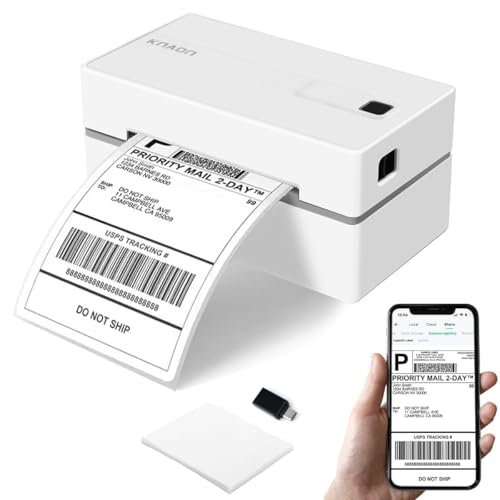
The KNAON printer offers a broad compatibility profile with iOS, Android, Windows, Mac, and Chromebook platforms. It uses Bluetooth for wireless printing when paired with the FlashLabel Pro app, and USB connectivity is available for desktop systems. Mac users with M1/M2/M3/M4 processors can also connect via the app, expanding cross-device workflows. The device ships with a large template library, including thousands of templates, icons, and fonts to support custom labeling, shipping labels, barcode labels, and more. It supports a wide range of thermal label sizes and is designed to support both professional and personal labeling tasks.
Purchasers should plan for app-based printing on some platforms and verify that the operating system version supports the FlashLabel Pro app. This model is a fit for users who value a rich template ecosystem and versatile label design options alongside multi-platform support.
Rollo USB Shipping Label Printer

The Rollo USB Shipping Label Printer is a commercial-grade choice built for speed and clarity. It connects via USB to Windows or Mac computers (XP or newer for Windows, 10.9+ for Mac) and is optimized for 4×6 label printing. Rollo’s ecosystem includes a complimentary shipping app that integrates with multiple ecommerce platforms, enabling streamlined fulfillment and access to exclusive shipping rates. Its thermal technology eliminates ink entirely, delivering high-speed output at up to 150 mm/s with a 203 DPI print head, resulting in clean, scannable labels ideal for warehouse and shipping workflows.
Key considerations include ensuring driver installation on your Mac and confirming compatibility with your preferred ecommerce platforms. The Rollo model is especially suitable for businesses prioritizing speed, reliability, and a robust software ecosystem for shipping workflows.
Buying Guide: Key Purchase Considerations
- Compatibility: Verify macOS support (versions, drivers, and required apps) and whether you’ll also print from Windows, iOS, Android, or Chrome OS. Consider whether you need USB, Bluetooth, or both for your setup.
- Label Size and Type: Choose a printer that supports your typical label widths (1.5″ to 4.4″ for 4×6 shipping labels). Determine whether you need fanfold or roll labels and the availability of compatible label stock.
- Print Quality and Speed: Look for at least 203 DPI for clear text and barcodes. Speed matters for high-volume shipments; speeds around 60–150 mm/s are common in this category.
- Cost of Ownership: Thermal printers eliminate ink cartridges, reducing ongoing costs. Consider transfer or replacement label stock, app subscriptions, and any required software.
- App and Ecosystem: A strong companion app can simplify label design, PDF imports, and integration with platforms like ShipStation, Amazon, Etsy, and eBay. Check for cloud or local printing capabilities and how easy it is to calibrate label sizes.
- Reliability and Support: Evaluate printer durability, feed consistency, jam resistance, and the availability of technical support and driver updates. Long-term reliability matters in busy fulfillment environments.
- Portability vs. Stationary Use: If you need mobility, prioritize compact, Bluetooth-enabled models. For a fixed workspace, USB-connected printers with bulk labeling capabilities can be more economical.
- Security and Compliance: Ensure data handling aligns with your shipping and labeling workflows, especially if you process sensitive customer information.
Comparison Snapshot
- Bluetooth-first models (LabelRange, Nelko, JADENS, KNAON) offer wireless printing with App-based workflows, suitable for hands-off labeling and mobile operations. They vary in label width support, speed, and platform compatibility.
- USB-first models (Rollo) emphasize plug-and-play with strong driver support, high-speed printing, and a broad software ecosystem for shipping and labeling across platforms.
- All options avoid ink and toner by using thermal printing, delivering lower ongoing costs, but verify label availability and driver support for your exact macOS version.