For professionals and enthusiasts who run two computers side by side while needing a seamless, clutter-free dual-monitor setup, a DisplayPort KVM switch is essential. This guide highlights five leading DP KVM switches, each supporting two computers, dual monitors, and multiple USB peripherals. We focus on 8K/4K refresh rates, USB 3.0 compatibility, and easy switching options to help you choose a device that fits a busy workflow, gaming rig, or home office.
Summary of chosen products:
- Hearvo 8K@60Hz DP KVM Switch, 2 Monitors, 2 Computers
- CMSTEDCD 8K@60Hz Displayport KVM Switch, 2 Monitors
- UGREEN 8K@60Hz Displayport KVM Switch, 2 Monitors
- Unitek 2 Monitors DP/HDMI KVM Switch, 4K@60Hz
- TJCXELE Displayport KVM Switch, 2 Monitors 2 Computers
Hearvo 8K DisplayPort KVM Switch – Dual Monitors

The Hearvo DP KVM Switch enables two computers or laptops to share two monitors and three USB devices through a single setup. It supports 8K@60Hz and 4K@120Hz visual performance, with backward compatibility to lower resolutions. Extended Mode allows moving application windows across screens, while Copy Mode duplicates the main screen onto the secondary display for presentations. It is compatible with Windows, Linux, Mac, and other common OS families. The unit includes two USB cables for direct device connections and supports various input devices, including PCs, laptops, and consoles.
Key features include dual-monitor sharing, 8K/4K high-resolution support, and USB 3.0 sharing via three ports. The switch automatically detects connected devices and offers smooth switching between the two hosts. This model is designed for clutter reduction in both home offices and professional environments, promoting increased productivity through more screen real estate and straightforward control.
CMSTEDCD 8K DisplayPort KVM Switch – Dual Monitors
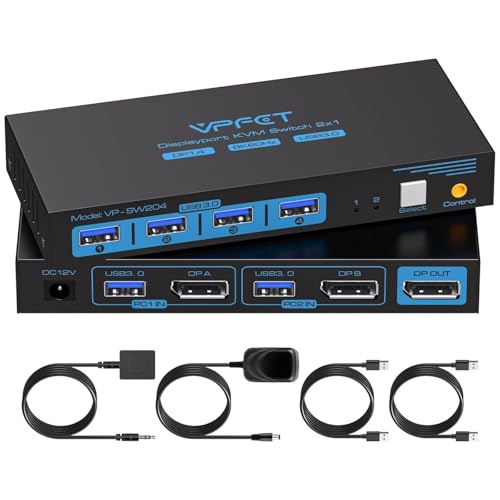
This KVM switch supports two computers sharing a pair of DisplayPort monitors and four USB 3.0 devices. It delivers up to 8K@60Hz and 4K@120Hz, with backward compatibility for lower resolutions. The device emphasizes Extended and Copy Modes to maximize multitasking and desktop organization. A desktop controller or integrated button enables fast hardware switching, while the unit notes the need for compatible DP cables to achieve maximum performance. It also supports HDCP and high-bandwidth DP connections for vibrant visuals and responsive control.
Design notes highlight the possibility of extending or mirroring content between the two PCs. The product includes essential USB sharing for peripherals such as mice, keyboards, printers, and USB drives, ensuring a straightforward setup for dual-workstation users who require reliable signal routing and immediate on-demand switching.
UGREEN 8K DisplayPort KVM Switch – Two Monitors

UGREEN’s 8K@60Hz DP KVM Switch supports two computers sharing two monitors and four USB 3.0 ports. The DP 1.4 switch handles resolutions up to 8K@60Hz and remains backward compatible with 8K@30Hz, plus 4K variants. It supports extend and mirror modes, enabling flexible workflows for professionals and gamers alike. A dedicated 12V/2A external power supply is required when using the switch, and a standard DP 1.4 cable is needed for maximum 8K performance. USB 3.0 ports ensure fast peripheral data transfers for printers, drives, and other devices.
The device emphasizes a clutter-free desk with a remote switch option and a desktop controller. It is designed for users who need reliable, high-bandwidth connections across two computers and multiple peripherals, while maintaining compatibility with USB 2.0 devices.
Unitek KVM Switch – Dual Monitors, 4K

Unitek offers a DP/HDMI KVM switch handling two computers with dual monitors and three USB 3.0 ports for peripherals such as keyboards, mice, hard drives, and printers. The product supports a broad OS range and works with devices like PS4. It provides two modes of switching: a one-button interface and a wired remote controller for a flexible setup and a cleaner desktop. It supports 4K@60Hz and is compatible with HDMI 2.0, HDCP 2.2/1.4, and HDR content for versatile media use, as well as entry-level 1080p displays.
CMSTEDCD 8K DP KVM Switch – 2 Monitors

This DisplayPort KVM switch supports two computers sharing two monitors and four USB devices, with DP 1.4 connections enabling 8K@60Hz and 4K@120Hz. It also supports extended and copy modes for multitasking convenience. A dedicated display indicator shows the active channel, and a wired extension button provides flexible placement for easy access. Note that hotkeys are not supported. The product targets users seeking high-resolution output and flexible physical control for shared workstations.
Alxum DP 1.4 KVM Switch – Dual PCs

Alxum’s DP 1.4 KVM Switch supports two computers sharing one monitor with dual switching modes. It achieves up to 8K@60Hz and 4K@144Hz, and includes four USB 3.0 ports. The setup offers dual control via device buttons and a remote for flexible placement. It is backward compatible with USB 2.0, 1.1 devices, and provides a clean workspace by centralizing control of two PCs with a single keyboard and mouse. The product is designed for both work and high-refresh-rate entertainment contexts.
TJCXELE DisplayPort KVM Switch – DP 1.4

The TJCXELE DP KVM Switch supports two computers sharing two DisplayPort outputs and four USB devices. It emphasizes DP 1.4 compatibility with extended and copy modes, plus a clear indicator system for the active channel. The device requires both DP ports to connect to the same computer, and it notes that a DP cable is not included. It uses a straightforward push-button interface for switching and may be paired with a wired extension for flexible placement, making it suitable for organized workstations and gaming setups that demand immediate control over connected devices.
Buying Guide: Key Considerations When Choosing a DisplayPort KVM Switch
- Resolution and refresh rate: Select a switch that supports your target output (8K@60Hz, 4K@120Hz, or 4K@144Hz). Ensure your PCs, monitors, and cables can handle the same specifications to avoid bottlenecks.
- Number of ports and devices: Verify how many USB ports you need for keyboards, mice, printers, drives, and other peripherals. Confirm whether USB-C or USB-A ports are required.
- Switching method: Consider a front-panel button, desktop controller, or remote switch for easy access. Some models offer hotkeys but may not support them universally.
- Extended vs. Copy modes: Extended mode moves an application window across screens; Copy mode replicates the main display. Choose based on whether you present across two displays or prefer extended multi-tasking space.
- Power and cabling: Some switches require an external power supply and specific DP cables (often DP 1.4). Check length limitations and ensure you have compatible cables for maximum performance.
- Compatibility and OS support: Ensure the switch supports your operating systems (Windows, macOS, Linux) and any devices like PS4 or docking stations you plan to use.
- Build and cooling: Aluminum housings and robust connectors help with heat and durability in busy office environments or gaming setups.
- Future-proofing: If you anticipate upgrading to higher resolutions or more peripherals, select a switch that supports higher bandwidths and additional USB ports.
In choosing a DP KVM switch, evaluate how you work across two computers, the importance of high-resolution output, and how often you switch between hosts. Consider whether you require remote or wired control, and ensure your cables and monitors are compatible with the target resolution. The selected models here cover a spectrum of needs—from high-end 8K@60Hz to robust 4K@120Hz setups—while offering practical switching options and sufficient USB peripheral support for most dual-PC workspaces.