Kiosk touch monitors enhance customer engagement, streamline self-serve tasks, and deliver dynamic content in retail, hospitality, and corporate environments. This article highlights five top options tailored for public-facing use, with varying screen sizes, touch capabilities, and operating systems. Whether you need robust 10-point multitouch, Android-based content management, or high-brightness displays for bright spaces, these models offer reliable performance and flexible connectivity to fit modern digital signage needs.
Summary of selected products:
| Product | Brand | Screen Size | Touch | Key Features | Content/OS Notes |
|---|---|---|---|---|---|
| JASZDOT 32″/43″/55″/65″ Digital Signage Display (32″ Non-Touch) | JASZDOT | 32″ / 43″ / 55″ / 65″ | Non-Touch | UHD, IPS, 600 nits, USB/HDMI/WiFi | Android OS, content updates via USB/WiFi |
| Displays2go 24″ Two-Sided Interactive Touch | Displays2go | 24″ | 10-point IR touch | WiFi, Android 11, pre-installed content tools | Android-based with content editor |
| MAGEX 15.6″ Touchscreen Monitor | MAGEX | 15.6″ | 10-point touch | HDMI/VGA/DVI, HDR, 178° viewing, IPS | PC/Pi/ POS compatibility |
| Canlarriz 55″ 4K Touch Kiosk | Canlarriz | 55″ | Capacitive touch | 700 nits, 178° viewing, 24/7 looping | Android system, USB/HDMI/WiFi |
| PWR4GTR 65″ 4K Capacitive Kiosk | PWR4GTR | 65″ | Multi-point capacitive | 4K UHD, CMS included, 60,000 Hrs, 178° | Android 11, USB/HDMI-in |
JASZDOT 32/43/55/65 Inch Digital Signage Display
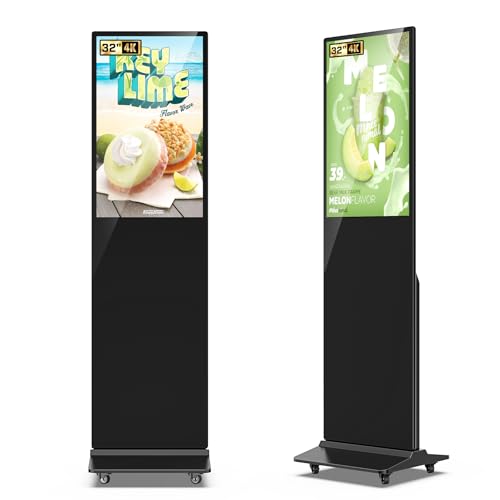
The JASZDOT model set combines large-format digital signage with an Android OS for straightforward content management. It provides UHD image quality via an IPS panel, 178-degree viewing angles, and 600 nits of brightness, ensuring visibility in busy public areas. Content management relies on USB, HDMI, or Wi‑Fi connections, enabling easy uploads of images, text, and video. Suitable for non-touch needs on larger displays where audience interaction is less required, this line supports flexible configurations across multiple screen sizes.
Displays2go 2-Sided Interactive 24″ Touch Kiosk

This two-sided display is designed for high-traffic environments where interaction is essential. It ships with 10-point IR touch and pre-installed DiViEX content editor for creating engaging multimedia presentations. Android 11 provides a familiar app ecosystem and regular firmware updates, helping maintain security and performance while delivering dynamic content across both faces of the kiosk.
MAGEX 15.6″ Touchscreen Monitor

The MAGEX 15.6″ touch monitor emphasizes versatile connectivity with HDMI, VGA, and DVI, plus a dedicated USB B port for touch. Its true IPS panel offers a wide 178-degree viewing angle and vivid 1080p visuals with 450 cd/m² brightness and a 16.7 million color palette. The 10-point touch surface supports precise and responsive interaction, making it well-suited for POS, kiosks, or compact control stations where space is limited.
Canlarriz 55 Inch 4K Touch Kiosk

Canlarriz offers a 55 4K interactive display built for demanding environments. With a capacitive touchscreen, an all-metal chassis, intelligent cooling, and 700 nits brightness, the unit ensures crisp fidelity in bright spaces and reliable operation around the clock. Its 178° viewing angle and 50,000-hour lifespan support continuous public use, while the device supports HDMI/USB inputs and Wi-Fi connectivity for flexible content management and remote updates. The option for 24/7 looping playback aids in constant information delivery.
PWR4GTR 65″ 4K Capacitive Kiosk

The PWR4GTR 65 kiosk emphasizes high-end 4K visuals with a capacitive multi-touch surface for interactive experiences. Its Android 11 platform, 4K UHD resolution, and included CMS system enable remote content management, scheduling, and robust advertising capabilities. Aimed at professional settings, the metal frame and tempered glass construction offer durability, while the wide viewing angle supports visibility from multiple positions. USB/HDMI-in connectivity and the option for customized logos help brands tailor their display strategy.
ANGEL POS 15-Inch Capacitive Touch Monitor

This 15-inch ANGEL POS monitor focuses on a seamless flat touch experience with a robust, water- and dust-resistant design. It is plug-and-play for Windows systems and supports up to 10-point touch on compatible versions, making it suitable for interactive kiosks, retail terminals, or staff-assisted stations. The driver-free operation for modern Windows versions reduces setup complexity, while broad OS compatibility expands use cases in commercial settings.
ANGEL POS 17.3-Inch 1080p Touchscreen Monitor

Designed for heavy-duty use in industrial or retail environments, this 17.3-inch ANGEL POS display emphasizes durability and reliability. Its seamless flat capacitive touchscreen design reduces ingress points for moisture and dust, while plug-and-play operation ensures easy deployment across Windows systems. The monitor supports multi-touch and is built for continuous operation in demanding settings, making it a practical choice for public kiosks or service desks requiring robust interaction.
SKitphrati 17″ Square Touch Monitor

The SKitphrati 17-inch square touch monitor provides a classic 5:4 aspect ratio with 1280×1024 resolution and 10-point multitouch. It offers HDMI and VGA connections via Type B ports for broad compatibility with PCs, laptops, and various media devices. The adjustable stand allows tilt, accommodating different user heights and viewing angles, which is useful in retail displays, inspection stations, or classroom kiosks where ergonomic positioning matters.
Buying Guide: Key Purchase Considerations For Kiosk Touch Monitors
- Touch technology and accuracy: Choose IR or capacitive touch based on use-case, durability, and operator interaction level. Consider multi-touch support and whether gloves or wet conditions affect performance.
- Screen size and visibility: Larger screens attract attention but require more space. For bright public spaces, look for high brightness (nits) and wide viewing angles to maintain legibility from multiple positions.
- Operating system and content management: Android-based kiosks enable app ecosystems and remote updates. Windows-compatible options may simplify integration with existing software. Ensure CMS options or content editors meet your workflow requirements.
- Connectivity and expansion: Ensure USB, HDMI, Wi-Fi, and possibly Bluetooth support for content delivery, CMS access, and peripheral compatibility (printers, scanners, etc.).
- Durability and longevity: For 24/7 use, prioritize rugged enclosures, tempered glass, and cooling systems. Water and dust resistance are critical for industrial or outdoor-adjacent deployments.
- Mounting and footprint: Consider floor-standing, wall-mounted, or countertop configurations. Plan for cable management and ventilation in enclosed spaces.
- Content scheduling and security: Look for devices offering remote management, CMS integration, and secure user access to prevent tampering or unauthorized updates.
- Brand and support: Select models from vendors with US-based support, firmware updates, and accessible replacement parts to minimize downtime.