When you’re using an Android tablet for work, study, or leisure, a compact, reliable keyboard can transform it into a portable workstation. The following selection focuses on Bluetooth keyboards designed to pair smoothly with modern Android devices, while also offering broad compatibility with iOS and Windows. Each product below is chosen for portability, backlight options, battery life, and stable connections. The overview table highlights key facts to help you compare at a glance.
| Product | Brand | Key Strength | Backlight | Notes |
|---|---|---|---|---|
| Rechargeable Bluetooth Keyboard And Mouse Combo | GOGARA | Universal compatibility | None | Lightweight, compact 10-inch form |
| Backlit Bluetooth Keyboard Small Portable Wireless Keyboard | TOHAKATA | 7-color backlight | Yes | Small, pocket-friendly design |
| OMOTON Bluetooth Keyboard | OMOTON | Multi-system with FN switch | No | Ultra-portable, large keycaps |
| XCHYTECHER Universal Tablet Keyboard Case | XCHYTECHER | Integrated case with keyboard and mouse | 7-color backlit | Versatile tablet case solution |
| Ultra-Slim Bluetooth Keyboard | Xukinroy | Compact, long battery life | No | Very slim, lightweight |
The products below are arranged to help you compare form factors, backlighting options, and cross-platform compatibility. Each entry includes a concise summary of features drawn directly from product descriptions to assist in a quick, informed decision.
GOGARA Rechargeable Bluetooth Keyboard And Mouse Combo

GOGARA’s Rechargeable Bluetooth Keyboard And Mouse Combo offers broad compatibility across iOS, Android, and Windows. This wireless pair is designed for Apple devices, Samsung tablets, and other Bluetooth-enabled tablets and smartphones. The set promises a stable, long-range connection up to 10 meters, making it suitable for couch use, travel, or a flexible home workspace. Weighing only about 6.35 ounces and with compact 9.84 x 5.9 x 0.24 inch dimensions, the keyboard is easy to slip into a bag. Its portable design emphasizes everyday typing tasks such as emails and note-taking, with a focus on portability and ease of use.
Key considerations include cross-device pairing, the stability of the Bluetooth connection, and overall portability. While the product highlights a 10-meter range, real-world performance can depend on other Bluetooth devices nearby and background interference. The included mouse complements the keyboard for users who want a minimal desktop experience without sacrificing mobility. This option is well-suited for travelers, students, and professionals who want a single, compact solution for multiple devices.
TOHAKATA Backlit Bluetooth Keyboard For Tablets

TOHAKATA presents a compact, backlit Bluetooth keyboard designed specifically for mobile devices including Samsung tablets, iPads, and other tablets with built-in Bluetooth. The standout feature is a 7-color backlight with a breathing mode and adjustable brightness, which can be toggled via dedicated keys to optimize visibility in dark environments. The keyboard emphasizes stability and ease of pairing across iOS, iPadOS, Android, and other mobile operating systems, with a note that it is not intended for desktop computers. Its lightweight build and small footprint make it a practical travel companion for nightly typing tasks or quick document edits on the go.
Potential drawbacks include the need to manage power consumption through backlight usage and ensuring compatibility with non-tablet devices. The keyboard’s design prioritizes portability and tactile feedback with convenient access to function keys and shortcuts, though it’s better suited for mobile work rather than extended desktop typing sessions.
OMOTON Bluetooth Keyboard For Tablet And Mobile
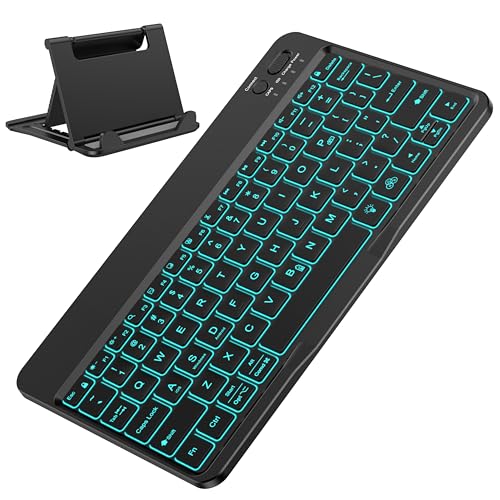
OMOTON’s keyboard is aimed at tablets and mobile devices with multi-system compatibility. It requires users to switch between iOS, Windows, and Android using Fn+A/S/D, which enables quick transitions among operating environments on a single device. The keyboard is described as ultra-thin and highly portable with a compact footprint that pairs well with many Galaxy Tab models and similar tablets. Its larger-than-average keycaps are designed to deliver a more comfortable typing experience, which can be beneficial for longer typing sessions on a tablet. The emphasis is on compatibility and portability rather than desktop-centric functionality.
Users should be mindful of the manual system-switch steps required before use. This keyboard is particularly suited for students, commuters, and professionals who frequently switch between devices and platforms on the go, providing a simple, pocket-friendly typing solution.
XCHYTECHER Universal Tablet Keyboard Case With Mouse (Pink)

XCHYTECHER couples a universal keyboard case with an integrated mouse and a removable keypad featuring a 7-color rainbow backlight. This solution is marketed for 9″ to 11″ tablets and covers a wide range of popular tablets, including various iPad generations and Samsung models. The magnetic closure case acts as a protective cover, and the built-in keyboard turns the tablet into a laptop-like setup. A key feature is the adjustable multi-angle viewing provided by grooved supports, enabling comfortable use in different settings, whether on a lap or a couch. The package includes a mouse, expanding productivity options for tablet users.
Considerations include the overall weight of the combined setup and whether users need a built-in keypad with backlight. For those who want a stylish, all-in-one case that doubles as a keyboard and mouse, this option offers a compelling, portable solution.
MoKo Universal Tablet Case With QWERTY Keyboard

MoKo’s universal tablet case integrates a removable QWERTY keyboard designed for a wide range of 9″ to 11″ tablets. It supports iOS and Android tablets, including many iPad and Samsung Galaxy models. The case features a built-in rechargeable battery and a stable stand design for comfortable viewing angles. A wide back opening accommodates camera placement, and a magnetic attachment secures the keyboard to the case when in use. The included pen holder and side pocket add practical storage for accessories, creating a compact, all-in-one travel solution for mobile typing and note-taking.
Potential trade-offs include ensuring the correct tablet dimensions fit within the provided case and keyboard footprint, as well as relying on English QWERTY layout assumptions. This option is ideal for students and professionals seeking a foldable, portable way to convert a tablet into a more traditional typing setup.
Buying Guide: Key Considerations When Buying a Keyboard For Android Tablets
- Device compatibility: Look for multi-system support (Android, iOS, Windows) and confirm Bluetooth versions to ensure stable pairing with your tablet and other devices.
- Portability and weight: For on-the-go use, prioritize slim, lightweight keyboards and compact cases that fit easily into bags or purses.
- Typing comfort: Larger keycaps and tactile feedback improve long-form typing. Consider backlit options if you work in low-light environments, but balance battery life with backlight use.
- Battery life: rechargeable keyboards with long standby and active-use life are preferable for travel or daily commuting. Check whether the keyboard supports wake-up from sleep to minimize downtime.
- Versatility: If you want a case-with-keyboard solution, ensure the stand angles are stable and that the case provides adequate protection without hindering access to ports or cameras.
- Additional inputs: A built-in touchpad or a separate mouse can enhance productivity, but increases weight. Consider your balance of convenience versus portability.
- Pricing and warranties: Compare build quality and warranty terms to ensure long-term reliability, especially for frequent travelers or students.
The options above collectively emphasize portability, cross-platform compatibility, and battery efficiency for Android tablet users. When selecting a keyboard, consider how you plan to use your tablet—casual typing at a cafe, on-screen document editing at your desk, or travel-friendly productivity—and choose a model that best aligns with those needs.