Answer: A key switch tester helps you compare tactile, linear, and clicky switches before buying. This guide highlights five top testers that suit budget shoppers, DIY hobbyists, and professionals evaluating typing feel, sound, and actuation. Each pick includes who it’s best for and why it stands out.
| Product | Brand | Key Features |
|---|---|---|
| Akko 16-Key Switch Tester Mechanical Keyboards Acrylic Testing Tool | MONSGEEK | 16-key tester; includes multiple brands; 60M keystroke durability |
| GATERON Keyboard Switches Tester, 35pcs | GATERON | 35 switches; includes oil king variants; suitable for DIY testing |
| Griarrac Cherry MX Switch Tester 12-Key | Griarrac | 12 switches; printed keycaps; easy color recognition |
| DUROCK Keyboard Switch Tester, 30-Key | DUROCK | 30-key kit; includes a variety of DUROCK switches; comes with puller |
| Keychron Switch Tester 100 Max Edition | Keychron | 100 switches; magnetic options; realistic keyboard structure |
Akko 16-Key Switch Tester By MONSGEEK

The Akko 16-key tester presents a broad sampling of tactile, linear, and clicky switches across three brands. It emphasizes durability with an estimated 60 million keystrokes and is designed for quick, simple testing using a keycap puller to swap tests. Best for shoppers who want a compact, all-in-one starter set and who value durability at a low cost.
Who it’s best for: beginners evaluating overall feel across brands; budget-conscious buyers who want a wide variety in one compact tester. Limitation: no PCB or full keyboard integration; primarily a switch sampling tool.
GATERON 35-Piece Keyboard Switch Tester

This tester bundles 35 Gateron switches, including oil king and wall-stem variants, for a broad comparison of linear, tactile, and clicky experiences. It helps test compatibility and feel when selecting future builds. Best for enthusiasts who want a large, varied sample set in one package.
Note: Magnetic switches included in some listings may not be compatible with all mechanical keyboards; verify compatibility with your setup before testing.
Griarrac Cherry MX Switch Tester 12-Key

This tester mirrors the feel of Cherry MX switches with 12 distinct options and printed PBT keycaps for easy color identification. It includes a puller for quick keycap removal and optional O-rings for dampened acoustics. Best for users focused on Cherry MX compatibility and precise switch feel.
Limitation: only Cherry MX-style switches are represented; may not cover other brands as comprehensively.
DUROCK 30-Key Switch Tester

The DUROCK tester focuses on a broad 30-key set, covering Ice Kings, Thocky variants, and magnetic options. The kit includes a stainless steel switch puller and a precision acrylic housing. Best for testers who want a robust range of DUROCK-specific switches and a reliable puller.
Tip: Some users may prefer larger sets for broader brand comparison; this kit emphasizes DUROCK lineage and feel.
Keychron Switch Tester 100 Max Edition
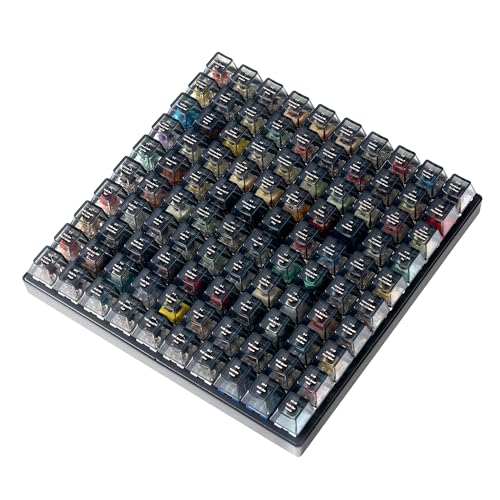
The Keychron 100 Max Edition provides a large, curated collection of 100 switches, including 27 Keychron, 31 Gateron, 40 Kailh, and 2 Huano. It also includes 12 magnetic switches to broaden the comparison range. Best for researchers, professionals, or enthusiasts who want an extensive, side-by-side evaluation and a realistic testing experience with a steel-plate style frame.
Limitation: No PCB means you cannot connect the tester to devices; it’s a stand-alone evaluation tool.
Buying Guide
What to consider when choosing a key switch tester
- Number of switches: More switches offer broader brand and feel comparisons but may increase size and cost. For quick comparisons, 12–35 switches can cover most needs.
- Switch variety: Look for testers that include tactile, linear, and clicky options across brands to reflect your target builds.
- Durability and build: Durable plastics or acrylic with a protective cover help ensure longevity and repeated testing without damage.
- Keycap puller and accessories: Included tools streamline testing and switching between switches quickly.
- Magnetic vs. non-magnetic variants: Some testers include magnetic switches; verify compatibility with your intended keyboard setup.
- Realistic testing context: Some testers mimic keyboard feel with a plate or case; this helps translate tester feel to real-world typing.
- Portability: If you travel or test on the go, a compact tester with a clear layout is advantageous.
How to use a key switch tester effectively
Start by grouping switches into categories: linear, tactile, and clicky. Note actuation force, travel distance, and sound. Use the included keycap puller to swap switches and compare immediately at your desk. For sound-focused decisions, consider adding dampening materials or experimenting with O-rings if provided in the kit.
Best practices for choosing a tester
- Match your target keyboard: If you plan a Cherry MX-based build, prioritize testers with multiple Cherry MX options.
- Assess future upgrades: A larger kit can accommodate long-term plans as you experiment with different brands.
- Check compatibility notes: Some testers include magnetic or 5-pin variants; ensure compatibility with your keyboard’s plate and PCB.
FAQ
- What is a key switch tester used for?
A tester lets you try different switch types before purchasing a full keyboard, helping you pick a preferred feel and sound.
- Do testers include pullers?
Many testers come with a keycap puller or switch puller to simplify swapping switches during testing.
- Is a larger switch tester always better?
A larger tester provides more options, but a focused set can be faster for deciding between primary preferences.
- Can testers predict real keyboard feel?
testers simulate feel but may not perfectly replicate a fully assembled keyboard; it’s a close reference for comparison.
- Are magnetic switches compatible with all keyboards?
No—magnetic switches may not be compatible with every keyboard. Verify compatibility before use.
- Should I choose a tester based on brands?
Yes—if you have a preferred brand family, choose a tester with multiple options from that family to compare intra-brand nuances.