With smartphones shooting more 4K videos and capturing high-resolution photos, extra on-device storage can be essential. The following five MFi-certified flash drives offer multi-port options, easy one-click backups, and plug-and-play usability across iPhone, iPad, Android, and PCs. Each product below supports transferring media without iCloud or cables, and many include compact, portable designs for travel. This guide highlights top picks by capacity, compatibility, and data-transfer speed to help American readers compare quickly.
| Product | Brand | Capacity | Interface Highlights |
|---|---|---|---|
| Techkey 128GB 3-in-1 | Techkey | 128GB | USB/Lightning/Type-C |
| SUDEHO 256GB | SUDEHO | 256GB | USB/Lightning/Micro USB/Type-C |
| BLANBOK+ 128GB | BLANBOK+ | 128GB | USB/Lightning/Type-C |
| ROSPE 256GB | ROSPE | 256GB | USB/Lightning/Micro USB/Type-C |
| EATOP 256GB | EATOP | 256GB | USB-C/USB-L/USB |
Techkey MFi Certified 128GB 3-in-1 Flash Drive

This MFi-certified flash drive integrates USB, Lightning, and USB-C interfaces to accommodate iPhone, iPad, Android, and PC. With 128GB capacity, it helps free space by backing up photos, videos, and contacts with one tap via the companion app. The device is built with durable metal and offers dust, drop, and anti-magnetic resistance, making it suitable for travel and daily use. A keychain adds portability for on-the-go storage and quick access.
Features include one-click backup and sharing capabilities, enabling direct transfers without cables or iCloud. iOS users should install the U-Disk app for full functionality, while Android and PC devices generally operate with OTG support. The product supports fast data transfer across multiple platforms, reducing reliance on cloud services.
SUDEHO 256GB MFi Certified Flash Drive

SUDEHO offers a 256GB option with official MFi certification and broad compatibility. This flash drive supports iOS 12.1 and above, and the included multi-port design allows plugging into USB, Lightning, Micro USB, and Type-C devices via an independent adapter. It is ideal for backing up photos and videos with one-click operations and sharing memories across social networks. While iPhone users may need to download a specific app from the App Store, Android devices typically only require OTG activation.
Note that capacity claims may be listed as 256GB or 512GB due to storage calculations, but the product provides generous local storage. The device emphasizes quick transfers to reduce reliance on cloud services and supports convenient one-step backups to a computer as well.
BLANBOK+ 128GB MFi Certified Photo Stick
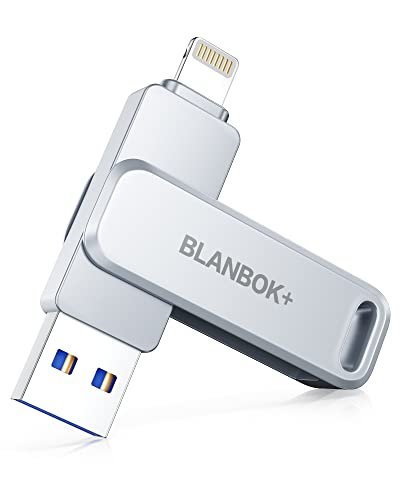
BLANBOK+ presents a 128GB MFi-certified flash drive with three interfaces: USB, Lightning, and Type-C via an independent adapter. The design prioritizes durability, offering waterproof, dustproof, and anti-drop properties with a metal body and keychain attachment for portability. One-click backup supports saving photos, videos, and phone contacts from iPhone or iPad to the drive, while the USB port provides a separate backup path to a computer. Android devices may require OTG and app installation in some cases.
The drive emphasizes simplicity: plug-and-play operation via the dedicated iPhone app, and straightforward data transfer across devices without iTunes or iCloud reliance. It suits users who want secure local backups and easy sharing options for memorable files.
ROSPE 256GB Multi-Port iPhone Flash Drive
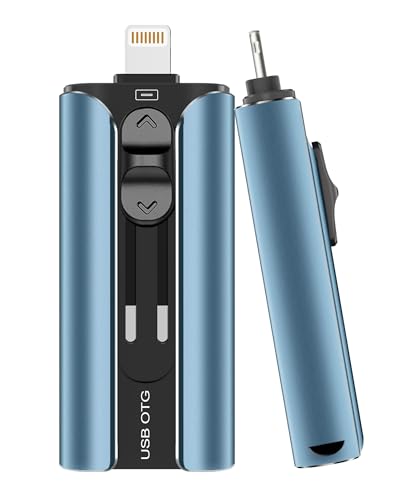
ROSPE’s 256GB iPhone flash drive features a four-interface design: USB, Lightning, Micro USB, and Type-C, enabling smooth data transfer between a wide range of devices. The connector’s retractable design reduces wear and exposure when not in use, while the included keychain enhances portability. iPhone and iPad users should download the compatible app for full functionality, with Android devices relying on OTG. The drive supports quick backups of photos, videos, and documents, and can also be used to transfer files to a computer for redundant storage.
Its advertised read and write speeds offer efficient media handling on the go, and the form factor is tailored for travel or fieldwork where cloud access is limited or undesirable.
EATOP 256GB iPhone Compatible Flash Drive

EATOP offers a 256GB option designed for iPhone and iPad, with multi-port USB-C/USB-L/USB compatibility. The device promotes plug-and-play use and does not require additional apps on some platforms, while iPhone users may need to install the required app to access all features. It is positioned as a versatile solution for backing up videos, photos, and other files directly to the flash drive, and for transferring content to a computer when needed. The device aims to reduce storage strain on iOS devices and supports quick on-device backups.
The design emphasizes portability and ease of use, making it useful for travelers and professionals who routinely manage large media libraries across devices without relying solely on cloud storage.
Buying Guide: Key Purchase Considerations
- Compatibility: Check that the drive supports your devices (iPhone, iPad, Android, PC). Look for devices with multi-port interfaces (USB, Lightning, USB-C) to maximize versatility.
- Storage Capacity: Choose capacity based on your media habits. 128GB is adequate for lighter usage, while 256GB or more supports larger photo/video libraries and frequent backups.
- App Requirements: Some drives require a dedicated app for iOS. Consider whether you prefer plug-and-play without apps or are comfortable installing software.
- Speed and Performance: Look for read/write speeds that meet your needs, especially for high-resolution videos or large file transfers.
- Durability and Design: Metal bodies, retractable connectors, and keychain attachments improve durability and portability for travel.
- Security and Data Management: Evaluate whether the drive supports one-click backups and easy sharing, and whether it offers encryption or password protection if needed.
- Price-to-Capacity Balance: Compare cost per gigabyte across models to identify the best value while meeting your performance requirements.
- OTG and App Store Availability: For iPhone users, ensure OTG is enabled and verify whether the App Store download is required for optimal use.
These devices provide a practical way to expand iPhone storage, back up precious media, and transfer files across devices without cloud reliance. When selecting, consider daily usage, the importance of quick backups, and how often you’ll need to access content offline.