In homes with many smart devices, laptops, and streaming clients, a robust router is essential. This guide highlights top routers that handle multiple devices efficiently, with emphasis on Wi‑Fi 6/6E, wide coverage, and strong security features. The selected products come from trusted brands and provide options for gaming, streaming, and home offices. Read on to compare capabilities and find a model that fits your household bandwidth needs without overpaying.
| Product | Brand | Technology | Approx. Bandwidth |
|---|---|---|---|
| TP-Link AX1800 WiFi 6 Router (Archer AX21) | TP-Link | Wi‑Fi 6, Dual‑Band | Up to 1.8 Gbps |
| TP-Link AXE5400 Tri‑Band WiFi 6E Router (AXE75) | TP-Link | Wi‑Fi 6E, Tri‑Band | Up to 5.4 Gbps |
| H3C AX5400 WiFi 6 Router (NX54) | H3C | Wi‑Fi 6, MU‑MIMO | Up to 4.8 Gbps |
| TP-Link AC1200 Gigabit Router (Archer A6) | TP-Link | Wi‑Fi 5, Dual‑Band | Up to 1.2 Gbps |
| NETGEAR Nighthawk WiFi 6 Router (RAX36) | NETGEAR | Wi‑Fi 6, AX3000 | Up to 3 Gbps |
TP-Link AX1800 WiFi 6 Router Archer AX21

The Archer AX21 provides dual‑band Wi‑Fi 6 with a combined 1.8 Gbps bandwidth, designed to smooth streaming, gaming, and multi‑device browsing. It supports OpenVPN and PPTP VPN servers for remote access and includes Alexa compatibility for voice control. While capable of handling multiple devices, performance varies with distance, walls, and ISP speed. The device is marketed as a consumer‑friendly option with “Certified for Humans” usability.
TP-Link AXE5400 Tri‑Band WiFi 6E Router AXE75

The AXE75 is a 6E router offering tri‑band coverage, including the new 6 GHz band for reduced congestion and higher bandwidth. It claims high‑speed performance suitable for gaming and streaming, with OFDMA and mesh compatibility for expanding coverage. It’s best suited for households with many devices seeking the lowest latency and the ability to dedicate bandwidth to critical tasks.
H3C AX5400 WiFi 6 Router NX54
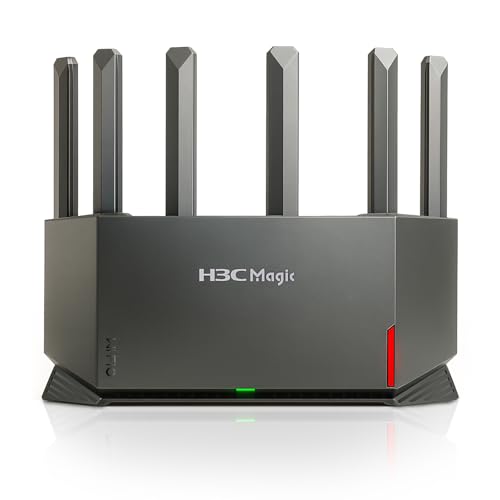
The H3C NX54 emphasizes high speed and multi‑device handling with Wi‑Fi 6, MU‑MIMO, and parental controls. It notes that a modem is required and highlights a 4K QAM modulation and 160 MHz channel for enhanced throughput. The router focuses on stable performance for families with multiple streams and devices, though setup and compatibility with specific ISP modems may vary.
TP-Link AC1200 Archer A6

The Archer A6 is a budget dual‑band option delivering up to 1.2 Gbps total bandwidth. It provides four Gigabit LAN ports for wired devices and OneMesh compatibility for expanding coverage with other TP‑Link mesh nodes. It’s a practical pick for smaller homes or users who don’t need the newest wireless standards, while still offering solid reliability for multiple devices.
NETGEAR Nighthawk RAX36 (AX3000)

The RAX36 is a Wi‑Fi 6 router offering AX3000 performance, designed to cover larger homes with multiple devices. It focuses on speeding up streaming, gaming, and video calls while providing a straightforward setup. It’s important to pair with a suitable modem and consider its fewer advanced features compared to higher‑end models if your network needs include extensive smart home ecosystems or high‑end gaming.
NETGEAR Nighthawk RS180 WiFi 7 Router

The RS180 brings WiFi 7 speeds up to 5.5 Gbps with a large coverage area and support for many devices. It’s positioned for future‑proofing, ideal for busy households with high bandwidth requirements, gaming, and streaming. Like other high‑end options, a compatible modem is still needed for internet access, and real‑world gains depend on network conditions and ISP speeds.
Buying Guide: Key Purchase Considerations
- Network size and device count: For households with many devices, prioritize Wi‑Fi 6/6E (and Wi‑Fi 7 where supported) and features like MU‑MIMO and OFDMA to efficiently serve multiple clients.
- Modem compatibility: Some routers require a separate modem. Check with your ISP which modem standards work best and whether a built-in modem is needed.
- Security and features: VPN support, WPA3, parental controls, guest networks, and device prioritization help protect and manage home networks.
- Future‑proofing: Consider Wi‑Fi 6E or Wi‑Fi 7 options if you anticipate adding devices that demand peak bandwidth or you want the lowest possible latency for gaming and video conferences.
- Budget vs. need: Entry‑level dual‑band routers can handle lighter multi‑device use, while high‑end tri‑band or 6E/7 models better serve power users and large households.
<liCoverage needs: Assess home square footage and obstacles. Look for routers with higher‑gain antennas, mesh compatibility, or tri‑band/6E options to reduce dead zones.