Finding the right internet modem router combo or a strong router can simplify setup and improve home WiFi performance. This guide highlights five solid options suitable for American households seeking high-speed WiFi 6 coverage, reliable compatibility with major ISPs, and straightforward setup. Each pick focuses on strong wireless performance, easy setup, and broad compatibility to help you choose the best fit for your home network.
| Product | Brand | Key Feature | What It Is |
|---|---|---|---|
| TP-Link AX1800 WiFi 6 Router (Archer AX21) | TP-Link | Wi-Fi 6, Open VPN Server, Dual Band | Router |
| NETGEAR Nighthawk WiFi 6 Router (R6700AX) | NETGEAR | AX1800, 1,500 sq. ft. coverage | Router |
| NETGEAR Nighthawk Modem Router Combo (CAX30) | NETGEAR | AX2700, DOCSIS 3.1, Cable modem + WiFi 6 | Modem Router Combo |
| ARRIS (G18) Cable Modem Router Combo | ARRIS | DOCSIS 3.1, Fast WiFi 6 | Modem Router Combo |
| Motorola MG8702 Modem Router Combo | Motorola | DOCSIS 3.1, AC3200 WiFi | Modem Router Combo |
TP-Link AX1800 WiFi 6 Router (Archer AX21)

TP-Link’s Archer AX21 is a dual-band WiFi 6 router designed to boost home networks with faster speeds and higher capacity. It supports Open VPN Server and PPTP VPN Server for remote access and secure connections. With AX1800 performance, you can expect smoother streaming, gaming, and downloads across multiple devices. Note that a separate modem is required to connect to the internet, and 6 GHz isn’t included in this dual-band setup.
NETGEAR 4-Stream WiFi 6 Router (R6700AX)

NETGEAR’s R6700AX delivers AX1800 dual-band WiFi 6 performance for homes needing reliable wireless coverage across up to 1,500 square feet and up to 20 connected devices. This model is a router only, so you’ll need a separate modem to access your internet service. It is ideal for streaming, gaming, and video calls with improved efficiency and reduced congestion compared to legacy routers.
NETGEAR Nighthawk Modem Router Combo (CAX30)

This NETGEAR combo aligns a DOCSIS 3.1 cable modem with a WiFi 6 router, delivering AX2700 performance. It is suitable for households using cable internet services and seeking a single device to handle both modem and router tasks. It supports multiple streaming devices and gaming sessions while maintaining strong wireless coverage.
ARRIS (G18) Cable Modem Router Combo

ARRIS G18 provides a DOCSIS 3.1 modem alongside dual-band WiFi 6. It’s designed for dependable cable internet experiences with solid coverage for an average two-story home. The router supports strong streaming performance and gaming with a reliable connection across all devices in your network.
Motorola MG8702 Modem Router Combo
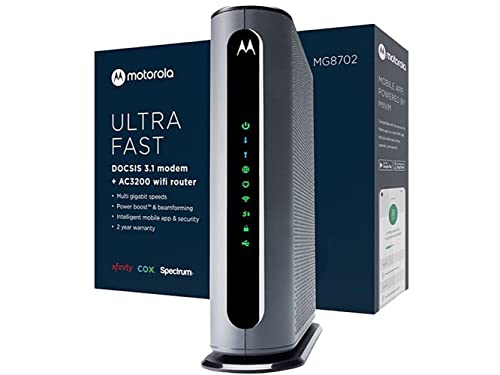
Motorola MG8702 combines a DOCSIS 3.1 cable modem with an AC3200 WiFi router. This option emphasizes high-speed wireless performance and the convenience of a single device to manage both networking and internet access, with features geared toward homes with multiple connected devices and bandwidth-intensive activities.
Buying Guide
Key considerations when selecting an internet modem router solution include compatibility, whether you need a modem/router combo or a standalone router, and the type of internet service you use (cable, fiber, or DSL).
Modem vs. gateway: If your internet plan requires a modem, a dedicated modem/router combo can reduce clutter. If you already own a separate modem, a standalone router may be the simplest upgrade path to faster WiFi 6 speeds and improved device handling.
DOCSIS standard and WiFi technology: For cable internet, DOCSIS 3.1 models support higher speeds with better efficiency. WiFi 6 (802.11ax) offers improved throughput and capacity in busy homes; WiFi 5 (AC) is still common in older devices but provides reliable performance with compatible equipment.
Coverage and device load: Consider the home size and number of connected devices. Small apartments benefit from compact routers, while larger homes may require mesh extenders or higher-power routers to maintain consistent coverage across multiple floors and rooms.
Security and features: VPN support, parental controls, guest networks, and automatic security updates help protect home networks. Some models also offer QoS (Quality of Service) to prioritize gaming or video traffic during peak times.
ISP compatibility and future-proofing: Ensure the device is compatible with your ISP’s service tier and any required authentication methods. If you plan to upgrade to faster tiers, a newer WiFi 6/6E router or a DOCSIS 3.1 modem with a strong router can help future-proof your setup.
Installation and support: Look for devices with straightforward setup processes and reliable customer support. Brand ecosystems—like TP-Link, NETGEAR, ARRIS, and Motorola—often provide user-friendly mobile apps to assist with setup and monitoring.