Answering the question “which internal wireless adapter should I buy for my desktop?” this guide highlights top internal PCIe and USB WiFi options that deliver strong speed, reliable connections, and good compatibility with Windows 10/11. These picks are ideal for gamers, streamers, and power users who need low latency, MU-MIMO, and future-proof Wi‑Fi 6 or 6E support. Below you’ll find a quick product comparison, followed by detailed sections to help you choose the right adapter for your setup.
| Product | Interface | Max Theoretical Speed | Best For |
|---|---|---|---|
| TP-Link Archer TX55E | PCIe | 2.4 Gbps (5 GHz 2402 Mbps + 2.4 GHz 574 Mbps) | Gamers on a busy network |
| TP-Link Archer TX3000E | PCIe | 2.4 Gbps | Power users needing low latency |
| TP-Link TX20U Plus | USB | AX1800 (up to 1800 Mbps) | Easy upgrade without opening PC |
| TP-Link Archer T2U Plus | USB | AC600 (up to 600 Mbps) | Budget-friendly dual-band |
| TP-Link Archer T5E | PCIe | AC1200 (867 Mbps 5 GHz + 300 Mbps 2.4 GHz) | Solid dual-band PCIe upgrade |
TP-Link Archer TX55E WiFi 6 PCIe Card

The Archer TX55E is a PCIe WiFi 6 card designed for desktops that demand high-throughput and low latency. It includes MU-MIMO and OFDMA for improved efficiency on crowded networks. It is best for gamers and real-time applications where fast, consistent performance matters. The card uses two high-gain antennas to extend range for better coverage in larger rooms or across multiple floors. Caution: Driver installation may be required for Windows 11/10 64-bit systems.
TP-Link Archer TX3000E PCIe WiFi Card

The TX3000E delivers Wi-Fi 6 performance with MU-MIMO and OFDMA to minimize lag during online gaming or VR experiences on busy networks. It supports up to 2.4 Gbps combined speed and provides ultra-low latency to keep gameplay smooth. It’s a strong choice for users upgrading from older PCIe adapters who want the latest standard and solid Windows 11/10 compatibility. Caution: Driver setup is required via TP-Link’s site or included media.
TP-Link TP-Link Archer TX20U Plus USB 6 Adapter

The Archer TX20U Plus USB adapter brings Wi-Fi 6 to devices without internal upgrades. It’s best for desktops that need a quick, plug-and-play enhancement with solid dual-band performance and a 2.4 GHz/5 GHz split for less congestion. It includes a high-gain antenna setup for broader coverage. Caution: Driver updates or installation may be necessary for full feature access on some systems.
TP-Link AC600 PCIe Desktop Card (Archer T2U Plus)
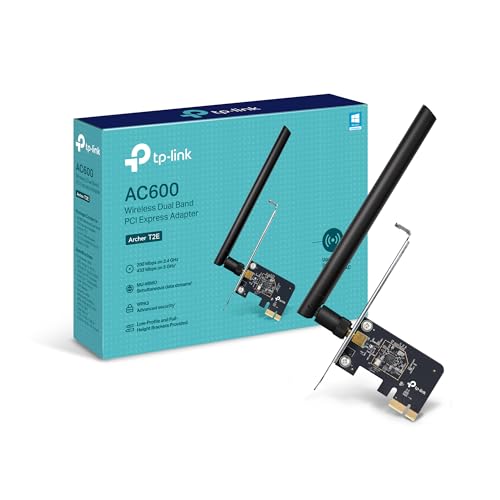
The Archer T2U Plus provides an affordable dual-band upgrade with MU-MIMO for desktop PCs. It’s best for users upgrading a legacy desktop to achieve better speeds on both bands, especially when streaming or light gaming. Limitation: The AC600 speed tier is modest compared with newer Wi-Fi 6 models, making it less ideal for very busy networks or 4K streaming on a crowded network.
TP-Link AC1200 PCIe Card (Archer T5E)

The Archer T5E offers a solid dual-band upgrade for desktops, delivering up to 867 Mbps on the 5 GHz band and 300 Mbps on 2.4 GHz. It’s a dependable choice for gaming and streaming without breaking the bank. Best for users who want a straightforward PCIe upgrade with reliable performance. Caution: Not the latest Wi-Fi 6/6E technology, so peak speeds won’t match newer models in very congested environments.
Buying Guide: Key Purchase Considerations
- Interface choice: PCIe cards typically offer better stability and lower latency for desktop gaming; USB adapters provide easier installation and portability but can be more prone to hubs or cable-induced interference.
- Wi-Fi standard: Wi-Fi 6 (AX) generally provides higher throughput and better multi-device performance than Wi-Fi 5 (AC). For future-proofing, prioritize AX or AX+ features like OFDMA and MU-MIMO.
- Antenna design: External high-gain antennas improve range and signal quality, especially in larger rooms. Some PCIe models include two antennas; USB adapters vary in antenna design.
- Driver support: Check for Windows 11/10 64-bit compatibility and whether drivers are provided by the manufacturer or require a CD/website download.
- Network environment: If you share bandwidth with many devices or use a busy network, consider devices with MU-MIMO and OFDMA for better performance under load.
- Security features: Look for WPA3 support for stronger wireless security, along with WPA2 compatibility for legacy networks.
- Compatibility: Ensure the adapter fits your motherboard slot (PCIe x1/x4/x16) and that your system has available PCIe lanes or USB ports.
FAQ
- What’s the difference between Wi‑Fi 6 and Wi‑Fi 5?
Wi‑Fi 6 (AX) improves efficiency, reduces latency on crowded networks, and supports higher speeds with OFDMA and MU-MIMO. - Is a PCIe card better than a USB adapter?
PCIe cards typically offer lower latency and more stable performance; USB adapters are easier to install and portable. - Do I need drivers for Windows 11?
Most modern adapters require drivers, which are usually available from the manufacturer’s site; some Windows 11 installations may auto-detect. - Can I use two wireless adapters at once?
Yes, you can, but it’s usually unnecessary unless you’re bridging networks or testing speeds; one adapter is enough for typical use. - What’s MU-MIMO and OFDMA?
MU-MIMO serves multiple devices simultaneously; OFDMA partitions channels to reduce latency and improve efficiency on busy networks. - Is security a concern with USB adapters?
Security features like WPA3 are important; ensure your adapter supports the latest standard and that you keep drivers updated.