Expand your PC’s internal USB connectivity with purpose-built hubs that power multiple devices while keeping tidy cables and stable power. This guide highlights five top internal USB hub options, covering magnetic mounting, SATA-powered stability, and easy plug-and-play installation. Whether you’re adding front-panel USB devices, RGB controllers, or fans, these hubs help you optimize space inside your case without sacrificing performance.
Summary of chosen products:
| Product | Brand | Key Benefit | Power | Installation |
|---|---|---|---|---|
| NZXT Internal USB Hub 3 | NZXT | 4 USB 2.0 ports + motherboard connection | SATA power | Compact, plug-and-play |
| Corsair Internal 4-Port USB 2.0 Hub | Corsair | High-density internal expansion | SATA/power-ready | Magnetic installation |
| Thermalright Internal USB Hub X5 | Thermalright | 5 USB 2.0 ports, magnetic mount | SATA powered | Magnetic mounting |
| HYTE Powered Internal USB Hub | HYTE | Transforms 1x USB 2.0 header into 4 USB 2.0 outputs | Powered via internal header | Includes magnets and adhesive strip |
| Ocypus Delta EU04 | Ocypus | 4-port expansion with 9-pin SATA power | SATA power | Magnetic mount, dual-lock tape |
NZXT Internal USB Hub 3 Overview

The NZXT Internal USB Hub 3 adds four internal USB 2.0 ports, plus a dedicated port that connects to the motherboard. Its compact design helps you hide the hub inside the case while preserving access to a clean cable layout. A SATA power connection ensures a stable power delivery, supporting reliable operation for multiple USB devices without drawing power from the motherboard alone. The hub is designed for plug-and-play use, simplifying installation for most PC builders and enthusiasts.
Corsair Internal 4-Port USB 2.0 Hub

Corsair’s internal hub provides four USB 2.0 ports with a straightforward magnetic installation process. It fits neatly into many PC builds and supports connectors that are compatible with most Intel and AMD motherboards. The design emphasizes easy integration, allowing you to add internal USB devices like RGB controllers or fans without resorting to USB headers on the front panel. The hub helps keep cables organized while expanding your internal USB footprint.
Thermalright Interal USB Hub X5
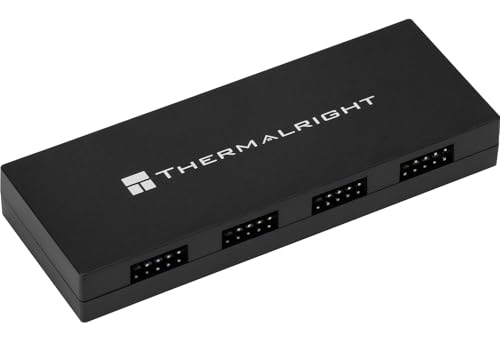
The Thermalright USB Hub X5 features five USB 2.0 ports using 9-pin connectors, designed to broaden internal connectivity for peripherals and components. It is SATA-powered, ensuring stable voltage delivery to all connected devices—a key factor when using power-hungry peripherals or multiple hubs in a single system. The magnetic mounting capability allows tool-free installation, making it simple to secure the hub inside the chassis and maintain a clean interior.
HYTE Powered Internal USB Hub
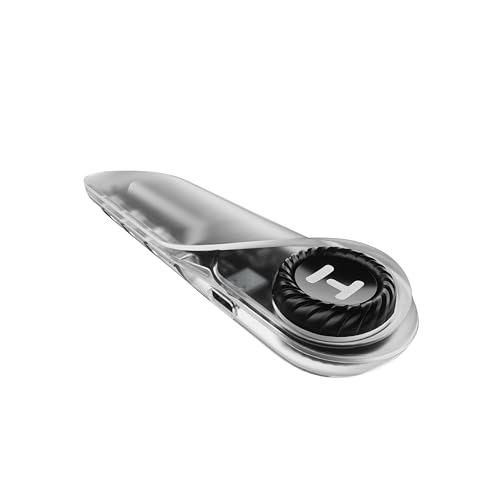
The HYTE internal hub converts a single USB 2.0 header into four powered USB 2.0 outputs, expanding compatibility for modern DIY components and front-panel devices. It emphasizes clean cable management and reliable power delivery, aided by its extra-strength magnets and included adhesive strip. This setup is well-suited for compact builds that require additional USB ports without cluttering the interior with long header cables.
Ocypus Delta EU04 Internal Hub

The Ocypus Delta EU04 offers 4 USB 2.0 ports with a 9-pin SATA-powered supply, facilitating stable power for multiple devices. Its magnetic mounting and 3M dual-lock tapes support easy, tool-free installation, allowing users to secure the hub in a convenient location inside the case. This model is designed for straightforward expansion, balancing reliability with a compact form factor suitable for most mid-tower builds.
Bejavr 5 Ports Internal USB Hub

This Bejavr model expands internal USB connectivity with five ports, including three 9-pin USB 2.0 headers and a Type-E/regular USB port. It uses a SATA auxiliary power connector to provide ample power for connected devices. The hub is plug-and-play with most motherboards and aims to simplify adding internal USB capabilities, particularly for systems needing additional 2.0 ports without external hubs or front-panel headers.
Bejavr 5-Port USB 2.0 + Gen 1 Adapter
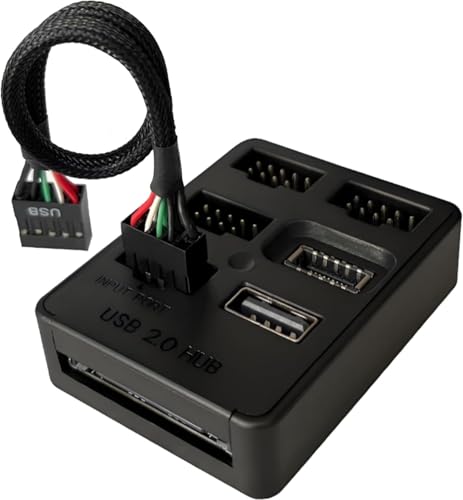
This Bejavr option provides five internal USB 2.0 ports via 9-pin headers, plus a USB 2.0 to USB 3.2 Gen 1 header adapter for extending USB-C front-panel ports on compatible cases. It emphasizes compatibility across a wide range of motherboards and emphasizes a plug-and-play experience, making it a versatile choice for upgrading internal USB capability in diverse builds.
Buying Guide: Key Considerations for Internal USB Hubs
- Power delivery: SATA-powered hubs offer stable power to several devices; consider total current draw and whether your components may require additional power beyond motherboard headers.
- Port count and type: choose a hub with the right number of USB 2.0 ports and compatible header configurations (9-pin, Type-E, etc.) for your motherboard and planned devices.
- Installation method: magnetic mounting, magnetic with adhesive strips, or tool-free options help with clean cable management and quick setup.
- Space and compatibility: evaluate the internal space within your case and ensure the hub fits without obstructing other components or airflow.
- Cable management: consider hubs that use short cables or shielded headings to minimize clutter and signal interference.
- Expansion needs: if you anticipate future upgrades, select a hub with additional ports or compatibility with adapters for USB 3.x or front-panel expansions.
- Compatibility with peripherals: ensure the hub supports your planned devices, such as RGB controllers, cooling fans, or front-panel USB devices, without bottlenecks.
In summary, these internal USB hubs provide scalable, tidy, and power-stable ways to expand your PC’s USB capabilities. The right choice depends on your motherboard header availability, desired port count, and how you prefer to install and organize cables inside the case. Consider magnetic mounting or SATA-powered options if you value a clean interior and reliable power for multiple devices.