Choosing the right interactive display can transform lessons, collaboration, and engagement in the classroom. This guide highlights five high-performance interactive boards that blend 4K clarity, multi-touch input, and robust software ecosystems. Each option is designed for modern teaching needs, from real-time annotation to seamless wireless sharing, ensuring a smooth learning experience for students and educators alike.
| Product | Brand | Key Benefit |
|---|---|---|
| COOLHOOD 65″ Smart Board | COOLHOOD | Powerful Android 13, 20-point touch, 128GB storage |
| KEINONE Interactive Smart Board 55″ | KEINONE | 8GB RAM, 128GB SSD, 4K visuals, built-in Android |
| 65 Inch 4K Smart Board | HORION | 50-point touch, all-in-one tools, AI features |
| BIG VUE 65″ Interactive Smart Board | BIG VUE | Android 14, 8GB RAM, 256GB storage, 50 touch points |
| JASZDOT 55” Smart Board | JASZDOT | 4K touch, Android 13, built-in video conferencing |
COOLHOOD 65-Inch 4K Interactive Whiteboard

The COOLHOOD board combines a 65-inch 4K interactive display with 20-point multi-touch and the Android 13 ecosystem. It ships with 128GB of storage and a capable octa-core processor, enabling smooth performance for complex lessons and everyday classroom tasks. Its presentation and annotation tools support wireless screen sharing across Mac, Windows, iOS, and Android, making collaborative activities seamless. Real-time votes, screenshots, and a built-in timer help structure activities and optimize classroom workflows. A wall mount is included; the stand is sold separately if needed.
KEINONE Interactive Smart Board, 55”

The KEINONE smart board offers 8GB RAM and 128GB SSD for versatile use beyond whiteboarding, including 4K UHD visuals across tasks. Built-in Android with an open app ecosystem supports a range of educational tools, making it suitable for interactive lessons, multimedia presentations, and collaborative projects. Its 20-point touch interface promotes group participation, while its lightweight design supports flexible classroom setups. It also supports easy wireless sharing across devices to facilitate dynamic lessons.
65 Inch 4K Smart Board by HORION
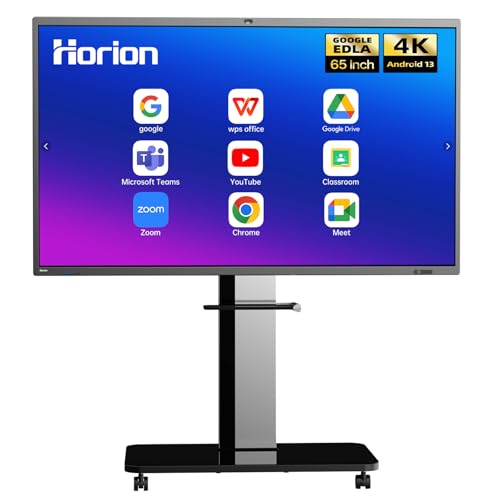
HORION’s 65-inch 4K smart board emphasizes a multi-tool approach, combining a full 4K display with a 50-point touch capacity, 8GB RAM, and 128GB storage. It functions as an all-in-one presentation hub, supporting wireless sharing from Mac, Windows, iOS, or Android. One-tap annotation, instant screenshots, and a built-in digital manual speed up classroom workflows. The board supports education-focused apps and works well for interactive lessons, remote collaboration, and hybrid classrooms.
BIG VUE 65″ Interactive Smart Board

The BIG VUE board delivers native 4K resolution with a broad color range and wide viewing angles. It features Android 14, 8GB RAM, and 256GB storage for multitasking and media-rich lessons. With 50 touch points and infrared touch technology, multiple students can interact simultaneously. It is compatible with Zoom, Teams, and Google Meet, and supports wireless screencasting and preinstalled whiteboarding apps, making it suitable for live lectures and collaborative sessions across classrooms or conference spaces.
55 Inch HORION Smart Board with 40-Point Touch

This 55-inch HORION model offers a 4K display with up to 40 touch points for multi-user collaboration. It runs Android 13 and supports dual-system collaboration, enabling quick switching between Android and Windows modes (with an optional OPS module). Features include one-click annotation, remote collaboration, and easy file sharing from multiple devices. A strong option for classrooms that emphasize flexible workflow and remote teamwork.
JASZDOT 55” Smart Board
The JASZDOT 55-inch smart board runs Android 13 with 8GB RAM and 128GB storage to deliver a responsive education and presentation experience. It features a true 4K UHD touchscreen and built-in video conferencing capabilities, enabling hybrid classes and remote collaborations. Wireless screen sharing supports cross-device compatibility, and the device is geared toward engaging lessons with crisp visuals and reliable performance for classrooms and studios alike.
JAV 75″ Smart Board Pro
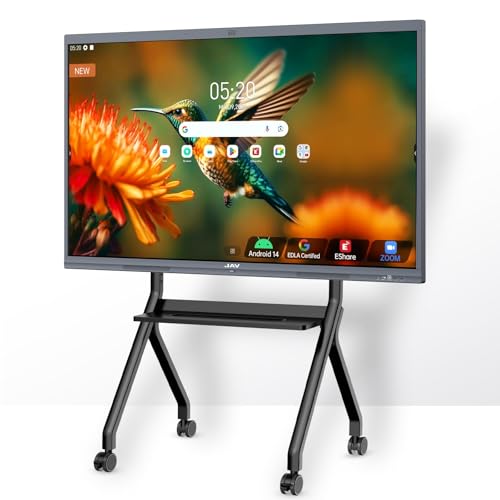
The JAV 75-inch board uses a high-end 4K UHD multi-touch display with Android 14, 8GB RAM, and 128GB storage, ensuring robust performance for demanding teaching tasks and long sessions. It supports Google Drive integration with AI-assisted tools for annotation and document handling. The system enables multi-user writing across 20-point touch and offers cross-platform wireless sharing with Zoom, Meet, Teams, and Webex compatibility. It also features AI-driven conference capabilities and remote control for streamlined presentations.
JAV Smart Board 49 Inch

The 49-inch JAV board emphasizes Google EDLA certification and a preinstalled Google Play Store for app access directly on the board. Running Android 13 with 16GB RAM and 256GB storage, it supports smooth multitasking and fast switching between apps. Wireless screen sharing via EShare enables up to 16 split screens. It also includes a variety of ports (HDMI, USB-C, USB 3.0) to connect peripherals, making it adaptable for different classroom configurations.
Buying Guide: Key Purchase Considerations
- Display quality and size: Choose 4K resolution for sharp visuals and consider board size based on room distance and seating arrangement.
- Touch capabilities: Evaluate multi-touch point support (e.g., 20–50 points) to support group activities and simultaneous inputs.
- Operating system and ecosystem: Android vs. Google EDLA, and the availability of essential educational apps and collaboration tools.
- Connectivity and sharing: Look for wireless casting, cross-platform compatibility (Mac/Windows/iOS/Android), and QR/file sharing features for efficient workflow.
- Storage and performance: Higher RAM and larger SSD storage support smoother multitasking and media-rich lessons.
- Audio and camera: For hybrid classrooms, built-in speakers and AI-powered cameras can improve conferencing and engagement.
- Installation options: Wall mount vs. optional stands or OPS modules; ensure compatibility with room layouts and future reconfigurations.
- Maintainability and security: Check firmware updates, app access controls, and enterprise-grade security features for school networks.
In selecting a best-fit interactive board for a classroom, balance display size, touch capacity, software flexibility, and ease of collaboration. The options above cover a range from compact 55-inch models to expansive 75-inch configurations, all designed to support interactive learning, remote collaboration, and integrated lesson planning in American classrooms.