Answering the question, which in-dash head unit should I buy for my car? This guide highlights five reliable choices that balance features, ease of use, and value. Each entry targets a different buyer type—from tech enthusiasts seeking wireless CarPlay/Android Auto to budget-minded listeners who want solid Bluetooth and USB playback. The table below summarizes the featured models to help you compare at a glance.
| Product | Brand | Why It Stands Out |
|---|---|---|
| Camecho Car Radio Double Din | CAMECHO Store | Affordable 7″ touchscreen with Bluetooth and Mirror Link for Android; good for value seekers. |
| Pioneer DMH-130BT | PIONEER Store | Compact 6.8″ display with solid Bluetooth, backup camera, and flexible display options. |
| BOSS Audio 611UAB | BOSS Audio Systems Store | Budget-friendly single-DIN option with Bluetooth and USB for essential media playback. |
| Pioneer MVH-S322BT | PIONEER Store | Smartphone-ready with Bluetooth, USB/AUX; strong baseline for connectivity. |
| Soundstream VRCPAA-7DR | Soundstream Store | 7″ double-DIN with Wireless CarPlay/Android Auto and multiple inputs for flexible media. |
Camecho Car Radio Double Din 7″ LCD
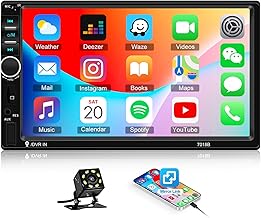
Best for budget-conscious buyers who want a large touch display and basic smartphone connectivity. This 7″ LCD head unit supports Bluetooth for hands-free calls and music, plus Mirror Link for Android devices (USB connection only). It includes FM/SD/USB playback, a built-in car DVR option, and remote control compatibility. Pick this if you want an affordable upgrade with essential features and a larger screen for easier navigation and media control. Caution: It does not support Wi-Fi or built-in GPS navigation; use Mirror Link for navigation via your phone.
Best for: value-focused buyers who prioritize a large screen and straightforward media playback. Why selected: combination of 7″ touchscreen, Bluetooth, and Mirror Link at a low price point, with a built-in DVR option for recording road trips.
Key specifications and limitations:
- Display: 7″ multimedia touchscreen
- Output: 4-channel, FM radio (18 stations)
- Inputs: USB, SD/MMC
- Connectivity: Bluetooth 2.0, Mirror Link (Android via USB)
- Limitations: No Wi-Fi or standalone GPS
Pioneer DMH-130BT 6.8″ Double Din

Best for drivers who want reliable Bluetooth connectivity in a compact chassis with solid audio output. The DMH-130BT offers a 6.8″ resistive touchscreen, built-in Bluetooth for hands-free calls and wireless audio streaming, and a short chassis design that can fit many vehicles. It supports USB playback and AM/FM radio. Choose this if you value ease of use, Pioneer’s interface familiarity, and a compact form factor. Limitation: Lacks some newer advanced features found in top-tier models, such as wireless Android Auto/Apple CarPlay in this specific variant.
Best for: steady Bluetooth integration with traditional audio playback. Why selected: compact, reliable, and simple to operate—great for upgrading older setups without a heavy feature load.
Key specifications and limitations:
- Display: 6.8″ resistive touchscreen
- Bluetooth: Hands-free calling, wireless audio
- Inputs: USB, AM/FM
- Limitations: Not a flagship CarPlay/Android Auto model
BOSS Audio Systems 611UAB Car Stereo

Best for those on a strict budget who still want Bluetooth and USB media playback. The 611UAB offers Bluetooth hands-free calling, streaming, and USB playback alongside AM/FM radio. It’s a straightforward, no-frills option that covers essential listening with simple setup. Caution: Being a single-DIN option, it may require additional dash space or a specific install kit for some vehicles.
Best for: budget-minded buyers needing reliable Bluetooth music and USB playback. Why selected: essential feature set at a low price point, with simple operation.
Key specifications and limitations:
- Bluetooth: Hands-free calling and streaming
- Inputs: USB, aux
- Media: MP3/WMA playback
- Limitations: Single-DIN form factor may require installation adjustments
Pioneer MVH-S322BT Bluetooth Car Stereo

Best for drivers who want strong connectivity with USB/AUX inputs and broad file support. The MVH-S322BT includes built-in Bluetooth for hands-free calling and audio streaming, along with USB and auxiliary input options. It supports common formats like MP3, WMA, AAC, and WAV. Choose this if you need flexible USB playback and reliable phone integration without extra bells and whistles. Caution: Does not include wireless Apple CarPlay/Android Auto in this variant, which may matter for some users.
Best for: dependable Bluetooth streaming and USB playback. Why selected: straightforward setup, broad codec compatibility, and solid daily use.
Key specifications and limitations:
- Bluetooth: Hands-free calling, wireless audio
- Inputs: USB, AUX
- Media: MP3, WMA, AAC, WAV
- Limitations: No built-in wireless CarPlay/Android Auto
Soundstream VRCPAA-7DR 7″ Double Din

Best for tech-savvy buyers who want native wireless CarPlay and Android Auto. The VRCPAA-7DR offers true wireless CarPlay and Android Auto, Bluetooth hands-free calling, and multiple inputs including USB/AUX and microSD. It supports backup camera input and features steering wheel control compatibility, plus FM/AM tuners. Choose this if you want the most seamless smartphone integration and modern infotainment in one package. Caution: Some features require compatible devices and app setup; ensure your phone supports wireless CarPlay or Android Auto for full benefits.
Best for: users seeking premium smartphone integration and future-proof connectivity. Why selected: wireless CarPlay/Android Auto, robust media options, and compatibility with steering wheel controls.
Key specifications and limitations:
- Wireless CarPlay & Android Auto
- Bluetooth: Hands-free calling, streaming
- Inputs: USB, AUX, microSD
- Limitations: Requires compatible smartphones for wireless CarPlay/Android Auto
Buying Guide
What should you consider when choosing an in-dash head unit?
- Display size and type: Larger screens provide easier navigation; capactive vs resistive touch affects responsiveness.
- Smartphone integration: Do you need wireless CarPlay or Android Auto? Check if the model supports it and whether it’s wireless or wired.
- Connectivity: Bluetooth for hands-free calling and audio streaming; USB/aux for direct device playback; SD/microSD support can be useful for media libraries.
- Vehicle fit: Confirm the dash slot size (single vs double DIN) and required installation kits for your car’s dashboard.
- Navigation: Some units rely on phone-based navigation via Mirror Link; others offer built-in GPS in select models.
- Audio output and compatibility: Ensure the unit supports your preferred audio formats and provides adequate preamp power for your speakers.
- Camera support: If you plan to add a rear-view or backup camera, verify camera input compatibility and wiring requirements.
Frequently Asked Questions
- Which in-dash head unit is best for wireless CarPlay? The models with true wireless CarPlay/Android Auto, such as the Soundstream VRCPAA-7DR, are best for wireless smartphone integration.
- Do I need a new car stereo if my dash is single-DIN? Yes, you’ll need a single-DIN to double-DIN adapter or replacement that fits your dashboard and installation space.
- Can I use Mirror Link for navigation? Some units support Mirror Link to mirror your phone screen for navigation, but built-in GPS may be absent on budget models.
- Will these head units fit any car? Check your vehicle’s dash slot size (DIN measurement) and space for mounting kits before buying.
- Is Bluetooth enough for hands-free calls? Bluetooth provides hands-free calling and wireless audio; for best experience, ensure your device supports the Bluetooth version used by the head unit.
- Do these units require Wi-Fi? Most do not require Wi-Fi for basic playback; some models use your phone’s data or Mirror Link for navigation.