Answering the search for reliable home network data storage means finding devices that balance capacity, performance, and ease of use. This guide highlights five NAS options suitable for different households—from beginners to power users, creators, and remote workers. Each pick is evaluated for who it’s best for, why it stands out, and any practical limitations to consider. The following table summarizes key attributes to help you compare at a glance.
| Product | Best For | Capacity Range | Key Benefit |
|---|---|---|---|
| UGREEN DXP2800 | Advanced users, creators | Up to 80TB | Powerful CPU/RAM; Docker/VM; 2.5GbE |
| BUFFALO LinkStation 210 2TB | Budget-friendly home storage | 2TB | RAID-ready; simple setup; 24/7 support |
| BUFFALO LinkStation 210 6TB | Mid-range home storage | 6TB | Higher capacity; shared network storage |
| UGREEN DH2300 | Beginners seeking private cloud | Up to 64TB | Easy setup; private cloud/remote access; media sharing |
| Synology DS225+ | Private cloud and media streaming | Diskless (expandable) | Intel CPU; hardware transcoding potential |
UGREEN DXP2800 2-Bay NAS for Advanced Home Users

The DXP2800 targets advanced home users, remote workers, and creators who need centralized storage plus robust processing for multimedia workflows. It is designed to run Docker containers and virtual machines, handle large 4K media files, and power a Plex media server. This model emphasizes expandability with dual M.2 NVMe slots, 8GB DDR5 RAM, and 2.5GbE networking for faster data transfer. Best for tech enthusiasts and households running multiple apps or media servers in parallel. A limitation is that disk drives and SSDs aren’t included, so you’ll need to add your own storage.
Why choose this for your setup: its Intel N100 Quad-Core CPU delivers solid multitasking performance, while the 2x M.2 NVMe slots offer caching and acceleration for large libraries. The 2.5GbE port improves local network throughput, which is noticeable when multiple users access 4K videos simultaneously. This is a strong pick for households that want a flexible, high-capacity central hub and value Docker/VM capabilities.
Best for: creators, remote workers, and power users who run media servers or multiple NAS apps. Better for: larger digital libraries with frequent file transfers. Choose this if: you need Docker/VM support and 4K media handling in a single device. Caution: configuration and expansion require some technical familiarity.
BUFFALO LinkStation 210 2TB 1-Bay NAS

This 2TB unit is a budget-friendly option designed for basic centralized storage and backup across home devices. It’s simple to set up and compatible with Windows and macOS, making it suitable for households that want straightforward shared storage without complex features. The inclusion of basic RAID options provides a measure of data protection, though advanced media-server capabilities may be limited. A practical caveat is the smaller capacity, which may require more frequent maintenance or expansion for growing libraries.
Best for: users seeking an affordable, easy-to-use home cloud. Better for: smaller households with modest media needs. Choose this if: you want plug-and-play shared storage with minimal setup. Caution: limited features compared with higher-capacity or more feature-rich NAS devices.
BUFFALO LinkStation 210 6TB 1-Bay NAS
The 6TB variant increases capacity for households with larger media libraries or more extensive data backups while preserving a simple, centralized storage model. This unit is well-suited for homes needing more space without stepping into multi-bay configurations. It remains straightforward to deploy and manage, with the same Windows/macOS compatibility and Buffalo support. A limitation is that it remains a single-bay unit, which offers less redundancy than dual-bay designs.
Best for: families needing more storage without added complexity. Better for: media-heavy households that can’t justify a multi-drive array. Choose this if: you want more room than a 2TB unit without increasing complexity. Caution: single-drive protection options are limited compared with dual-bay NAS options.
UGREEN NAS DH2300 2-Bay for Beginners

The DH2300 is positioned for beginners or private cloud users who want a simple, private storage hub. It emphasizes ease of use, multi-device backup, and remote access to personal files. This model is attractive for users transitioning from cloud storage or external drives and seeking a one-time purchase rather than ongoing cloud fees. It does not support Docker or virtual machines, which is a key limitation for power users. Capacity can reach up to 64TB with appropriate drives.
Best for: individuals starting with NAS who want private cloud features. Better for: simple backups and media sharing across devices. Choose this if: you don’t need Docker/VM support. Caution: not suitable for workloads requiring virtualization or heavy app hosting.
Synology DS225+ Private Cloud Media Server
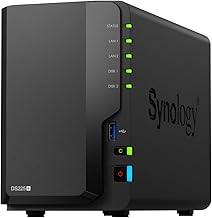
The Synology DS225+ targets private cloud storage with strong media streaming capabilities and data protection. While listed as diskless, it supports hardware transcoding through its Intel-based CPU, which can be advantageous for 4K streaming and media libraries. This unit is well-suited for households needing reliable backup, easy cloud access, and robust media capabilities. A limitation is the requirement to supply your own drives, and some advanced features may require Synology ecosystem services.
Best for: users prioritizing private cloud and media streaming with solid software support. Better for: those who value Transcoding-ready hardware and reliable backups. Choose this if: you want a strong Synology ecosystem. Caution: initial setup requires selecting compatible drives and software configuration.
Buying Guide
What should you consider when choosing home network storage?
- Capacity needs: Estimate current and future storage for photos, videos, backups, and documents. For large 4K libraries or RAW photos, plan for higher capacities and potential expansion.
- Performance vs. simplicity: Docker/VM support and 2.5GbE networks boost performance but may add setup complexity. Beginners may prefer simpler, single-drive or two-bay units.
- Drive configuration: Decide between single-bay, dual-bay, or multi-bay. Dual bays offer RAID data protection, while single bays maximize simplicity and cost.
- Remote access and apps: If you need private cloud access, confirm features like remote file access, cloud integration, and media server support (Plex, etc.).
- Expandability: Consider whether you want two bays with NVMe caching, external expansion, or future drive upgrades.
- Software ecosystem: Synology and Buffalo offer mature software ecosystems; UGREEN focuses on performance and flexibility, especially for creators and tech-savvy users.
FAQ
- What is the main benefit of a NAS for a home network?
To centralize storage, backups, and media streaming, accessible from multiple devices across the network.
- Do I need a multi-drive NAS for data protection?
Dual-bay or multi-bay models enable RAID configurations that protect data against drive failure.
- Is Docker/VM support important for home use?
Only if you run containers or virtual machines for apps, development, or advanced media workflows.
- Can I use these NAS devices for Plex streaming?
Yes, most NAS devices support Plex or similar media servers, but hardware transcoding matters for 4K content.
- Do I need to buy drives separately?
Yes. Most models in this guide are diskless or require user-supplied drives, so factor that into cost.
- What should I consider when expanding storage later?
Check drive bays, RAID options, and whether NVMe caching or external expansions are supported by the model.