Explore a selection of high-speed card readers designed to transfer photos, videos, and large files quickly across USB-C and USB-A devices. This guide highlights top options with dual and multiple card slots, USB 3.0/3.2 speeds, and broad compatibility for Mac, Windows, Android, and more. Each product below includes key features to help you choose the right model for photographers, videographers, and creators on the go.
Summary of chosen products:
| Product | Brand | Key Benefit | Card Slots |
|---|---|---|---|
| uni SD Card Reader | uni | USB 3.0 + USB-C, dual-slot with fast transfers | SD, Micro SD (Dual Slot) |
| BENFEI 4in1 USB 3.0/USB-C Reader | BENFEI | 4 cards simultaneously, cross-compatibility | SD, Micro SD, MS, CF |
| Anker SD Card Reader 2-in-1 | Anker | Ultra-compact, broad USB-C compatibility | SD, Micro SD |
| UGREEN USB C SD 4.0 Card Reader | UGREEN | High-speed USB 4.0 with UHS-II support | SD, Micro SD |
| Lexar Professional CFexpress/SD Reader | Lexar | Dual slots, up to 10Gbps transfers | CFexpress Type B, SD |
uni SD Card Reader: High-Speed USB-C Dual Slots

The uni reader combines USB 3.0 and USB-C interfaces, delivering data transfer up to 5 Gbps. It supports SD, SDHC, SDXC, MMC, and microSD variants, including microSDXC and microSDHC, across two slots. It is backward compatible with USB 2.0/1.1 and requires no driver on Windows or Mac OS X. The dual-slot design enables simultaneous access to microSD and SD cards, boosting productivity for photographers, videographers, and editors who need quick transfers on the go. The compact, protective design helps shield cards from dust and liquid exposure.
BENFEI 4in1 USB 3.0/USB-C Card Reader

BENFEI’s integrated 4-in-1 reader handles SD, Micro SD, MS, and CF cards via USB-C or USB 3.0. It supports UHS-I transfer speeds up to approximately 104 MB/s and is backward compatible with USB 2.0/1.1. The device reads and writes up to four cards simultaneously, reducing the need to swap cards during shoots or editing sessions. Its universal compatibility makes it a versatile option for laptops, smartphones, and newer MacBooks.
Anker SD Card Reader: Dual Slot USB-C

Anker’s two-slot reader emphasizes compact, near-field USB-C use alongside an SD and microSD slot. It is designed for smooth compatibility with a wide range of USB-C devices, including newer MacBooks and Android phones. The compact form factor makes it easy to keep in a bag for travel, with an emphasis on plug-and-play operation without extra software. This option is well-suited for editors and photographers who need a lightweight, reliable USB-C memory reader.
UGREEN USB C SD 4.0 Card Reader

UGREEN’s USB-C 4.0 reader supports UHS-II cards with claimed speeds up to 312 MB/s, a notable bump over standard USB 3.0 readers. It features SD and TF (microSD) slots with two-card simultaneous read/write capability. The device is designed for MacBook, iPhone 16/15 Pro Max, tablets, and Android devices, with a focus on high-speed transfers and efficient multitasking for creators who need rapid offloads from high-capacity media cards.
Lexar CFexpress/SD USB 3.2 Dual-Slot Reader

Lexar’s LRW520U-RNBNG provides two slots: CFexpress Type B and SD. It supports USB 3.2 Gen 2 speeds up to 10 Gbps, enabling fast offloads of high-resolution imagery and 8K RAW video. This model is aimed at professionals who work with CFexpress Type B cards in high-end cameras and need rapid transfers to minimize downtime during shoots or editing.
Lexar Pro USB 3.2 Type-C Dual-Slot Reader
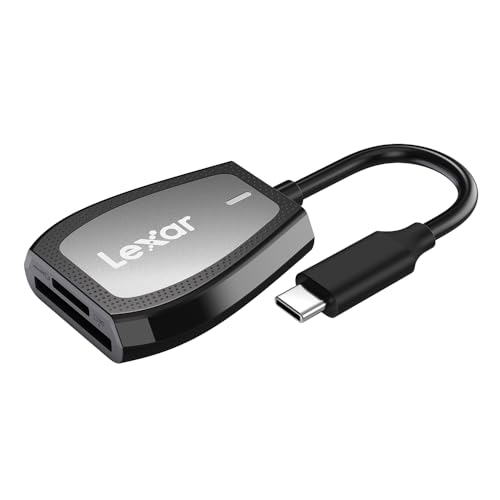
Lexar LRW470U-RNHNU offers dual slots for SD and microSD with read speeds up to 312 MB/s. It supports USB 3.2 Gen1 (Type-C) connectivity and provides a straightforward, high-performance solution for transferring media from SD and microSD cards to a computer or editing workstation. LED indicators help confirm activity and status during transfers.
Buying Guide: Key Purchase Considerations
When selecting a high-speed card reader, consider card compatibility, transfer speeds, and connector type. Consumers should evaluate whether USB-C, USB-A, or dual-header designs best fit their devices and workflow. For photographers and videographers, dual-slot readers that support simultaneous transfers can save time during field shoots. For editors working with CFexpress or SD UHS-II cards, readers with higher speeds and dedicated USB 3.2 Gen 2 support provide noticeable performance gains.
Compatibility and future-proofing matter. Look for readers that list card support beyond SD and microSD, such as CFexpress, MS, and RS-MMC. Backward compatibility with USB 2.0/1.1 is useful for older devices, but real-world speed will rely on the card’s class and the port type. Build quality, anti-dust design, and an attached cable or compact form factor contribute to reliability in travel scenarios.
Usability factors include plug-and-play operation, driver requirements, LED indicators, and any bundled accessories. Some readers include protective end caps or integrated cables that reduce loss and protect connectors. If you frequently work with multiple devices, prioritize USB-C compatibility to maximize compatibility with modern laptops and mobile devices.
In sum, the best high-speed card reader choice depends on your card types, required speeds, and device ecosystem. For multi-card needs, options like BENFEI and uni offer robust dual-slot performance, while Lexar models provide professional-grade speeds and CFexpress support for advanced workflows.