For cold mornings or chilly workspaces, a heated mouse pad or desk pad can turn a typical desk into a warm, productive zone. This guide assesses top picks that combine rapid heating, adjustable temperatures, safety features, and durable materials. The selections below are well-suited for home offices, gaming setups, and professional desks across the United States.
The following summary table highlights five strong options, each designed to keep hands warm without compromising desk space or safety. Use it to compare features at a glance before diving into each product detail.
| Product | Brand | Key Features | Size |
|---|---|---|---|
| Heated Desk Pad Mouse Pad | tulpock | 3 heat levels, auto shut-off 4h, UL/FCC certified | 31.5″ x 13″ |
| Heated Desk Pad 31.5″ x 13″ | Voltiefy | 5 temperature levels, 3h auto shut-off, waterproof | 31.5″ x 13″ |
| Bublonics Heated Mouse Pad | Bublonics | 3 heating levels, digital display, auto shut-off | 31.5″ x 13″ |
| iCasso Heated Mouse Pad | iCasso | 4 heating levels, 4 auto shut-off levels, honeycomb design | 31.5″ x 13″ |
| UMySpcl Heated Desk Pad | UMySpcl | 5 heat levels, quick heat-up, 4h auto shut-off | 31.5″ x 13″ |
All options listed provide generous surface area to accommodate keyboards and mice, with a focus on safety, rapid warmth, and easy maintenance. The products vary in heat levels, shut-off timers, and design details, allowing you to pick a model that fits your desk setup and winter routine.
Heated Desk Pad Mouse Pad By tulpock

The tulpock heated desk pad combines a PU leather surface with a waterproof PVC backing, providing a quick and reliable heat response. With three heat levels—high, medium, and low—the user can tailor warmth to personal comfort. An auto shut-off after four hours prevents overheating, and the control box at the left corner keeps operation simple. This desk pad supports a wide desktop footprint, measuring 31.5 by 13 inches, making it suitable for both keyboards and mice. The UL/FCC safety certifications add a layer of assurance for everyday office use. This option is positioned as a versatile winter accessory for homes and professional spaces alike.
Key features include:
– 3 heat levels with rapid warming
– Auto shut-off after 4 hours
– Durable PU leather surface and waterproof PVC backing
– Large 31.5″ x 13″ footprint
Recommended environments: home offices, study desks, and workstations in cooler climates. The design emphasizes ease of use and straightforward maintenance, making it a practical first choice for someone exploring heated desk gear.
Heated Desk Pad With Five Heat Levels By Voltiefy

Voltiefy’s heated desk pad offers five temperature settings and a one-touch control panel for quick adjustments. The digital display shows the current temperature for precise tuning, and the surface uses a waterproof, flame-retardant housing with a premium leather finish that’s easy to wipe clean. The product is designed for home offices and gaming setups, providing a steady, uniform warmth across a large work area. The three-hour auto shut-off timer supports energy efficiency and safety during longer sessions.
Highlights include:
– Five temperature levels (95°F–131°F)
– Digital temperature display
– Waterproof, leak-proof construction
– 31.5″ x 13″ size for keyboard and mouse comfort
Bublonics Heated Mouse Pad, 3-Level Heating

The Bublonics desk mat emphasizes safety with a four-layer design, including protective film, waterproof PU leather, a heating sheet, and a non-slip bottom. It is CE, FCC, and UL certified, and the integrated over-current protection reduces the risk of electric shock. The pad includes three heating levels and a digital display to monitor temperature, delivering rapid warmth in about 15 seconds. A 4-hour auto shut-off keeps energy use efficient, while a one-hour sedentary reminder encourages mindful breaks during long sessions.
Notable points:
– Four-layer safety construction
– Three temperature settings with digital readout
– Fast heating and even heat distribution
– Auto shut-off and inactivity reminders
iCasso XL Heated Mouse Pad With Honeycomb Design
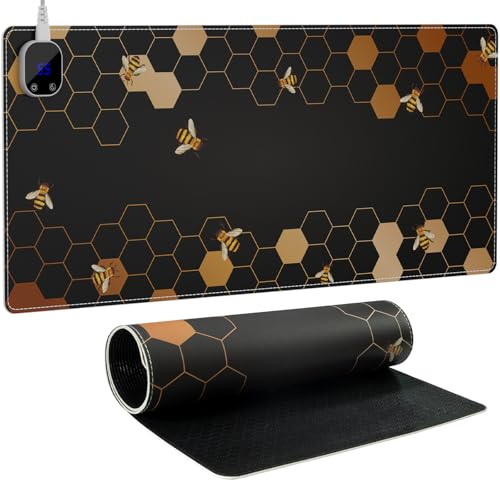
The iCasso desk mat stands out with a honeycomb aesthetic paired with practical performance. It provides four heating levels (104°F–131°F) and four automatic shut-off timing options (1h–4h). The warm desk pad heats quickly, and its large 31.5″ x 13″ surface accommodates multiple devices. Safety features and a stylish, durable fabric finish make it suitable for prolonged use in offices, gaming setups, or dorm rooms. The auto-off options help manage energy and heat output, even during long sessions.
Key details:
– 4 heating levels and 4 timing options
– Rapid 15-second heat onset
– Large 31.5″ x 13″ surface
– Honeycomb design with bees motif for visual appeal
UMySpcl Heated Desk Pad With Five Heat Levels

UMySpcl’s model offers five heat levels ranging from 86°F to 122°F, with a quick heat-up time that distributes warmth across most of the pad’s surface. A four-hour auto shut-off combined with a sedentary reminder helps manage heat and energy, making it well-suited for office workers, students, and gaming enthusiasts who value safety and consistent warmth. The surface is designed for easy cleaning and long-term use in busy environments.
Considerations include:
– Five adjustable heat settings with quick heat-up
– Four-hour auto shut-off and sedentary reminder
– FCC-certified safety design
– Suitable for desks of various sizes, with a large 31.5″ x 13″ footprint
Buying Guide: Key Purchase Considerations
What to look for when choosing a heated desk pad or mouse pad:
- Heat settings and control: More levels offer finer comfort control. Look for digital displays or easy-to-read controls so you can adjust without disrupting work.
- Auto shut-off and timers: A timer helps save energy and reduces the risk of overheating during long sessions.
- Surface material and durability: PU leather or waterproof leather provides a smooth glide for the mouse and is easy to clean. A non-slip base helps keep the pad in place.
- Safety certifications: UL, FCC, and CE certifications indicate better safety standards for electrical devices.
- Size and compatibility: Most options are 31.5″ x 13″, offering ample space for keyboards and mice; verify your desk space before purchasing.
- Power source: USB-powered pads are convenient for laptops, while standard AC-powered pads may be more suitable for desktop setups.
- Auto shut-off duration: Shorter shut-offs (1-3 hours) may be preferred for work sessions, while longer periods suit gaming marathons—consider your workflow and risk tolerance for overheating.
- Warranty and maintenance: Check for warranties and whether surfaces are easy to wipe down to extend product life.
From a usability perspective, the strongest candidates deliver rapid warmth within seconds, consistent heat across the entire surface, and a straightforward user experience. For environments with sensitive electronics or kids nearby, choose models with robust safety features and certified components. If desk space is at a premium, prioritize larger pads that can accommodate multiple devices without crowding.