Looking for the best headset for PC voice chat? This guide highlights top options that prioritize clear voice transmission, noise reduction, and comfortable wear for long sessions. The selections are suited for office calls, online classes, gaming chats, and remote work. Each pick includes who it’s best for, plus practical trade-offs to help you decide fast.
| Product | Best For | Why It Stands Out |
|---|---|---|
| Sonitum Headset With Microphone | Office calls and online meetings | Strong noise-reduction mic and rotating mic for flexible positioning |
| AOC USB Headset With Microphone (Black) | Remote work and daily Teams/Zoom use | 40mm drivers, soft cushions, USB-A/C compatibility |
| AOC USB Headset With Microphone (270° Rotatable) | Busy open offices or call centers | 270° mic adjustability and clear call audio |
| JBL Quantum 400 | Online gaming chats and multimedia | QuantumSURROUND, DTS, and a voice-focused flip mic |
| Sennheiser PC 3 Chat | Casual gaming and e-learning | Lightweight, plug-and-play with noise-cancelling mic |
Note: The table above compares general strengths. Individual results depend on your computer, mic boom position, and room noise levels.
Sonitum Headset With Microphone
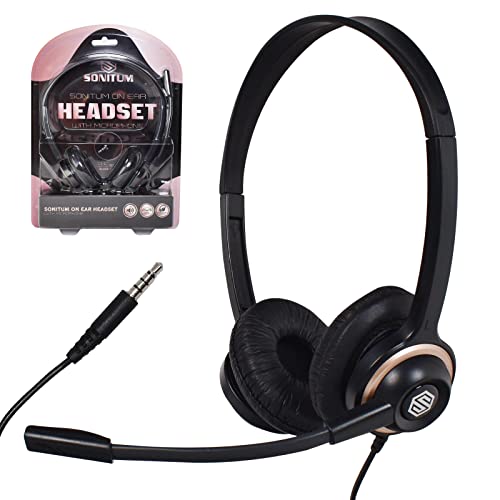
Best for: Office meetings and general PC voice chat where long wear is common.
The Sonitum headset emphasizes crystal clear audio and a microphone tailored for professional online meetings. Its noise reduction technology helps keep your voice clear in busy environments, making it suitable for call centers, virtual classes, and YouTube recordings. The lightweight design with an adjustable headband and cushioned ear pads supports hours of use. The rotating mic can be positioned for comfort and optimal pickup.
Why selected: Clear voice transmission and comfortable, all-day wear are essential for frequent communicators. The rotating mic adds flexibility for different seating positions.
Limitations: Specific feature claims rely on generic in-use conditions; mic performance may vary with extreme ambient noise. No wireless option is listed, so USB/3.5 mm connectivity is required.
AOC USB Headset With Microphone For PC (Black)

Best for: Daily office calls, Zoom/Teams meetings, and long workdays.
This headset pairs 40mm drivers with a noise-cancelling mic for clear conversations. The soft protein-memory ear cushions and lightweight frame are designed for all-day wear. USB-A/C compatibility ensures easy setup across devices, and the mic is designed to suppress background noise for crisper calls.
Why selected: Balanced audio for calls and work-related video content, with long-wear comfort a key advantage for remote workers.
Caution: The overall comfort level depends on head size and ear shape; some users may prefer a lighter model for ultra-long sessions.
AOC USB Headset With Microphone (270° Rotatable)
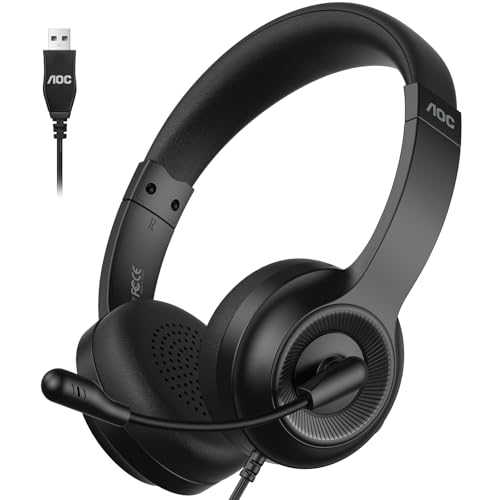
Best for: Open-office environments or shared workspaces where noise is common.
The 270° rotatable mic focuses on your voice and minimizes background sounds. It’s designed to support clear communication on Zoom and Teams, and the 40mm drivers deliver balanced sound for calls and media. The lightweight design helps reduce head pressure over long shifts.
Why selected: The rotatable mic and noise-focus make it a practical choice where background noise is a factor.
Caution: While comfortable, some users may prefer extra padding if wearing headphones all day in a high-noise area.
JBL Quantum 400

Best for: Gamers and multimedia users who want immersive sound during voice chats.
The JBL Quantum 400 combines JBL QuantumSURROUND/DTS for immersive audio with a directional flip-up mic for focused voice capture. It’s designed to help players hear the environment while maintaining clear team communication. Memory foam ear cushions add long-wear comfort, which is helpful during extended sessions.
Why selected: For voice chat in gaming and multimedia contexts, the balance between game audio and clear voice is crucial. The Quantum 400 offers a specialized surround experience and a focused mic.
Caution: The feature set is oriented toward gaming audio; if you want a simpler work headset, consider alternatives with lighter software requirements.
Sennheiser PC 3 Chat

Best for: Casual gaming and e-learning with easy setup and reliable call quality.
This durable, lightweight headset offers plug-and-play simplicity and balanced stereo sound. It’s designed for internet telephony and e-learning, with a straightforward approach that suits users who want reliable performance without extra software.
Why selected: Simplicity and dependable call quality for everyday PC voice chat makes it a practical choice for students and casual gamers.
Caution: Some users may prefer more robust noise cancellation in very noisy environments or for heavy headset users seeking premium comfort.
EPOS Sennheiser PC 5 Chat

Best for: Focused work sessions with long wear time and clear communication in meetings.
The PC 5 Chat emphasizes a lightweight, comfortable design with noise-cancelling microphone. It’s suited for everyday communication, e-learning, and light gaming, providing a clean mic pick-up and secure fit for extended use.
Why selected: The blend of comfort and clear mic performance makes it suitable for office and school environments where reliable voice clarity is essential.
Caution: Its minimalistic design may lack some advanced audio features found in higher-end gaming headsets.
Buying Guide: Key Considerations For Choosing PC Voice Chat Headsets
- Voice clarity and mic quality: Look for noise-cancelling mics and adjustable boom mics. A clearer mic improves communication in busy environments.
- Comfort for long sessions: Prioritize soft ear cushions, adjustable headbands, and light weight. Consider ear cup material and clamp force.
- Connectivity: Choose between USB, USB-C, 3.5 mm, or dual USB/3.5 mm. USB headsets are generally easier to set up on modern PCs.
- Sound profile: Balanced audio is preferable for calls and media. Some headsets add bass boost or surround features—useful for games but not essential for voice chat.
- Durability and build: Metal or reinforced plastics tend to last longer under daily use; check cable quality and strain relief.
- Platform compatibility: If you use Teams, Zoom, or Skype, verify compatibility with those clients and any required software.
- Portability: For travelers or students moving between locations, consider foldable designs or lighter models with compact storage.
FAQ
- Do I need a USB headset for PC voice chat? USB headsets are typically easier to set up and provide plug-and-play compatibility with most PCs and laptops. They also enable digital audio processing and, in some cases, software-based enhancements.
- Is noise-cancelling mic important for voice chat? Yes. A noise-cancelling mic helps isolate your voice from background sounds, which is beneficial in open offices, cafes, and busy homes.
- Are wireless headsets better for voice chat? Wireless can offer more freedom, but wired headsets typically provide lower latency and consistent performance, which is important for real-time chat.
- What’s more important for calls: mic quality or comfort? Both matter. A good mic ensures clear speech, while comfort supports longer sessions without fatigue.
- Can I use gaming headsets for work calls? Yes, many gaming headsets are suitable for work calls, but consider weight, comfort, and mic placement to ensure comfortable all-day wear.
- Which headset is best for Teams or Zoom? Look for headsets with clear mic pickup, minimal latency, and USB connectivity; many models listed above are well-suited for these platforms.