If you need a headset with an easy mute button for calls, meetings, and online classes, these five options are reliable choices for a variety of work and study setups. Each model features inline mute controls or a boom mic with mute capability, making it simple to silence yourself without interrupting your flow. This guide helps you pick the right one for your environment—whether you’re in a busy office, attending virtual classes, or working remotely from home.
| Product | Best For | Why It Stands Out |
|---|---|---|
| Logitech H390 Wired Headset | Office calls and meetings | Rotating noise-canceling mic and in-line controls for quick mute/volume |
| FEABASK USB Headset | Online classes and home office | Lightweight with in-line mute and strong noise-canceling |
| awatrue EH05-U Headset | Extended long sessions | In-line MIC mute and comfortable all-day wear |
| REBOCOON USB Headset | Calls and meetings on multiple devices | 290° rotating mic and mute/volume controls |
| Lenovo USB-A Wired Headset | Teams/Zoom and busy environments | In-line controls with mute and replaceable ear cups |
Logitech H390 Wired Headset for PC/Laptop

Best for: Office calls and meetings where clear dialogue and simple controls are valued. The H390 delivers digital stereo sound and a rotating, noise-canceling microphone for focused conversations. Inline controls let you adjust volume or mute without interrupting your task, making it ideal for quick muting during calls or voice recordings.
Why selected: The combination of a wired USB-A connection, noise-canceling mic, and easy inline mute supports productive communication in busy workspaces. It’s compatible with Chromebooks and laptops, minimizing setup friction.
Limitation: Some users may prefer wireless comfort for long days, as wired headsets require a tether to a device. In extremely loud environments, microphone proximity can affect noise rejection.
FEABASK USB Headset With Microphone

Best for: Online classes and home office calls where lightweight wear and clear calls matter. The FEABASK headset emphasizes comfort with soft ear cushions and an adjustable headband, plus integrated USB audio and a mute-ready inline control.
Why selected: Its USB interface and noise-canceling microphone produce clear voice transmission in busy environments, while the lightweight design minimizes fatigue during long sessions. Suitable for video conferences, e-learning, and remote work.
Limitation: Requires a USB port for microphone functionality, which may not be available on some older devices without adapters.
JIAMQISHI USB Headset With Microphone

Best for: Day-long calls and online classes where all-day comfort and strong mic performance are needed. The unidirectional 270° boom mic helps focus on your voice while reducing ambient noise, and the on-ear design supports flexible wearing options.
Why selected: It combines a solid mic with 40mm drivers for clear audio and a comfortable fit, making it a practical pick for balanced day-to-day use. The ability to position the mic on either ear adds flexibility for users with different preferences.
Limitation: Some users may prefer alternative mic patterns if extreme noise environments are present, as mics can still pick up close-range noise in highly echoey rooms.
awatrue EH05-U Wired USB Headset
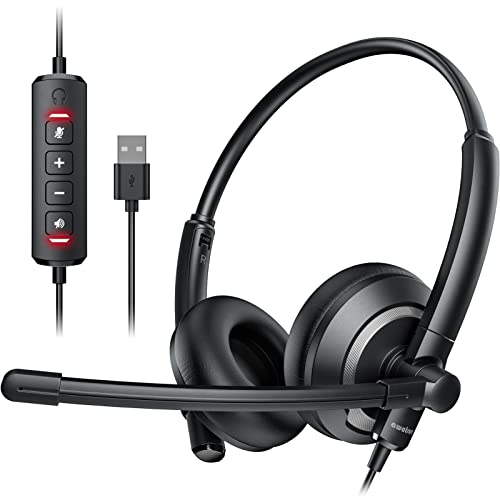
Best for: Users who want reliable mic performance with in-line mute and long-wearing comfort during virtual classrooms or office calls. The EH05-U emphasizes crisp audio with a mute-equipped inline control for quick privacy during meetings.
Why selected: The headset focuses on practical day-to-day use, offering a comfortable design and stable USB connection with mute control, ensuring you can mute when needed without fumbling.
Limitation: Data notes emphasize wired reliability; if mobility is essential, a Bluetooth option might be preferable, though this model delivers steady performance over USB.
Lenovo USB-A Wired Stereo Headset

Best for: Professional calls in busy environments, with Teams or Zoom. Lenovo’s headset offers AI noise canceling via software and simple in-line controls for mute and volume, making it a strong choice for formal video conferences.
Why selected: The combination of in-line controls and replaceable ear cups supports a long-term, comfortable use case in corporate settings. It’s a practical pick for those who value clear communication and easy muting during calls.
Limitation: The software-based noise cancellation requires setup with Lenovo software, which may add a step to initial configuration for some users.
Buying Guide: Key Purchase Considerations
What to look for when choosing a headset with a mute button:
- Microphone design: Look for a unidirectional or cardioid mic that focuses on voice and reduces background noise. A 270° or 290° rotating mic adds flexibility for wearing on either ear.
- Mute accessibility: Inline mute controls on the cord or a mic mute switch on the boom make muting quick and reliable during calls or recordings.
- Connection type: USB headsets provide easy setup and consistent power for the mic, while 3.5mm jacks offer broad compatibility with devices lacking USB ports.
- Comfort for long sessions: Lightweight designs, breathable ear cushions, and adjustable headbands help minimize fatigue during extended use.
- Sound quality: Clear voice transmission and decent audio playback matter for meetings and focus work. 40mm drivers are common and offer balanced sound.
- Durability and maintenance: Replaceable ear cups and rugged cables extend headset life in busy work environments.
- Software features: Some headsets offer enhanced noise cancellation via companion software—evaluate whether you need that level of customization.
Frequently Asked Questions
- Do all headset mics have mute buttons?
Most wired headsets include an inline mute control or a mic mute switch on the boom, but it’s best to verify in the product features. - Is a USB headset better for mute quality than a 3.5mm headset?
USB headsets typically provide consistent mic power and processing, which can improve mic clarity and mute performance in busy environments. - Can I use these headsets with both Windows and macOS?
Yes, most wired USB headsets are plug-and-play across major operating systems, though some features may rely on specific software. - What if I need to wear a headset all day?
Look for lightweight designs, soft ear cushions, and an adjustable headband to reduce pressure during extended wear. - Do these headsets work with video conferencing apps?
Yes, they’re designed for calls, meetings, and online classes, and are generally compatible with Zoom, Teams, Meet, and similar apps. - What if I want wireless freedom but still need a mute button?
This list focuses on wired options with mute controls. If wireless is essential, consider Bluetooth headsets with physical mute buttons or app-based mute controls.