Answering the demand for flexible audio on the go, these headset adapters connect your wired headphones or headsets to modern phones and tablets. They’re ideal for users who want to preserve premium sound quality, keep using favorite 3.5mm headphones, or enable in-line controls on devices lacking a headphone jack. This guide highlights five adapters suited for daily commuting, work, travel, and multimedia. Choose based on device ecosystem, sound quality, and in-line control needs.
Buyer snapshot table (selected products):
- Product: USB C to 3.5mm Headphone Jack Adapter for iPhone17/16/15; Best for: Users needing broad compatibility with iPhone and Galaxy devices
- Product: USB-C to 3.5mm Audio Headphone Adapter – HiFi 2 Pack; Best for: Apple and Android users who want high-fidelity sound and multiple adapters
- Product: YGKSAA USB C to 3.5mm Female Adapter; Best for: On-the-go listeners who prioritize plug-and-play simplicity
- Product: Avaya Headset HD Voice with HIS Adapter; Best for: Office and call-center environments needing durable headsets with a mic
- Product: [Apple MFi Certified] Lightning to 3.5 mm Headphone Jack Adapter; Best for: iPhone users requiring Apple-certified reliability
Best All‑In‑One USB‑C Adapter Pack for Phones

Best for: Users who want universal compatibility across iPhone, Samsung Galaxy, and tablet devices, plus a spare adapter for travel or sharing.
This USB‑C to 3.5mm audio adapter uses an advanced DAC to deliver Hi‑Fi sound with noise reduction. It supports a wide range of USB‑C devices, including recent iPhone and Galaxy models, and can connect headphones, headsets, or speakers. The compact design makes it easy to carry, and the two‑pack ensures a backup or shared use. Cautions: Some devices may require system permissions or app access for mic function; volume control via inline controls may vary by headset model.
HiFi USB‑C to 3.5mm Audio Headphone Adapter (2 Pack)

Best for: Android and Apple users seeking high‑fidelity sound with a robust DAC, plus a two‑pack option for multiple devices or households.
Key features include a high‑fidelity DAC delivering deep bass and clear highs, plus a 92dBFS signal‑to‑noise ratio for clear calls. It supports inline controls (microphone, volume, play/pause) on many headsets. Note: Apple EarPods volume control may not be supported on some devices. Caution: Some in‑line mic functions may not work with all headsets; verify compatibility with your specific earphones before relying on mic control.
YGKSAA USB C to 3.5mm Female Adapter

Best for: Listeners who want a plug‑and‑play experience with a compact build for daily transport and quick paired use.
Features include a built‑in DAC for high‑quality audio, shielding to minimize interference, and full compatibility with USB‑C devices that support 3.5mm headphones. The adapter supports call control via headset buttons. Caution: It explicitly notes that phones with a 3.5mm jack are not supported, so this is for USB‑C devices only.
Avaya Headset HD Voice with HIS Adapter
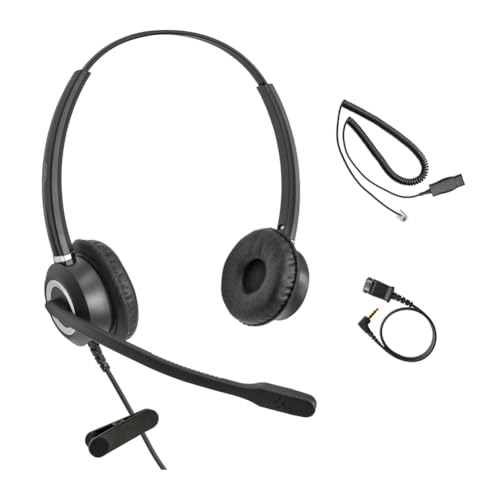
Best for: Office environments requiring a reliable headset connection with enhanced microphone performance and adjustable fit.
Designed for compatibility with Avaya 1600, 9600, and J100 series phones, this 3.5mm adapter delivers stable audio transmission and noise‑reduced mic performance. Comfort is addressed with an adjustable headband and soft cushions. Limitations: Primarily intended for desk phone use, not always ideal for casual mobile listening or music playback.
Apple MFi Certified Lightning to 3.5mm Adapter

Best for: iPhone users seeking Apple‑certified reliability and broad compatibility with 3.5mm headphones.
Key benefit is Apple MFi certification, reducing the risk of incompatibility or error messages. Compatible with many iPhone generations and iOS versions, this adapter supports standard 3.5mm jack accessories. Limitation: Does not support call functionality on all headsets; designed primarily for music playback and listening.
Criello USB‑C to 3.5mm Audio Headphone Jack Adapter

Best for: Those who want Hi‑Fi, low‑distortion audio with a compact, portable design and in‑line control features.
Hi‑fi lossless output supports up to 48kHz/26‑bit decoding, with a mic for call answering and in‑line controls. The adapter is palm‑sized for easy carrying and works well for commuting or travel. Limitation: Some cars or headsets may require different port configurations; test with your specific setup before relying on it in critical use.
Buying Guide: How To Choose The Right Headset Adapter
What should you consider before buying a headset adapter for your phone?
- Device compatibility: Confirm whether you need USB‑C or Lightning, and whether the adapter supports your phone’s model, iPad, or tablet.
- Sound quality vs. convenience: If you prize Hi‑Fi audio, look for adapters with advanced DACs and low noise. For casual listening, a straightforward plug‑and‑play option may suffice.
- Inline controls: Decide if you need microphone, volume, and playback controls on the headset cable, and whether those controls work with your headphones.
- Build quality and durability: Metal housings and shielded designs tend to last longer in daily carry scenarios.
- Certification and compatibility notes: Apple MFi or universal compatibility claims help reduce compatibility issues, especially with iPhones and iPads.
- Two‑pack vs single: A two‑pack is convenient for multiple devices or travel partners, often providing better value.
Frequently Asked Questions
- Can I use these adapters with both iPhone and Android devices? Yes, many USB‑C adapters support multiple Android devices, while Lightning adapters work with iPhones. Always verify device compatibility in the product details.
- Do these adapters support inline microphone control? Some do, depending on the headset and device. Check the features list for mic and control support.
- Will using an adapter affect audio quality? High‑quality DACs and properly shielded cables minimize distortion and noise, but cheaper adapters may exhibit reduced fidelity on demanding audio tracks.
- Are Apple MFi certified adapters required for iPhone use? While not strictly required, MFi certification reduces risk of compatibility issues and error messages with iOS devices.
- Is a two‑pack better than a single adapter? A two‑pack can provide convenience and value if you need adapters for multiple devices or to keep a spare in your bag and car.
- What should I do if my headset’s mic isn’t recognized? Try a second adapter from the same model line to determine if the issue is device‑specific, and ensure the headset is compatible with inline mic control.