Looking for a simple external sound card to enhance headphone sound or enable mic input on a PC, PS4/PS5, or laptop? This guide highlights five well-suited options and explains why each might be the right pick for your setup. The selections cover USB audio adapters, built-in karaoke headsets, and wireless sound cards to fit gaming, streaming, or casual listening. Each product is evaluated for compatibility, ease of use, and practical benefits for different buyers.
| Product | Brand | Best For |
|---|---|---|
| DUKABEL USB Headphone Adapter | DUKABEL | PC, PS4/PS5 users who need plug-and-play USB to 3.5mm TRRS with mic support |
| VENTION USB Sound Card | VENTION | Compact, driver-free USB audio with volume controls for gamers and streamers |
| [Upgrade] 1Mii USB Sound Card | 1Mii | Desktop or laptop setups needing virtual 7.1 and easy mute/volume control |
| KM08U Sound Card Karaoke Headset | Facmogu | Karaoke and live streaming with in-ear monitoring and DSP effects |
| KM08U Alternative | Facmogu | Same family of all-in-one sound-card headsets for streaming and recording |
DUKABEL USB Headphone Adapter
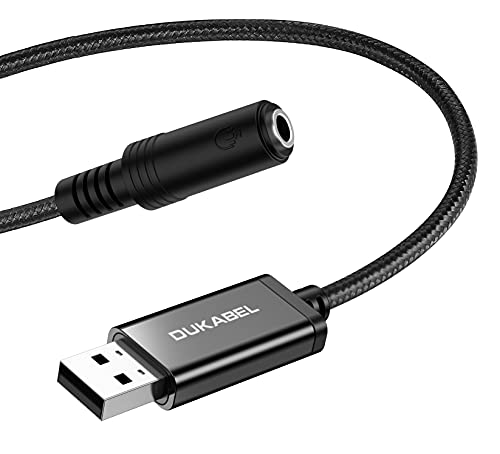
Best for: PC and console users who need a simple USB-to-3.5mm TRRS jack that supports both listening and speaking. This adapter adds a combined microphone and audio output interface, making it easy to use headsets with devices lacking a dedicated analog port. It works across Windows, Mac OS X, Linux, and popular single-board computers, which makes it versatile for classroom, home office, or casual gaming setups.
Why selected: The key advantage is true plug-and-play functionality with broad compatibility. Because no drivers are required, it minimizes setup friction for users who want immediate use with Windows, macOS, or Linux systems. The TRRS compatibility supports headsets with integrated mics, which is practical for voice chat and streaming in a compact USB form.
Limitations: It does not work with TVs, cars, PS3, or trucks. If you rely on Bluetooth or need advanced DSP features, this option may feel basic compared to dedicated sound cards with software controls.
Sound Card Karaoke Headset with In-Ear Monitoring

Best for: Singers and streamers who want in-ear monitoring plus voice-changing effects for on-the-fly performances. This headset combines a built-in microphone, DSP-driven vocal processing, and real-time monitoring to help keep pitches and timing in sync with backing tracks during live streams or recordings.
Why selected: The integrated in-ear monitoring and multiple sound effects offer a compact all-in-one solution that reduces setup complexity. Real-time voice changes and DSP modes support varied performances, from casual singing to live dubbing and gaming commentary.
Limitation: The product emphasizes karaoke and live use, which may be less ideal for pure music listening or work calls where a traditional, neutral sound profile is preferred.
VENTION USB Sound Card

Best for: Gamers and casual users who want a compact, driver-free solution with a volume knob and mic control for easy quick adjustments. Ideal for those who need a balanced USB audio adapter for a PC, Mac, or laptop without software dependencies.
Why selected: Its plug-and-play design and built-in volume control knob provide straightforward management of both microphone and output levels. The absence of drivers simplifies compatibility across Windows, macOS, and Linux, and its 3.5mm jack supports common headsets and headsets with mics.
Limitation: While convenient, the device’s feature set may be basic for power users seeking advanced audio customization or virtual surround sound without external software.
[Upgrade] 1Mii USB Sound Card

Best for: Desktop or laptop users who want virtual 7.1 surround sound and a dedicated control surface for quick mute and volume adjustments. This option suits gamers and multimedia enthusiasts seeking enhanced spatial audio without installing drivers.
Why selected: The 7.1 virtual surround capability offers a more immersive listening experience for games and movies. The multi-function controller and LED indicators help users quickly manage audio and mic states during fast-paced sessions.
Limitation: Virtual surround sound can vary by game and headphones; some users may not notice a strong difference depending on the content and headset compatibility.
Facmogu E8 Wireless Sound Card

Best for: Creators who want wireless flexibility for live streaming, gaming, or recording, with a compact receiver and remote control. Suitable for those who prefer moving around while maintaining high-quality audio capture and monitoring.
Why selected: The wireless setup reduces desk clutter and provides control via remote with features like denoise and echo adjustment. It supports cross-compatibility with Apple and Android devices for mobile streaming and on-the-go content creation.
Limitation: Wireless connectivity can introduce occasional latency or interference in crowded environments; line-of-sight range may affect performance.
Bhvrtls USB-C In-Ear Wired Headphones

Best for: Modern devices with USB-C ports. This option provides integrated high-fidelity sound with a 5-mode audio setup tailored for gaming, calls, and media consumption on compatible USB-C devices.
Why selected: The USB-C interface enables direct digital audio without a 3.5mm jack, offering a streamlined solution for newer laptops, tablets, and smartphones. Multiple modes help tailor the listening experience to different activities like gaming or vocal chats.
Limitation: USB-C only devices vary by platform; some older machines or adapters may not support all features, and overall bass and treble balance depends on the source content.
USB to 3.5mm Jack Audio Adapter

Best for: Users seeking a universal USB DAC that supports both microphone input and headphone output via a single USB connection. Suitable for Windows, Mac, Linux, and PS4/PS5, enabling a broad compatibility profile.
Why selected: This adapter offers dual-functionality (listening and speaking) with a built-in DAC that can improve audio clarity and reduce impedance mismatch. It supports CTIA standard jacks and is compatible with a wide range of devices, making it a versatile travel companion.
Limitation: Some ultra-low-latency or high-demand gaming setups may require more feature-rich sound cards; the included DAC performance depends on the host device capabilities.
Buying Guide: Key Considerations for Choosing a Headphone Sound Card
- Compatibility and plug-and-play convenience: Check whether the device supports your OS (Windows, macOS, Linux) and whether it requires no drivers for immediate use.
- Input/output needs: Determine if you need a dedicated microphone input, a combined TRRS jack, or dual outputs for separate headphones and mics.
- Audio features: Consider virtual surround sound, bass/treble controls, DSP modes, mic muting, and volume knobs that fit your workflow.
- Form factor and portability: Decide between compact USB adapters and larger all-in-one headsets with built-in sound cards, depending on travel or desk space.
- Latency and monitoring: For karaoke, streaming, or gaming, in-ear monitoring and zero-latency features can improve timing and performance.
- Wireless versus wired: Wireless solutions offer freedom of movement but may introduce latency; wired options provide consistent latency and reliability.
- Durability and warranty: Assess build quality and whether the product offers a warranty to protect against component failure.
Frequently Asked Questions
- What is a headphone sound card and why would I need one?
It’s an external USB device that processes audio signals for better output, often providing mic input, volume control, and sometimes virtual surround sound. It’s useful when your computer’s built-in audio port is insufficient. - Do USB sound cards require drivers?
Many plug-and-play models don’t require drivers. Some advanced devices may offer optional software for extra features, but basic functionality is typically driver-free. - Can a USB sound card improve microphone quality?
Yes, particularly when the built-in mic path is limited. A USB sound card with a dedicated mic input and proper impedance can enhance clarity and reduce noise in many setups. - Is virtual 7.1 surround sound available on all USB sound cards?
Not all models include true surround processing. Some offer 7.1 virtual surround via software or hardware emulation. Check product specs for compatibility with your headphones. - Are wireless sound cards better for streaming?
Wireless solutions offer mobility but may introduce latency. For critical timing or competitive gaming, a wired option is often preferred. - Can I use these adapters with PS5 or PS4?
Many listed models advertise compatibility with PS4/PS5, but always verify the exact product page notes about console support and required ports.