When you need a reliable Mini HDMI to HDMI cable, the goal is clear: fast, stable signal transfer that supports high resolutions with minimal lag. This guide highlights five well-matched options for photographers, gamers, and media professionals who rely on mini HDMI ports to connect cameras, tablets, or mini PCs to HDTVs, monitors, or projectors. Each selection emphasizes compatibility, 4K/60Hz capability, and bi-directional use. The top picks suit different buyers—from compact camera users to Raspberry Pi enthusiasts and creators working with high-resolution video feeds.
| Product | Best For | Why It Stands Out |
|---|---|---|
| JSAUX Mini HDMI to HDMI Cable | Compact cameras and laptops | Bi-directional support, aluminum shell, 4K@60Hz |
| Highwings Mini HDMI to HDMI Cable | Raspberry Pi and micro-device setups | Bi-directional, HDMI 2.0 features, broad compatibility |
| Silkland 8K/4K Mini HDMI to HDMI Cable | Professional creators | Full HDMI 2.1 bandwidth, 8K/4K at high refresh rates |
| ApoJodly Mini HDMI to HDMI Cable 3FT | On-the-go setups | Bi-directional, 4K@60Hz, robust features list |
| Amazon Basics Mini HDMI to HDMI Cable | Generic mini HDMI devices | Simple, reliable, device-verified compatibility |
JSAUX Mini HDMI to HDMI Cable 6FT

Best for: Camera, camcorder, or compact laptop users who need reliable 4K at 60Hz. This cable supports bi-directional Mini HDMI transmission and works with devices such as Raspberry Pi Zero, Nvidia/GeForce cards, and several Nikon or Canon cameras with a mini HDMI port. It’s designed with an aluminum shell and braided cable for durability, making it ideal for on-the-go shoots or desk setups where space is tight.
Why chosen: The cable offers true 4K@60Hz performance with backward compatibility to 1080p, ensuring smooth playback on external displays. The bi-directional capability makes it flexible for both mini HDMI-to-HDMI and HDMI-to-mini HDMI scenarios, which is helpful when you switch between devices and displays.
Best for: Creators and hobbyists who value durability and straightforward plug-and-play connections. Limitations: Ensure your device actually uses a mini HDMI port, not micro HDMI or micro USB, to avoid compatibility issues.
Highwings Mini HDMI to HDMI Cable 10FT
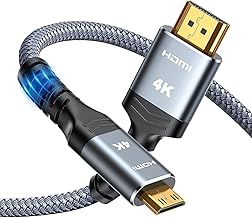
Best for: Media centers, classrooms, or desk setups where extra length is beneficial. The 10-foot cable provides bi-directional Mini HDMI to HDMI connectivity and supports HDMI 2.0 features with a bandwidth up to 18Gbps, enabling 4K at 60Hz and 1080p at higher refresh rates.
Why chosen: It’s a robust choice for Raspberry Pi Zero builds, NVIDIA Shield Tablet K1, and other mini HDMI devices that require a longer run to reach a display. It’s designed to handle 4K content without compromising color depth and detail. Caution: Confirm that your device supports full HDMI 2.0 features to maximize performance.
Silkland 8K/4K Mini HDMI to HDMI Cable

Best for: Professionals needing high bandwidth and future-proofing for creators, with 8K/60Hz and 4K up to 240Hz options. This cable supports HDMI 2.1 features like Dynamic HDR, VRR, ALLM, and eARC, making it suitable for high-end gaming setups or cinematic editing suites where the source and display support top-tier specs.
Why chosen: It is designed to maximize signal integrity across devices like Sony HDR-XR500, Nikon D3200/D810, Canon EOS series, and Raspberry Pi Zero. The risk is potential over-spec for simple HD viewing; ensure your equipment truly benefits from 8K/4K 2.1 features.
ApoJodly Mini HDMI to HDMI Cable 3FT

Best for: Short-distance connections where space is tight, such as compact camera rigs or portable monitors. This 3-foot cable supports 4K@60Hz, 2K at higher refresh rates, and includes HDCP 2.2, ARC, and other HDMI 2.0 features in a braided, durable form.
Why chosen: The bi-directional design covers both mini HDMI-to-HDMI and HDMI-to-mini HDMI tasks, offering versatility. Limitation: Confirm your device’s port type is Mini HDMI (not Micro HDMI) to prevent misfit.
Amazon Basics High Speed Mini HDMI To HDMI Cable

Best for: Value-conscious buyers who need a dependable, straightforward Mini HDMI to HDMI connection for camcorders or tablets. It supports Mini HDMI to HDMI Type A and emphasizes compatibility with standard mini-HDMI devices.
Why chosen: Simple and reliable for those who want a no-fruss setup. Caution: Make sure your device uses a real Mini HDMI port and not Micro HDMI to avoid misfit or reduced performance.
Buying Guide: Mini HDMI To HDMI Cables
- Port Type Matters: Verify your device uses a Mini HDMI port (not Micro HDMI or USB-C). Mismatching ports is the most common issue and can render a cable unusable.
- Version And Bandwidth: For best results, consider HDMI 2.0 or 2.1 cables if you plan 4K at 60Hz or higher refresh rates, HDR, or ARC. This ensures bandwidth up to 18Gbps or more where supported.
- Bi-Directional Convenience: If you switch between devices, bi-directional cables offer more flexibility by supporting both Mini HDMI to HDMI and HDMI to Mini HDMI connections.
- Length And Durability: Longer cables provide flexibility but may introduce signal loss in low-quality builds. Look for braided coverings and aluminum shells for durability in travel or on set.
- Device Compatibility: Not all mini HDMI ports are equal. Cameras, camcorders, Raspberry Pi, and some laptops support mini HDMI, while others may use micro HDMI or USB-C for video output. Check device manuals.
- Future-Proofing: For creators and enthusiasts, consider cables that claim 8K/4K 120–240Hz potential (HDMI 2.1) if your source and display support those standards.
Frequently Asked Questions
- What is the difference between Mini HDMI and Micro HDMI?
Answer: Mini HDMI ports are larger than Micro HDMI ports and are not interchangeable. Always confirm the port size on your device before purchasing a cable. - Can a Mini HDMI to HDMI cable transfer audio as well as video?
Answer: Yes. Many Mini HDMI to HDMI cables carry both video and audio signals, depending on device support and HDMI version. - Is a longer cable always better?
Answer: Not necessarily. Longer cables can introduce signal degradation if not built to high standards. Choose reputable brands and consider shorter runs when possible. - Do I need HDMI 2.1 cables for 4K at 60Hz?
Answer: Not strictly. HDMI 2.0 supports 4K at 60Hz, while 2.1 adds higher bandwidth for 4K at higher refresh rates and features like dynamic HDR in some setups. - Are bi-directional cables harder to find or more expensive?
Answer: Bi-directional cables are common for Mini HDMI to HDMI connections and are typically similar in price to single-direction cables.