For Mac users seeking extra storage, external hard disk drives (HDDs) offer affordable, high-capacity options with straightforward setup. This article highlights five top HDD picks that work well with macOS, emphasizing plug-and-play usability, data security, and performance for backups, media libraries, and travel storage. Each option supports easy file transfer and is compatible with both Mac and Windows systems, often without additional software.
| Product | Capacity | Brand | Key Strength |
|---|---|---|---|
| Seagate Portable 2TB | 2TB | Seagate | Compact backup on the go |
| WD 2TB Elements Portable | 2TB | WD | Budget-friendly, high capacity |
| Seagate Portable 1TB | 1TB | Seagate | Slim, simple setup |
| WD 5TB My Passport Ultra for Mac | 5TB | WD | Mac-ready with security features |
| SanDisk Professional 8TB G-Drive | 8TB | SanDisk Professional | Enterprise-class performance |
Seagate Portable 2TB External HDD — USB 3.0

The Seagate Portable 2TB drive provides straightforward plug-and-play storage designed to work with Mac and Windows. It supports USB 3.0 for quick transfers and requires no software installation, making backup by dragging and dropping simple. It is a compact external option suitable for travelers who need reliable Mac-friendly storage with automatic recognition when connected to a computer.
Key features include a 2TB capacity for media libraries, documents, and backups, USB connectivity, and automatic recognition on first connection. The device is marketed for cross-platform use, aligning with typical Mac workflows that may involve external backups or portable media libraries. The bundled rescue service adds an extra layer of recovery support for data security.
Seagate Portable 5TB External HDD

The Seagate 5TB portable drive delivers ample space for large media collections and backups on the go. It supports USB external drive compatibility with Windows or Mac computers and emphasizes drag-and-drop backup workflows. Quick setup is highlighted, though some models note software requirements for initial recognition or formatting adjustments. This drive is aimed at users needing substantial capacity in a portable form factor, with cross-platform use in mind.
Core strengths include the large 5TB capacity, USB 3.0 connectivity, and a simple plug-and-play approach. For Mac users, reformatting may be needed depending on the intended file system, and the drive is positioned as a convenient solution for expanding storage without plugging into a desktop primarily.
WD 2TB Elements Portable External HDD

The WD Elements 2TB model is a compact, plug-and-play solution that emphasizes capacity and portability. It is designed to work with both Windows and Mac systems, offering straightforward file storage for photographers, videographers, and general users who need reliable on-the-go backups. It supports USB connection and requires no software for basic operation, appealing to users who want a simple, reliable Mac-compatible external hard drive.
Highlights include a compact form factor, substantial 2TB capacity, and broad compatibility. The drive is positioned as a practical daily-use option for expanding storage space, with the caveat that formatting adjustments may be needed to optimize macOS backups or Time Machine workflows depending on the user’s setup.
WD 5TB My Passport Ultra for Mac

The WD My Passport Ultra for Mac is a higher-capacity option featuring USB-C and USB 3.1 compatibility. It targets Mac users with macOS-friendly features and a refined metal finish. Security is addressed via password protection and 256-bit AES hardware encryption, helping protect sensitive files while providing seamless integration with Time Machine backups and Mac workflows. The drive is designed for users who want a premium-looking, durable Mac-ready external HDD with strong security features.
Considerations include ensuring compatibility with USB-C ports on newer Macs, potential reformatting for certain backup schemes, and the value of built-in encryption for sensitive data. The 5TB capacity makes it suitable for large media libraries and professional backups, particularly in Apple-centric environments.
SanDisk Professional 8TB G-Drive Enterprise-Class
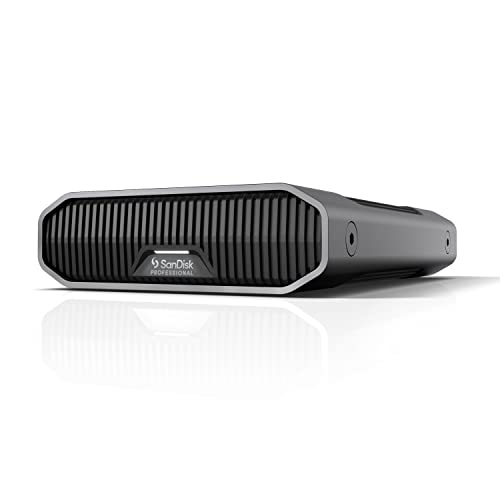
The SanDisk Professional G-Drive Enterprise-Class is an 8TB external desktop HDD built for demanding workloads. It uses the Ultrastar 7200RPM drive inside and offers USB-C with 10Gbps throughput, along with USB 3.2 Gen 2 compatibility. Mac readiness and Time Machine compatibility are highlighted, with easy reformats for Windows as needed. This drive targets professional users who need sustained performance for large backups, media editing, and archival storage in a Mac-centric environment.
Key considerations include ensuring that the USB-C host supports 10Gbps capabilities to realize the full speed potential, the drive’s enterprise-grade internals for reliability, and the formatting choices that optimize macOS backups and workflows. The 8TB capacity supports extensive media libraries or long-term archival storage with robust data integrity features.
Buying Guide
Choosing the right external HDD for Mac depends on several factors. Consider the following perspectives to balance cost, capacity, and performance:
- Capacity vs. need: If you store large media collections, opt for 4–8TB ranges. For simple backups, 2–4TB may suffice.
- Mac compatibility: Look for drives marketed as Mac-ready or Time Machine-compatible. Check if formatting is required for your backup workflow.
- Connection type: USB-C and USB 3.x offer faster transfers. Ensure your Mac has the appropriate ports or adapters for optimal speeds.
- Security: If sensitive data is stored, select drives with hardware encryption and password protection. Confirm compatibility with macOS security features.
- Portability vs. desktop: Portable USB drives are easy for travel, while desktop drives often provide larger capacities and better cooling for long backup sessions.
- Reliability and warranty: Enterprise-class or drive-grade components can improve longevity. Look for product warranties and data-rescue options when available.
- Formatting and file systems: macOS users commonly use HFS+, APFS, or exFAT depending on cross-platform needs. Plan for Time Machine compatibility if backing up macOS systems.
- Security and recovery: Some models include bundled recovery services or encryption features. Evaluate the importance of data recovery options for your use case.