Finding the right hard drive for a RAID setup means balancing capacity, speed, reliability, and compatibility. This guide highlights five strong options spanning internal NAS drives and external RAID-friendly enclosures. Each choice is designed to optimize multi-drive arrays, reduce downtime, and support fast file sharing across networks or workstations. Whether you build a home NAS, a small office server, or upgrade an external RAID system, these drives offer solid performance, endurance, and compatibility with popular RAID configurations.
| Product | Capacity | Interface | Typical Use |
|---|---|---|---|
| Seagate IronWolf 8TB NAS | 8 TB | SATA 6Gb/s | NAS, multi-user |
| WD 16TB My Book Duo | 16 TB | USB | Desktop RAID (RAID-0 ready) |
| SanDisk Professional 24TB G-RAID Project 2 | 24 TB | Thunderbolt 3, USB | High-capacity editing and backup |
| CENMATE 2-Bay Enclosure | 2 bays | USB 3.0 | External RAID/ JBOD |
| LaCie Rugged Raid Shuttle 8TB | 8 TB | USB-C/USB 3.0 | Portable RAID |
In this article, each section details a drive or enclosure that complements RAID workflows. The selections emphasize compatibility with RAID 0, 1, JBOD, and NAS environments, while balancing endurance and noise considerations in real-world setups. Readers should evaluate drive type (internal NAS vs. external), drive spin rate, cache, and enclosure capabilities alongside budget and reliability needs.
Seagate IronWolf 8TB NAS Drive for RAID

The Seagate IronWolf 8TB NAS internal hard drive is designed for multi-user NAS environments. It features a 7200 RPM spin rate and a large 256MB cache to help sustain file transfers across shared networks. The drive is purpose-built for NAS enclosures, delivering reliable performance with reduced wear and tear, and lower noise and vibration. Its 8TB capacity supports expanding storage pools while maintaining responsive access during peak usage. Ideal for small office or home NAS setups that require steady read/write performance and long-term endurance.
WD 16TB My Book Duo Desktop RAID

The WD 16TB My Book Duo pairs a robust desktop RAID solution with convenient USB 3.1 connectivity. It arrives RAID-0 ready out of the box, enabling high-speed data transfers and improved workflow for large media projects. The drive combines substantial capacity with automated auto-backup options and password protection features, offering a straightforward way to protect important files while supporting fast upload and retrieval. This makes it a practical choice for photographers, video editors, and small studios needing expandable external RAID storage.
SanDisk Professional 24TB G-RAID Project 2

The SanDisk Professional G-RAID Project 2 offers up to 24TB within a RAID-0 configuration, featuring two high-capacity 7200RPM Ultrastar drives. It provides transfer speeds up to 540MB/s read and 490MB/s write, well-suited for editing and backup workflows that demand high throughput. The unit also includes a PRO-BLADE SSD slot option for expanding capacity and performance without changing the main chassis. This makes it a compelling choice for professional creators who need large-scale RAID performance in a portable, dual-drive enclosure.
CENMATE Aluminum Dual Bay Enclosure

The CENMATE 2-Bay enclosure supports 2.5/3.5″ SATA drives and handles RAID 0, 1, JBOD, and Normal modes. It emphasizes cooling with an integrated fan and uses aluminum construction for heat dissipation. The enclosure is USB 3.0 capable, providing up to around 5Gbps throughput under UASP, which helps maximize performance in RAID configurations. While it does not include built-in RAID software for macOS, it suits users needing a sturdy external RAID option with straightforward hot-swap capability and ample overall capacity when paired with suitable drives.
LaCie Rugged Raid Shuttle 8TB
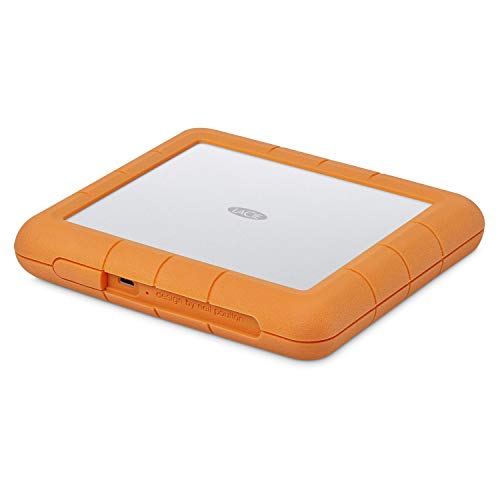
The LaCie Rugged Raid Shuttle combines rugged portability with RAID functionality. Its 8TB capacity supports RAID 0/1 configurations, facilitating performance or redundancy depending on user needs. The rugged design includes protection against drops and environmental exposure, making it suitable for mobile editors and on-site work. The device offers a password-based secure access system to protect projects and sensitive data, with USB-C and USB 3.0 compatibility to streamline connections with modern computers and laptops.
CENMATE 4 Bay Enclosure for 80TB

The CENMATE four-bay enclosure supports 2.5/3.5″ drives and boasts a high theoretical capacity of up to 80TB across bays. It’s designed for external storage needs with robust cooling and a 5Gbps USB 3.0 interface under UASP control for fast data transfers. While the box is not a dedicated NAS, it provides flexible RAID options and straightforward expansion for workstations and small offices seeking large external RAID storage without a full NAS setup.
Buying Guide: Key Considerations for RAID-Ready Hard Drives
When selecting a hard drive or enclosure for RAID, consider drive type, performance characteristics, and the intended use case. Internal NAS drives like IronWolf are built for continuous operation and multi-user access, offering reliability and NAS-optimized features. External RAID enclosures provide portability and expandability, but verify fan noise, heat management, and connectivity to ensure the setup remains quiet and stable in your environment.
- Capacity vs. performance: Higher capacities are common in RAID-ready drives, but ensure the spindle speed (RPM) and cache align with your workload—for example, 7200 RPM with a sizable cache supports faster bursts in NAS environments.
- RAID compatibility: Confirm RAID levels supported by the enclosure or NAS, such as RAID 0 for performance, RAID 1 for redundancy, or JBOD for flexibility. Some enclosures also require driver support or software controls for RAID management.
- Interface and throughput: USB 3.0/3.1, USB-C, and Thunderbolt 3/4 interfaces influence real-world transfer speeds. For demanding video workflows, Thunderbolt or high-speed USB interfaces can be crucial.
- Heat management: Adequate cooling reduces wear and noise. Enclosures with fans or aluminum construction help dissipate heat generated by sustained write operations in RAID arrays.
- Noise and vibration: In office or home environments, low-noise drives are preferable. NAS drives are designed to minimize vibration and acoustic output, supporting long-term reliability in multi-drive arrays.
- Data protection: Evaluate features like password protection, hardware encryption, and automatic backup software compatibility to safeguard stored data across the RAID array.
- Portability vs. permanence: Internal NAS drives are ideal for fixed installations, while external RAID enclosures suit mobile setups or temporary projects. Choose based on how often you move the storage between locations.