If you’re shopping for a graphing calculator specialized for trigonometry and higher math, this guide spots the best options for different needs. The top picks below are suitable for high school courses, AP exams, and college-level math. Whether you want color displays, Python compatibility, or exam-ready reliability, there’s a clear choice for each buyer type.
| Product | Why It’s Notable |
|---|---|
| Texas Instruments TI-84 Plus CE Color Graphing Calculator | Color display, rechargeable battery, extensive preloaded apps |
| Casio fx-9750GIII Graphing Calculator | Natural textbook display and robust graphing tools |
| CATIGA CS-229 Scientific Calculator With Graph Functions | Large display, 360+ functions, multi-mode versatility |
| Nadex Scientific Calculator with Graphing Functions | 360+ functions, three operating modes, graphing |
| Texas Instruments TI-84 Plus CE Color Graphing Calculator, Rose Gold | Similar capabilities in a stylish finish; color screen |
Texas Instruments TI-84 Plus CE Color Graphing Calculator, Black
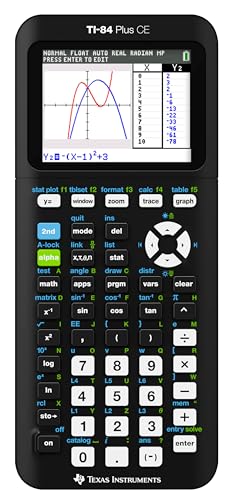
The TI-84 Plus CE is a color graphing calculator with a high-resolution backlit display and a rechargeable battery. It supports horizontal and vertical split-screen, preloaded apps, and images, making it a strong choice for trigonometry, algebra, and calculus. Best for students who want a familiar TI experience with modern visuals and quick access to graphing features.
- Best for: High school and early college math students who value color graphs and quick app access.
- Why selected: Combines TI reliability with a bright display and rechargeable power.
- Limitation: Heavier on battery management if used heavily in exams without charging; ensure you carry the charger.
Casio fx-9750GIII Graphing Calculator
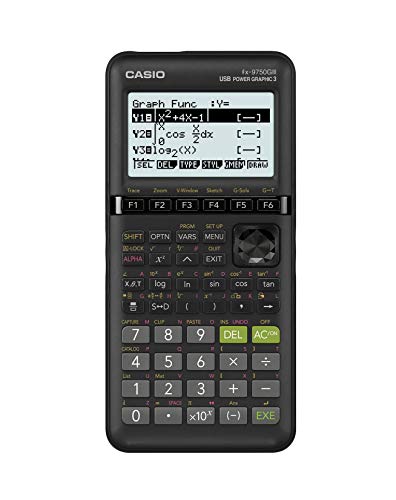
The Casio fx-9750GIII offers natural textbook display and a robust feature set for exams and coursework. It supports graph plotting, vectors, probability distributions, and more, making it ideal for STEM courses from pre-algebra through AP statistics. Best for students who prefer Casio’s interface and need integrated graphing with textbooks-friendly display.
- Best for: Students who want a natural textbook display with strong graphing capabilities.
- Why selected: Broad math support from basic to advanced topics, with easy interpretation of graphs.
- Limitation: May lack some of the newer programming features found in premium models.
CATIGA CS-229 Scientific Calculator With Graphic Functions

The CATIGA CS-229 combines a scientific calculator with graphing capabilities and an extra-large display. It features 360+ functions and three operating modes (Angle, Calculation, Display). This option is well-suited for students who need visible equations and graphs at once, including trigonometry and statistics tasks.
- Best for: Students who want a broad function set and a large, easy-to-read screen.
- Why selected: Strong visual clarity helps with multi-step trigonometry problems and analysis.
- Limitation: While feature-rich, it may not be as widely supported in standardized exams as TI or Casio premium models.
Nadex Scientific Calculator With Graphing Functions

The Nadex graphing calculator provides 360+ functions, including complex numbers, fractions, linear regression, statistics, and variable solving. It features three operating modes: Calculation, Angular Measurement, and Display, making it adaptable for both classroom work and exam prep. Best for students who want extensive function coverage in a compact package.
- Best for: Students who require deep math functionality across algebra, calculus, and statistics.
- Why selected: The three-mode design helps separate calculation types and display preferences for clarity.
- Limitation: Some users may need more brand familiarity or online support resources.
Texas Instruments TI-84 Plus CE Color Graphing Calculator, Rose Gold

This TI-84 Plus CE variant emphasizes the same core graphing capabilities as the black model but arrives in a rose gold finish. It retains the high-resolution color display and rechargeable battery, with preloaded apps and images to support trigonometry, calculus, and statistics work. Best for students who want TI reliability with a stylish appearance.
- Best for: Aesthetic-conscious students who value color features and TI software ecosystem.
- Why selected: Consistent performance and broad compatibility with classroom materials.
- Limitation: Cosmetic color should not be mistaken for a feature change; functionality remains similar to other TI-84 Plus CE models.
Buying Guide: Graphing Calculators For Trigonometry
What features matter most for trigonometry?
For trigonometry, look for a calculator with reliable graphing, natural textbook display, and the ability to handle radians and degrees seamlessly. Ensure the model supports trig functions, inverse trig, and convenient mode switching for angles.
Display and usability considerations
A large, high-contrast display helps when reading multi-line equations and graphs. Color displays can improve differentiation between curves, especially in complex graphs. A backlit or rechargeable display is beneficial for study sessions outside well-lit classrooms.
Programability and math breadth
Programs and apps can speed up problem solving in algebra, calculus, and statistics. Some models offer Python or other programming capabilities, which can be advantageous for STEM coursework and projects. Consider whether you need advanced features beyond standard trig functions.
Exam compatibility and reliability
Check whether a calculator is permitted for your exams and whether it requires specific modes or restrictions. Reliability, battery life, and a robust keyfeel matter during timed tests. Some brands offer exam-friendly modes and recognized conventions that align with coursework.
Which model fits which buyer?
- Best value with strong features: Texas Instruments TI-84 Plus CE Color Graphing Calculator (Black) and Rose Gold variant.
- Best for natural display and robust Casio features: Casio fx-9750GIII.
- Best for maximum function variety: Nadex Scientific Calculator with Graphing Functions.
- Best for large, clear visuals: CATIGA CS-229 with its extra-large display.
Care and maintenance tips
- Keep a protective case to prevent screen damage and accidental button presses.
- Charge regularly if you rely on rechargeable batteries; avoid deep discharges when possible.
- Store in a dry place; protect from extreme heat and direct sunlight to preserve display longevity.
Quick comparison at a glance
| Model | Display | Key Strengths | Best For |
|---|---|---|---|
| Color backlit | Preloaded apps, color graphs | Color coding in trig problems | |
| Natural textbook | Strong graphing suite | Casio interface fans | |
| Large display | 360+ functions, multi-mode | Multi-topic coursework | |
| Graphing capable | Three modes, extensive functions | Advanced math and prep | |
| Color backlit | TI ecosystem, stylish finish | Style-conscious TI buyers |
FAQ
- Do these calculators handle trig identities and identities proofs? Yes, all listed models support trigonometric functions and identities as part of their graphing and algebra capabilities.
- Is a color display necessary for trig coursework? Not strictly necessary, but color can help distinguish graphs and functions, aiding comprehension.
- Are these calculators allowed on exams? Many are; always verify with your instructor or exam board for permission and mode restrictions.
- Should I prefer Python-enabled calculators? If you plan to program or analyze data beyond standard trig, a Python-capable model can be beneficial.
- What about battery life and charging? Models with rechargeable batteries reduce the need for frequent replacements, but keep a charger handy for longer study sessions.
- Which model is best for a beginner? Casio fx-9750GIII and CATIGA CS-229 offer intuitive interfaces with strong graphing features for newcomers.