Looking for a reliable phone gimbal to stabilize your videos? This guide highlights five top options that balance stability, portability, and smart features for different shooting needs. Ideal buyers include content creators seeking cinema-like stabilization, travelers needing compact gear, vloggers chasing simple setup, and social media creators who want fast editing tools.
Summary table of selected products:
| Product | Best For | Key Strength | Notable Limitation |
|---|---|---|---|
| DJI Osmo Mobile 7 | Content creators and solo shooters | Strong 3-axis stabilization, built-in tripod, ActiveTrack 7.0 | May feel premium-priced for casual users |
| DJI Osmo Mobile 8 Advanced Tracking Combo | On-the-go tracking with lighting | Native tracking with audio/lighting, 360° pan | Higher feature set can be complex for beginners |
| hohem iSteady X3 SE | Travelers and action-paced shooting | Detachable remote, foldable, strong stabilization | Remote adds an extra piece to carry |
| COMITOK L7C Pro | Aspiring videographers and creators | 9.0 AI tracking, lightweight with no leveling | App-based controls may require setup |
| AOCHUAN Phone Gimbal Stabilizer (Smart XE) | TikTok and short-form creators | Powerful 3-axis, focus/zoom wheel | Battery life varies with usage |
DJI Osmo Mobile 7 Gimbal Stabilizer

Best for solo creators who want cinema-quality stability with easy one-tap editing. The 3-axis gimbal delivers lossless stabilization for smooth motion in dynamic shoots. The built-in tripod simplifies hand-free setups for vlogging, and ActiveTrack 7.0 keeps subjects in frame as you move.
Who it’s for: Ideal for content creators, influencers, and travelers who want professional-looking footage without extra gear. This model is a strong all-around option for beginners who plan to grow their video workflow with DJI Mimo.
Caution: Some users may prefer newer features found in later models, but the Osmo Mobile 7 remains reliable for stable daytime footage and straightforward editing tasks.
DJI Osmo Mobile 8 Advanced Tracking Combo

Best for creators who need built-in lighting and reliable subject tracking on the go. The combination adds advanced native tracking with audio and lighting, plus a 360° pan for immersive shots. Direct phone connection enables quick setup, making it suitable for fast-paced vlogging and social content.
Who it’s for: This variant is well-suited for vloggers who shoot in variable lighting conditions and want consistent tracking without extra gear. It’s a strong upgrade when lighting and sound integration matters.
Caution: The richer feature set can be more complex to master for absolute beginners, so allocate time for quick-start tutorials to maximize benefits.
DJI Osmo Mobile 7P Gimbal Stabilizer

Best for creators who want quick launch tools and integrated editing features. The 7P model pairs a 3-axis gimbal with a multifunctional module for tracking, DJI Mic reception, and lighting, paired with One-Tap Edit for faster storytelling. Built-in extension rod and tripod provide versatile shooting options.
Who it’s for: Ideal for mobile journalists and solo filmmakers who need fast setup and editing tools in one package. Choose this if you value workflow-integrated features over a minimal setup.
Caution: The 7P’s extended feature set may require more initial learning time, especially for those new to DJI’s ecosystem.
hohem iSteady X3 SE Gimbal Stabilizer

Best for travelers and action-focused shooters who want portable power. The detachable remote control lets you capture selfies and videos from a distance, while upgraded 3-axis stabilization keeps footage smooth even during movement. The foldable design makes it highly portable for on-the-go filming.
Who it’s for: Perfect for family trips, hiking, and quick social clips where flexible control from afar adds value. Be mindful of carrying the remote as an extra accessory.
COMITOK L7C Pro Gimbal Stabilizer

Best for aspiring videographers seeking AI-powered tracking and a lightweight build. The L7C Pro features 9.0 AI tracking modes and a foldable design with no leveling required, making it quick to deploy in varied shooting scenarios. Focus wheel and zoom allow nuanced control over optical effects.
Who it’s for: Suitable for hobbyists advancing toward semi-professional content creation and social media workflows. App-based controls may require initial setup to optimize tracking modes.
Caution: While highly portable, this gimbal relies on the Comitok app for full tracking features, which may require device compatibility checks.
Acer Gadget Gimbal Stabilizer 1Axis
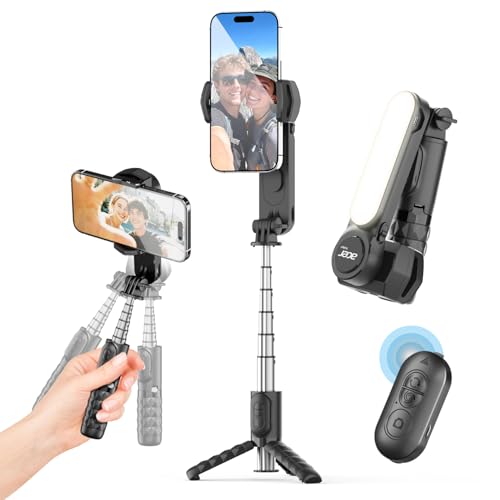
Best for basic stabilization with a simple control scheme. The 1Axis design focuses on compact stability with a detachable wireless remote and a lightweight frame. Ideal for beginners who want a straightforward gimbal experience for vlogs and live streaming.
Who it’s for: Great for first-time gimbal users and budget-conscious buyers who want entry-level stabilization. Battery life can vary with use, so plan sessions accordingly.
Caution: Fewer features than premium models may limit advanced filming techniques; consider upgrading if you need AI tracking or multi-axis control.
Buying Guide
What should you look for in a phone gimbal?
- Stabilization quality: Most 3-axis gimbals offer smooth footage, but look for models with advanced algorithms and ActiveTrack or AI tracking if you need reliable subject following.
- Weight and portability: Foldable designs travel better. Check weight if you plan long days of shooting.
- Battery life: Aim for 8–12 hours of use for all-day shoots; check whether the battery supports quick swaps or USB-C charging.
- Connectivity and app features: Some gimbals offer built-in editing, shot guides, or direct integration with camera apps. Consider whether you prefer standalone or app-driven workflows.
- Accessories: Built-in extension rods, tripods, or remote controls add versatility for different shot types. Ensure compatibility with your phone size and case.
FAQ
- What is a 3-axis gimbal?
A 3-axis gimbal stabilizes pan, tilt, and roll to reduce shake in video footage, keeping your phone steady as you move.
- Do I need a gimbal with AI tracking?
Not always, but AI tracking helps keep subjects in frame hands-free, which is useful for moving shots and solo filming.
- Can I use a gimbal with any phone?
Most gimbals support a wide range of smartphones, but check weight, width, and case compatibility before buying.
- Is there a difference between standard and advanced gimbals?
Advanced models add features like built-in lighting, extended reach, or more sophisticated tracking and editing tools.
- How do I calibrate a gimbal?
Follow the manufacturer’s on-screen prompts or app instructions. Calibration helps ensure smooth stabilization and accurate tracking.