Finding a gaming headset that’s comfortable for glasses wearers can be challenging. This guide highlights five top choices designed to reduce pressure, minimize ear fatigue, and deliver clear sound and mic performance. Each option below emphasizes glasses-friendly comfort, reliable sound, and cross‑platform compatibility to support long gaming sessions on PC, consoles, and mobile devices.
| Product | Brand |
|---|---|
| Razer BlackShark V2 X Gaming Headset | Razer |
| Turtle Beach Stealth 600 Wireless | Turtle Beach |
| Turtle Beach Stealth 700 Gen 3 | Turtle Beach |
| AOC Wireless Gaming Headset | AOC |
| HyperX Cloud III | HyperX |
Razer BlackShark V2 X: Lightweight, Quiet Comfort

The Razer BlackShark V2 X is built for long sessions with glasses. It uses closed earcups to minimize ambient noise and dense memory foam cushions to reduce pressure. The 50 mm drivers offer crisp highs and strong lows, with 7.1 surround sound available on Windows 10 systems for accurate in-game positioning. Titanium-coated diaphragms enhance clarity across frequencies, helping players hear footsteps and environmental cues with improved precision.
Turtle Beach Stealth 600 Wireless Multiplatform

Designed with glasses wearers in mind, the Stealth 600 uses memory foam cushions to reduce pressure and prevent glasses from digging in. It delivers vibrant audio with 50 mm Nanoclear drivers and includes a glasses-friendly design. The headset supports multi‑platform use and provides a user-friendly experience with a customizable wheel and mode button for quick game‑to‑party transitions.
Turtle Beach Stealth 700 Gen 3: Premium Wireless Comfort
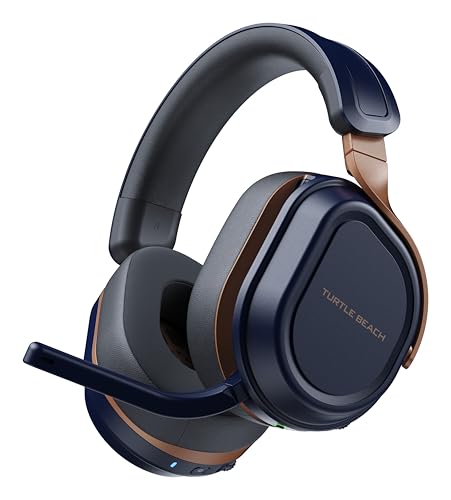
The Stealth 700 Gen 3 provides a high level of comfort with spacious earcups and a robust build. It features a cross‑platform wireless system with 60 mm Eclipse Dual Drivers for immersive sound. The AI noise‑cancelling microphone helps reduce background noise, and the headset supports both low-latency 2.4 GHz wireless and Bluetooth 5.2 for flexible connectivity across devices.
AOC Wireless Gaming Headset: Dual-Mode, Low Latency

The AOC headset offers dual-mode wireless with ultra-low latency (2.4 GHz) plus Bluetooth 5.4 for broad device compatibility. It supports USB‑A, USB‑C, and 3.5 mm wired connections, reducing the need for extra adapters. Its 7.1 virtual surround sound and graphene 50 mm drivers aim to deliver clear positional audio, while the built‑in DAC supports high‑fidelity output.
HyperX Cloud III: Comfort‑Focused Wired Gaming

The Cloud III emphasizes comfort with Cloud‑level memory foam ear pads and a lightweight frame ideal for glasses wearers. Angled 53 mm drivers are tuned for immersive gaming audio, while the detachable, noise‑cancelling microphone provides clear voice chat. The headset supports USB-C, USB‑A, and a 3.5 mm jack for versatile cross‑platform use.
Buying Guide: Key Purchase Considerations
- Comfort and glasses compatibility: Look for memory foam cushions, soft clamping force, and earcup depth that accommodate glasses without pressure on the temples.
- Sound quality and mic clarity: Prioritize drivers with clear highs and tight bass, plus a mic with noise cancellation or suppression features for clean communications.
- Connectivity: Decide between wired, wireless, or hybrid setups. Consider latency, range, and whether a USB DAC or Bluetooth is needed for your devices.
- Platform support and compatibility: Confirm that the headset works with your primary devices (PC, PS5/PS4, Xbox, Nintendo Switch) and supports multi‑platform use if you switch often.
- Durability and comfort features: Look for a sturdy headband, fabric or leatherette ear pads, and adjustable swivels that work with glasses frames.
- Battery life and charging: For wireless models, check battery life estimates and charging speed to avoid interruptions during long sessions.
- Software and customization: Some headsets come with companion software for EQ tuning, mic presets, and surround sound settings—useful for fine‑tuning to your taste.
Each option above targets comfort for glasses wearers while delivering reliable sound and cross‑device compatibility. When choosing, balance comfort with sound quality, mic performance, and your preferred ecosystem to maximize in‑game awareness and communication.