Artists and collectors often need high-resolution, faithful scans of artwork for prints, portfolios, or online galleries. The right flatbed scanner can capture colors, textures, and fine line work with clarity comparable to the original. This guide highlights top flatbed scanners that excel at artwork scanning, from compact models for quick scans to higher-end units that handle stock art, originals, and delicate works with care.
Summary of selected products:
| Product | Brand | Key Benefit for Artwork | Resolution | Notes |
|---|---|---|---|---|
| Epson Perfection V39 II | Epson | Compact, detailed scans of photos and artwork | 4800 dpi | Cloud scan options and USB power |
| Epson Perfection V19 II | Epson | Easy-to-use, high-detail artwork scans | 4800 dpi | One-touch scanning and software included |
| Epson Perfection V600 | Epson | Large, high-resolution artwork captures with transparency unit | 6400 x 9600 dpi | Supports film/slide scanning |
| Fujitsu fi-7280 | Fujitsu | Fast, professional-grade document and artwork handling | N/A | High-volume capability; flatbed for thick works |
| Xerox XD-COMBO Duplex | Xerox | Versatile with ADF for bulk scanning; flatbed for bound pieces | N/A | Color/black-and-white, efficient workflows |
Epson Perfection V39 II—Compact Flatbed For Artwork

The Epson Perfection V39 II offers a slim, space-saving design while delivering detailed scans suitable for artwork invoicing and archival copies. With 4800 dpi optical resolution, it captures fine lines, textures, and color gradations in paintings and drawings. Its color accuracy is well-suited for art prints and digital portfolios. The device is an image and document scanner that accommodates photos, illustrations, and books, making it a versatile option for artists who need a reliable flatbed. Cloud-scanning compatibility via Epson ScanSmart expands storage options for large art projects.
Key features translate into practical benefits for artwork scanning: high optical resolution supports enlargements and archival quality; compact form factor fits small studios or desks; and straightforward software simplifies organizing scans of multiple art pieces. The removable lid design helps with taller originals, while USB power keeps the setup simple. This model emphasizes simplicity and clarity for artists who prioritize dependable performance over heavy-duty professional features.
Epson Perfection V19 II—Easy High-Detail Artwork Scans

The Epson Perfection V19 II focuses on simple, reliable scans with a strong emphasis on detail. Its 4800 dpi optical resolution yields crisp reproductions of drawings, watercolors, and prints, making it a solid option for artists who want accurate digital copies for portfolios or limited edition prints. The built-in software, Epson ScanSmart, supports smooth workflow from scan to save or export. One-touch scanning reduces steps, helping artists capture quick iterations or drafts. The high scan quality is balanced with ease of use and a compact footprint.
For artwork workflows, the V19 II provides a user-friendly experience without sacrificing resolution. It’s well-suited to scan ink drawings, pencil sketches, and printed art. The high-resolution capture supports captioning and metadata tagging, aiding cataloging of a growing art collection. The removable lid and USB power keep setup flexible for artists working in small spaces or on location at studios and galleries.
Epson Perfection V600—High-Resolution Flatbed For Art And Photos

The Epson Perfection V600 is designed for archivists and artists who need versatility beyond flatbed scans. It offers a maximum resolution of 6400 x 9600 dpi and supports large enlargements up to 17″ x 22″, which is valuable for high-detail artwork reproduction. A built-in Transparency Unit enables scanning of 35mm slides, negatives, and other film formats, expanding the range of materials that can be digitized. The ReadyScan LED technology ensures fast, energy-efficient operation with minimal warm-up. This model handles prints, artwork, and film, making it a strong all-around option for high-detail artwork capture.
For artwork with texture or subtle shading, the V600’s high resolution helps preserve details that might be lost at lower dpi. The ability to scan beyond standard paper documents into slides and film makes it particularly appealing to artists who maintain mixed-media portfolios. While it is a larger unit, its performance for large pieces and high-fidelity color representation can justify the space. The USB 2.0 connectivity keeps compatibility with modern computers, and energy efficiency can lower long-term running costs in a busy studio.
Xerox XD-COMBO Duplex Scanner—Flatbed Plus ADF For Artworks

The Xerox XD-COMBO combines a duplex flatbed with a 35-page automatic document feeder, delivering efficient scanning for bulk projects. While it targets a broader document workflow, the inclusion of a flatbed makes it suitable for artwork captures that require careful placement and alignment. At higher volumes, this model helps teams scan multiple art sheets, portfolios, and proofs quickly. Its ability to scan in color, grayscale, and black/white, along with the ADF, supports versatile workflows for studios producing multiple art proofs or catalogs.
For artwork-focused users, this option shines when paired with a flatbed for thick or bound pieces (such as sketchbooks or oversized art boards) and an ADF for batch digitization. The organization features aid in batch processing and file naming, which can speed up cataloguing and archiving of artwork collections. The maintenance of color fidelity across batches remains a consideration, as with most multi-function scanners, but the XD-COMBO provides a robust workflow for mixed-media projects.
Plustek OpticSlim 2700—Slim, Fast Flatbed For Art
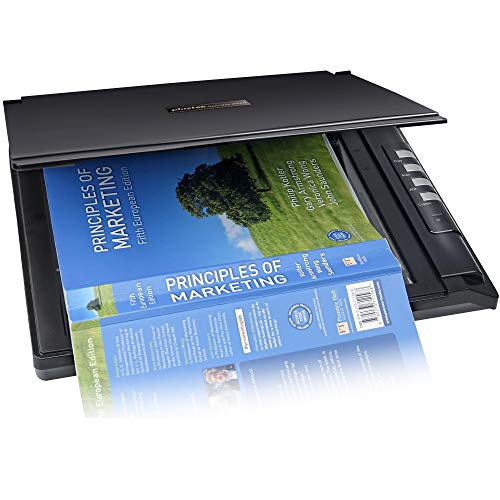
The Plustek OpticSlim 2700 emphasizes speed and compact design, suitable for home studios scanning artwork quickly. It claims fast scan speeds (about 3 seconds at 300 dpi in color) and supports simple editing and search features through bundled software. Its small footprint makes it a practical choice for artists who need to digitize drawings and paintings without sacrificing desk space. The built-in editing features, such as auto-rotate and crop, help streamline post-scan preparation for portfolios or archives.
For artists who work with sketches, watercolors, or pen-and-ink pieces, the OpticSlim 2700 offers adequate resolution and processing efficiency. While not designed for ultra-high-end film scanning, it balances performance and convenience for routine artwork digitization. Its compatibility with Windows and Mac ensures broad usability in mixed studio setups. When paired with the included software, it can accelerate cataloging, editing, and storage of digital art files.
Plustek PL4080—Flatbed Plus ADF For Multi-Piece Scans

The Plustek PL4080 is a high-speed, all-in-one scanner that combines a flatbed with a 50-sheet ADF, designed for multifunction scanning needs. It supports duplex auto-scanning and can reach high output speeds, which is useful for studios digitizing many pages or boards. For artwork, the flatbed allows handling thick or bound items, while the ADF supports bulk digitization of loose sheets, prints, and smaller artworks. The built-in OCR and search-friendly features enable quick indexing of scanned files, benefiting galleries, publishers, and artist portfolios that require efficient workflows.
In practice, the PL4080 serves studios that process a mix of art prints, sketches, and documents. The ability to scan large quantities while still accommodating delicate pieces on the flatbed provides a flexible solution for art digitization projects. Prospective buyers should weigh the need for volume against the desk space and power requirements, as well as ensure software compatibility with their preferred editing and catalog systems.
Buying Guide: Key Considerations For Art Scanning
- Resolution and tonal range: For artwork, prioritize scanners with high optical resolution (ideally 4800 dpi or higher) to capture fine lines and color nuance. Consider whether you need true optical resolution or if interpolation will suffice for your use case.
- Color accuracy and color management: Look for devices offering good color fidelity, with ICC profile support and software that lets you calibrate to standard swatches. This helps ensure prints and portfolios reflect the original work.
- Flatbed size vs. throughput: A larger flatbed is advantageous for bigger artworks, while compact models save space. If you handle many pieces, consider a model with an ADF for bulk scanning, but remember that flatbeds excel with fragile or bound items.
- Film and media capabilities: If you work with vintage photographs or mixed media, a scanner with a built-in transparency unit or film scanning capability can be valuable.
- Software ecosystem: Some models ship with robust software for editing, organizing, and exporting scans. Assess whether the software supports your preferred workflow, cloud storage, and file formats (TIFF, PNG, PDF, etc.).
- Ease of use and speed: One-touch scanning and intuitive interfaces reduce friction, especially when digitizing multi-piece portfolios or batches of artworks.
- Connectivity and power: USB-powered models simplify setups, particularly in compact studios. Ensure compatibility with your computer’s operating system and available ports.
- Maintenance and reliability: Consider the longevity of the unit, availability of replacement parts, and customer support. A durable scanner reduces long-term costs for art studios.
In choosing the right scanner for artwork, balance the need for high resolution and color fidelity with the practical constraints of space, workflow, and budget. For archival purposes or large originals, a higher-end model with a wide bit depth and a robust driver suite is preferable. For portfolio development or on-the-go digitization, compact models with strong image quality and simple software provide strong value. Across these options, organization features and image processing tools can streamline digital archiving and reproduction projects for artists and collectors alike.
Additional Considerations
When scanning artwork, check for edge-to-edge border capture and the scanner’s ability to reproduce soft gradients in watercolor or ink washes. Pay attention to optical rather than interpolated resolution to gauge the real detail you’ll receive from scans. If you frequently scan delicate or bound pieces, a flatbed with a secure lid and thick document handling capabilities can prevent damage and ensure consistent results. Finally, verify that the scanner’s driver is compatible with your current computer setup and editing software to avoid workflow disruptions.