Looking for a fine tip stylus pen that delivers precise input across multiple devices? This guide highlights five versatile stylus options that cater to writers, designers, students, and professionals who need accurate, responsive point-and-click input on tablets, smartphones, GPS devices, and more. Each product is evaluated for compatibility, tip type, and best-use scenarios. The included buying table helps you compare at a glance and choose the right tool for your daily tasks.
| Product | Best For | Tip Type | Notes |
|---|---|---|---|
| Stylus Pens for Touch Screens (2-pack) | Casual users and travelers | Round silicone + hard plastic | Good for capacitive screens; plastic tip works on resistive screens |
| Bopomofo Stylus (5 Pcs) | Artists and note-takers | Disc tip + rubber tips | 2-in-1 design with high accuracy |
| MEKO Stylus Pen (3-in-1) | Students and professionals | Transparent disc + two rubber tips | Excellent visibility of contact point |
| STYLUSLINK Stylus Pen (3-in-1) | All-round device users | Transparent disc + rubber tips | Three tips for flexible use |
| 6-Pack Black Dual-Tip Stylus Pens | Families and teams | Round silicone head + hard plastic tip | Dual-tip versatility for capacitive and resistive screens |
Stylus Pens for Touch Screens, 2-Pack

Best for casual users who need a simple, proven option for capacitive screens. This 2-pack includes a silicone round head for comfortable navigation and a hard plastic tip suitable for resistive screens like GPS units. The dual-head design supports both everyday swiping and pinpoint tapping. Ideal for quick note-taking on tablets and smartphones, as well as occasional navigation on GPS devices. Caution: the plastic tip may wear faster on rough surfaces; best used on smooth touchscreens.
Bopomofo Stylus (5 Pcs)
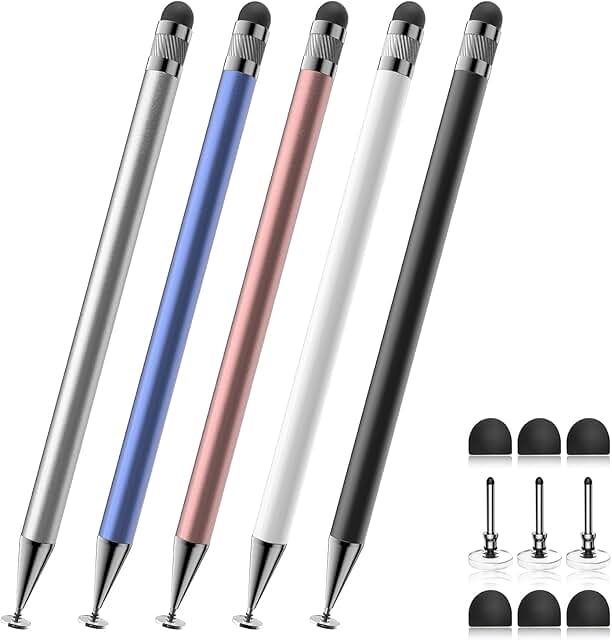
Best for artists and note-takers who want flexibility from a 2-in-1 design. The set includes a durable metal barrel stylus with a disc tip for precise, visible contact and two rubber tips for different feels. The disc tip helps you see exactly where you touch, reducing stray marks, while the rubber tips provide a smooth, finger-like experience. Selection is ideal when you frequently switch between writing and drawing. Limitation: the multiple tips require occasional cleaning to maintain smooth performance.
MEKO Stylus Pen for Touchscreen (3-in-1)

Best for students and professionals who need precise input across devices. This MEKO pen introduces a 3-in-1 design with a transparent disc tip for visibility, plus two rubber tips (0.18″ and 0.27″) for comfortable, scratch-free use. The 180° writing angle supports natural pen-like movement, making it suitable for writing, drawing, and navigating. Caution: disc-tip visibility aids precision but can be slightly less forgiving on very small icons compared with larger targets.
Stylus Pen for Touchscreen iPad (3-in-1)

Best for all-around device users who want universal compatibility. This 3-in-1 stylus offers a transparent disc tip plus two rubber tips, enabling precise input and smooth scrolling across iPad, iPhone, Android devices, and more. Designed for those who frequently switch between writing, tapping, and drawing on multiple platforms. Limitation: when used on smaller devices with tight icons, the disc tip may require careful alignment for accurate marks.
6-Pack Black Dual-Tip Stylus Pens

Best for families or teams needing multiple devices or users. This pack includes dual-tip styluses with a silicone round head for capacitive screens and a hard plastic pointed tip for resistive devices like GPS and GPS-based systems. The wide compatibility makes it a practical choice for households or work settings where various devices are used. Caution: with dense screens, the round head may be slightly less precise than disc-tip solutions.
Buying Guide
- What device type do you most often use? Capacitive screens are common on modern tablets and smartphones, while resistive screens appear on some GPS devices and older equipment. Dual-tip or 3-in-1 styluses cover both types.
- Which tip matters most to you? If you need visibility of the touch point, disc tips help you aim precisely. If you prefer a traditional feel, rubber tips simulate finger input.
- How important is precision versus convenience? Disc tips offer accuracy but may be slower for quick taps; rubber tips are faster for broad navigation but less precise for small icons.
- Do you require multi-device compatibility? Look for styluses advertised as universal for iPad, iPhone, Android tablets, laptops, switches, and GPS devices.
- Are you prone to finger fatigue? Soft-tipped silicone or rubber tips reduce strain during long sessions.
FAQ
- Q: Can a stylus with a round silicone head work on an iPad? A: Yes, many round silicone heads are designed for capacitive screens like iPads and smartphones.
- Q: What is a disc tip, and why use it? A: A transparent disc tip shows contact location, improving precision on handwriting or drawing tasks.
- Q: Do these styluses require charging? A: No, most listed styluses are passive and don’t require charging or batteries.
- Q: Will a dual-tip stylus scratch my screen? A: With the proper rubber tips and quality materials, scratches are unlikely; avoid using on rough surfaces.
- Q: Are these compatible with Nintendo Switch? A: Some models advertise compatibility with Switch and other tablets; check the product features for confirmation.
- Q: Which should I choose for navigation on GPS devices? A: Opt for a design with a rigid plastic tip for resistive screens or a disc-tip option for precise input.