Finding a fine point stylus for Android tablets and other capacitive screens is essential for precise writing, drawing, and navigation. This guide highlights five top options, explaining who each product is best for, and why they stand out. Whether you’re a student, designer, teacher, or casual user, these picks help you choose a stylus that fits your device, usage, and budget.
| Product | Best For | Why It Stands Out |
|---|---|---|
| GCHMDE Stylus | General note-taking and light drawing | Dual tips, high precision, no setup |
| CMARS Fine Point Stylus | Android tablets and non-iPad devices | USB-C charging, long battery life, sleep mode |
| NTHJOYS Fine Point Stylus | Apple/Android mixed usage | 2-in-1 design with magnetic cap, Apple Pencil-like feel |
| Luntak Stylus Pen | Broad Android compatibility | USB-C charging, smart sleep, precise POM tip |
| AmberVec 3-Pack Universal Stylus | Budget, multi-device households | Three-pack, fine tip plus fiber tip |
GCHMDE Stylus: Dual Tip Fine Point

The GCHMDE stylus offers enhanced precision with dual rubber tips (7mm and 5mm) for smooth, responsive performance across tasks like browsing, writing, drawing, and gaming. The aluminum body blends functionality with a sleek look, providing a comfortable grip for prolonged use. This stylus is ready to use immediately—no Bluetooth pairing or charging required. It’s best for users who want scratch protection and a natural writing feel without tech setup, making it suitable for note-taking and quick sketches. A limitation is that it may feel less specialized for professional artists who rely on pressure sensitivity.
CMARS Fine Point Stylus For Android

This CMARS stylus is designed for Android devices and several tablets, with a 1.5mm POM tip for smooth, precise writing and drawing. It operates without Bluetooth, uses USB-C charging, and includes a long standby time thanks to smart energy-saving features that switch to sleep mode after inactivity. It’s best for users who want a rechargeable option with long battery life and broad device compatibility (excluding some iPads and Windows devices). Note that it’s not suitable for iPads, which may limit its appeal for Apple users.
NTHJOYS Fine Point Active Stylus
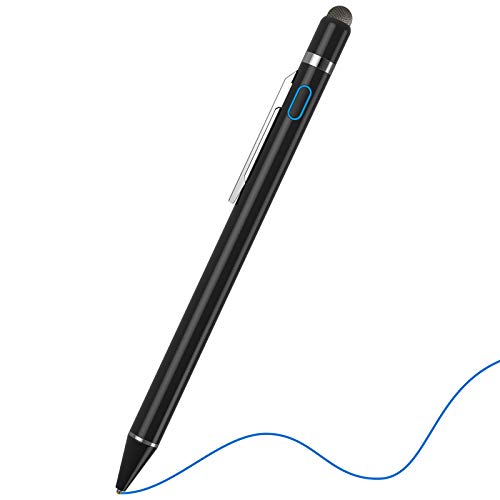
The NTHJOYS active stylus blends Apple Pencil-like capabilities with broad Android compatibility. It features a 1.5mm fine tip for precise writing and drawing and comes with a magnetic closure cap to protect the USB port. This option is best for mixed-device users who want a single stylus for iPads and Android devices, though it notes the lack of pressure sensitivity and palm rejection on some tablets. If you need Apple Pencil-like performance, consider this as a convenient alternative on multi-platform setups.
Luntak Rechargeable Stylus For Android

The Luntak stylus emphasizes wide Android compatibility with a USB-C charge, 8–10 hours of use after a short charge, and a smart sleep mode to conserve power. It uses a 1.5mm POM tip for precise input and is designed for professionals and students who need reliable responsiveness across many Android devices. A potential limitation is that it is not compatible with iPads, Microsoft devices, or Kindle devices—perfect for Android-first workflows but not universal cross-platform use.
AmberVec 3-Pack Universal Stylus

This three-pack from AmberVec offers universal compatibility with iPads, Android tablets, smartphones, and more. It features two ends: a precise fine tip for writing and drawing, and a fiber tip for browsing, which helps minimize fingerprints and smudges on screens. It’s ideal for households with multiple devices or users who want a budget-friendly set. The main caution is that performance can vary slightly by device, so some users may need to test which tip works best on their screen.
Buying Guide
What should you consider when choosing a fine point stylus for Android tablets?
- Device compatibility: Confirm whether the stylus works with your specific model and its operating system. Some styluses exclude certain tablets or iPads and are designed strictly for Android.
- Tip type and precision: Fine or ultra-fine tips (around 1.5 mm) offer higher accuracy for writing and drawing than broader tips. Consider dual-tip options if you want versatility.
- Power and connectivity: Bluetooth-enabled or rechargeable styluses add features but require charging. Bluetooth often adds setup complexity, while non-Bluetooth styluses are plug-and-go.
- Grip and ergonomics: A comfortable, balanced design reduces fatigue during long sessions.
- Durability and screen protection: Anti-scratch tips and screen-protective coatings help keep devices pristine.
- Intended use: Consider whether you need precise note-taking, detailed design work, or simple navigation and scrolling.
Frequently Asked Questions
- Do these styluses require Bluetooth to work?
Most listed options work without Bluetooth, but some offer additional features when paired via Bluetooth. - Will a fine tip improve drawing accuracy?
Yes, finer tips provide more precise input, ideal for detailed writing and sketching. - Can I use these on iPads?
Some are designed for Android devices only; others are universal and work on iPads as well. Check the product notes for compatibility. - Do any offer palm rejection?
Palm rejection is not guaranteed on all models. If you need palm rejection, look for an active stylus designed with that feature or confirm compatibility with your device. - How long does the battery last?
Rechargeable styluses typically offer several hours of active use, with long standby times if they support sleep mode. - Which stylus is best for multi-device households?
Universal or multi-device styluses, like AmberVec’s 3-pack, can cover iPads and Android tablets, making them convenient for shared use.