Choosing the right fan hub can simplify cable management, synchronize RPM speeds, and expand the number of fans you can run from a single motherboard header. This article reviews five leading fan hub solutions suitable for PC builders and enthusiasts in the United States. Each option supports PWM control, multiple fans, and reliable power delivery, helping you maintain optimal cooling with minimal clutter.
Summary of selected products:
- ARCTIC Case Fan Hub – 10-fold PWM Fan Distributor with SATA Power
- Noctua NA-FH1, 8 Channel Fan Hub
- Thermalright Integrated 10-Port 4 Pin PC Fan Controller
- ASUS TUF Gaming ARGB PWM Fan Hub
- ShakingTank ARGB and PWM Fan Hub Controller, 9 Ports
ARCTIC Case Fan Hub: 10-Channel PWM Distributor
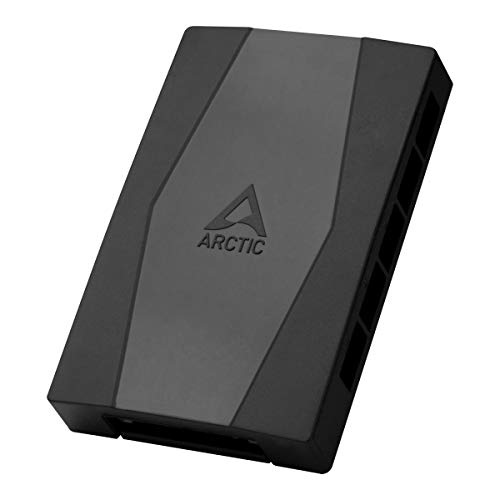
The ARCTIC Case Fan Hub functions as a central distributor that connects to the motherboard with a single cable while providing nine additional fan slots. It passes PWM control synchronously to all connected fans, allowing the RPM readouts from the first slot to be echoed to the system. This setup is ideal for users who need to expand cooling without adding numerous motherboard headers. The hub is designed for tidy cable management by living inside the PC case and enabling flexible cable routing in hidden areas.
Key considerations include the capacity for expanding ventilation in compact builds and ensuring that PWM signals stay synchronized across fans. With SATA power support, reliable operation under load is maintained. This solution suits mid-to-large builds where additional fans and simplified cabling are priorities.
Noctua NA-FH1: 8-Channel Fan Hub

The Noctua NA-FH1 provides eight channels for powering, controlling, and monitoring multiple fans. It transmits PWM signals from the motherboard or the NA-FC1 controller to all connected fans. The hub supports both 4-pin (for 5V and 12V) and SATA (for 12V only) inputs in parallel, with safety fuses protecting against overcurrent and short circuits. It delivers up to 54W via SATA for 12V fans and 24W via 4-pin, making it suitable for 12V PC fans and certain 5V fans with appropriate adapters. This hub is well-regarded for its robustness and compatibility with Noctua’s ecosystem.
When evaluating this option, consider whether your build benefits from dual input types and the safety features that reduce risk in high-load scenarios. It is especially appealing for users who want precise PWM control together with reliable monitoring capabilities across multiple fans.
Thermalright Integrated 10-Port Fan Hub
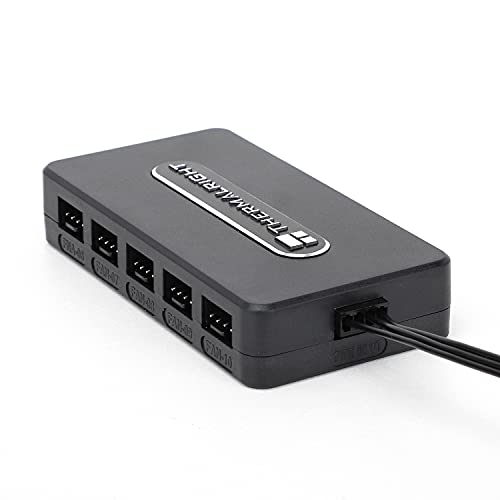
Thermalright’s 10-port 4-pin PC fan controller emphasizes compact design with a strong emphasis on cable management. The product highlights a SATA power direct input for clean power delivery and stable performance under high load. The hub uses a fixed mounting approach with a strong double-sided adhesive, keeping cables orderly and out of the way. The design targets straightforward installation while maintaining reliable operation for multi-fan setups, making it a good choice for users who want a robust, space-saving solution with efficient wiring management.
ASUS TUF Gaming ARGB PWM Fan Hub

The ASUS TUF Gaming ARGB PWM Fan Hub supports up to six fans, with PWM control and RGB synchronization. It includes clear power and operation indicators for easy status checks. The hub is designed to integrate seamlessly with ARGB lighting effects, enabling synchronized cooling and lighting across compatible components. This option is suitable for builds that emphasize aesthetic lighting as well as efficient fan control, providing a straightforward path to cohesive cooling and illumination.
ShakingTank ARGB and PWM Fan Hub Controller

ShakingTank’s hub combines ARGB and PWM control across nine ports with a magnetic backplane design for flexible placement. The product supports 5V 3-pin ARGB fans and ARGB LED strips, enabling synchronized lighting alongside fan speed management. Its wide compatibility with up to nine fans makes it a versatile choice for larger builds or custom cooling loops that prioritize both airflow and ambient lighting. The magnetic mounting and modular design simplify placement and cable routing within a PC case.
Cable Matters 3-Way 4 Pin PWM Fan Splitter Cable

Cable Matters offers a 2-pack of 3-way 4-pin PWM fan splitters that connect three fans to a single motherboard header. The splitters provide synchronized control via a master PWM signal while also returning RPM signals where supported. This option is practical for modest builds needing additional fans without a full hub, or for users seeking straightforward daisy-chaining compatibility with motherboard software for balanced cooling. The design emphasizes reliability through a simple, proven three-fan per header approach.
Thermalright ARGB Fan HUB Controller

Thermalright’s ARGB hub supports eight groups of fans, offering an 8-port 4-pin fan controller paired with a 5V-3Pin ARGB hub. It uses a strong paste and magnetic suction mounting method, alongside a SATA power connection for convenient direct input. The device emphasizes orderly cabling and reliable power transmission while maintaining compatibility with ARGB lighting setups. This option is well-suited for users who want broad ARGB control across multiple fans in a tidy, consolidated hub.
Thermaltake Commander FP SATA Powered 10-Port Hub

The Thermaltake Commander FP supports up to ten 4-pin PWM fans, enabling expansive cooling within a chassis. It uses direct SATA power input to drive up to nine PWM fans simultaneously, reducing the potential for stray currents. Included cable ties and Velcro tabs help organize cables, while a PWM signal cable keeps the hub securely connected to the motherboard. This hub is ideal for larger builds requiring many fans with tidy, centralized control.
Buying Guide: Key Purchase Considerations
When choosing a PC fan hub, consider the following factors to ensure the best fit for your system:
- Number of fans: Match the hub’s port count to your planned setup. Some hubs support 8–10 fans; others are more limited but lighter and simpler to install.
- PWM and RPM handling: Ensure the hub correctly broadcasts PWM signals to all connected fans and, if needed, returns RPM data for monitoring.
- Power delivery: SATA-powered hubs often offer stable power for many fans. Check the total wattage you’ll draw to avoid overloading the PSU connector.
- Cable management: Look for features like internal mounting, adhesive mounting, magnetic backs, or minimal cables to improve case tidiness.
- ARGB and lighting support: If your build emphasizes lighting, select hubs that coordinate ARGB with fans and LED strips for synchronized effects.
- Compatibility: Verify compatibility with your motherboard’s headers, ARGB controllers, and any brand-specific software you rely on.
- Installation complexity: Some hubs are plug-and-play, while others require careful routing and mounting considerations for maximum airflow and aesthetics.
In evaluating the options, consider your priority: maximum fan count, robust power delivery, ARGB synchronization, or ultra-clean cable management. For builds focused on quiet, evenly distributed cooling, prioritize hubs with stable PWM control and reliable RPM feedback. If you want dynamic lighting to complement cooling, choose ARGB-enabled hubs with clear indicators for status checks. Finally, assess whether you prefer a magnetic, adhesive, or traditional screw-in mounting approach to suit your case interior layout.