Choosing the right external microphone for a PC can dramatically improve how you sound in virtual meetings, online classes, and live streams. The selection below focuses on USB condenser and dynamic mics that are easy to set up, work across Windows and Mac, and offer features like noise reduction, mute controls, and directional pickup. This guide highlights five top options, based on build quality, ease of use, and suitability for office calls, remote work, and content creation.
| Product | Brand | Key Feature |
|---|---|---|
| TONOR Conference USB Microphone G11 | TONOR | Omnidirectional pickup for 360° coverage; plug & play |
| CMTECK USB Computer Microphone G009 | CMTECK | Cardioid pattern with noise-cancelling chip; LED mute indicator |
| CMTECK USB Computer Microphone (1.8m/6ft) | CMTECK | Built-in sound card; USB plug & play |
| HyperX SoloCast | HyperX | Tap-to-mute; USB-C; 24-bit/96 kHz |
| FIFINE AM8 | FIFINE | XLR/USB dynamic option with RGB, mute, and stand |
Below you will find five in-depth product sections, each covering how the mic sounds, who it’s best for, and practical setup tips to maximize performance in real-world PC use.
TONOR Conference USB Microphone G11

The TONOR G11 is designed for conference-style use with an omnidirectional pickup pattern that captures sound from all directions. Its claimed 11.5-foot pickup range helps ensure that voices in small to medium meeting rooms come through clearly without participants needing to raise their voices. Since it’s a condenser mic, it emphasizes voice clarity and detail over raw proximity. It’s noted as a plug-and-play device, compatible with Windows and macOS without driver installations. This makes it suitable for Zoom, Skype, WebEx, and other conferencing software as well as remote court reporting and training sessions.
Key considerations for this model include room acoustics and the omnidirectional pickup. In noisy environments, the lack of a cardioid focus means background chatter may be picked up more readily than with a directional mic. It shines in settings where multiple people speak from different spots or where a quick, no-fuss setup is preferred. A simple USB connection means reduced setup time for most users, and the absence of drivers helps keep configurations stable across updates.
CMTECK USB Computer Microphone G009

The CMTECK G009 features a cardioid condenser pickup pattern intended to focus on the voice in front of the mic while reducing ambient noise. It also includes an active noise-cancelling chip and a pop filter, which helps minimize plosives and street noise for clearer speech during online classes, meetings, and podcasts. A notable convenience is the mute button with an LED indicator, so users can quickly confirm whether their mic is live or muted. This model is marketed as a strong choice for Windows and Mac users who want crisp, clean vocal capture with straightforward operation.
For optimal results, place the microphone on a stable surface at mouth level and avoid placing it near fans or noisy computer components. The LED mute indicator is helpful in live scenarios where you need quick confirmation. While cardioid pick-up reduces side noise, maintaining a relatively quiet environment will yield the best outcomes for calls and recordings that require clear vocal presence.
CMTECK USB Computer Microphone (1.8m / 6ft)
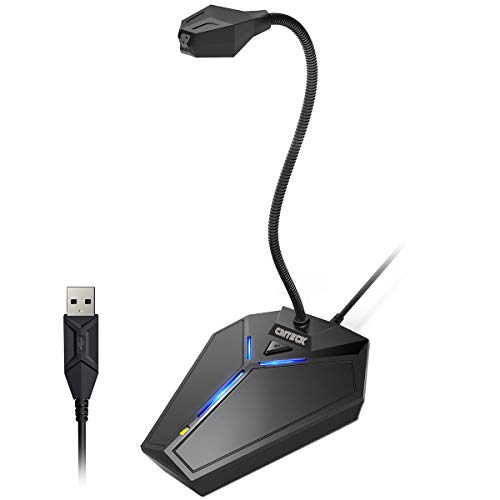
This CMTECK model emphasizes USB plug-and-play simplicity with an omnidirectional/adjustable design intended for general desktop use. The features highlight smooth recording for podcasts, YouTube, voice chats, and online classrooms. The included LED indicators and mute functionality provide practical on-desk controls, which are especially useful for streamers and remote workers who need to adjust audio levels quickly without diving into software settings. A cable length of 6 feet adds flexibility for desk layouts and separation from computer fans or desk clutter.
In practice, this mic is well-suited for users who want a compact footprint with reliable USB audio performance. It balances ease of use with solid vocal clarity, making it a practical option for students, telecommuters, and casual creators who value straightforward setup and stable performance across major platforms.
HyperX SoloCast – USB Condenser Microphone

The HyperX SoloCast is positioned for gamers, streamers, and podcasters who want a quick setup with minimal fuss. It uses a cardioid pickup pattern to focus on sounds in front of the microphone and reduce background noise, which helps isolate speech during recordings and live streams. The 24-bit/96 kHz recording capability supports high-quality audio for streaming platforms, podcasts, and calls. A distinctive feature is the tap-to-mute sensor with a visible LED indicator, providing a tactile and immediate way to silence audio during a session without opening software or menus.
Best use cases include desktop streaming, multiplayer gameplay commentary, and voice-focused content production. The SoloCast’s plug-and-play USB-C connection makes it compatible with modern laptops and desktops while offering straightforward setup for beginners and seasoned creators alike. Consider pairing with a small boom arm or adjustable stand to optimize mic placement for consistent voice capture during longer sessions.
FIFINE AM8 USB/XLR Dynamic Microphone

The FIFINE AM8 combines USB and XLR connectivity, offering flexibility for users who want to start with USB and later upgrade to an XLR setup for more professional studio-grade audio. This dynamic microphone design tends to handle background noise well, making it suitable for noisy environments or rooms with echo. The AM8 includes RGB lighting and a mute button, providing visual feedback on the mic’s status and a straightforward way to manage live sessions. The package typically includes a desktop stand, helping users position the mic optimally for voice capture during gaming, streaming, or podcasting.
When choosing between USB and XLR modes, consider your future needs. USB is simpler and plug-and-play, while XLR offers higher fidelity with the right audio interface or mixer. For beginners who want a future upgrade path, FIFINE AM8 is a versatile option that can grow with your setup while delivering solid vocal performance in both modes.
Buying Guide: Key Purchase Considerations
When selecting an external microphone for PC use, these factors help determine the best match for your needs:
- Pickup pattern: Cardioid mics focus on the speaker in front of the mic and reduce ambient noise, while omnidirectional mics pick up sound from all directions. Choose based on your typical speaking setup and room acoustics.
- Connectivity: USB mics are easiest to set up and largely universal across OSes. XLR mics offer higher fidelity with an audio interface but require additional gear.
- Built-in features: Mute buttons and LED indicators provide quick on/off control during live sessions. Tap-to-mute sensors are popular for streaming setups.
- Noise handling: Look for noise-cancelling capabilities or pop filters to minimize background noise and plosives in everyday environments.
- Compatibility and drivers: Most modern mics are plug-and-play on Windows and macOS. Verify software compatibility with your preferred apps (Zoom, Teams, Skype, etc.).
- Room and placement: Place the mic at mouth level and away from fans or keyboard noise. Larger rooms benefit from directional mics; smaller desks can benefit from cardioid patterns with proper placement.
- Future proofing: If you anticipate upgrading to professional audio interfaces or mixers, consider models offering XLR outputs or expandable ecosystems.
In short, for straightforward PC use, USB mics with cardioid pickup and practical on-mic controls are excellent. For content creators planning to scale to a studio setup, consider a dynamic mic with USB/XLR options that can grow with your equipment.