For gamers, creators, and power users, an external GPU (eGPU) enclosure can unlock desktop-level graphics on a portable laptop. This guide rounds up top eGPU enclosures that pair well with American setups, focusing on models that balance performance, compatibility, and ease of use. Each option below is designed to work with Thunderbolt or OCulink interfaces, supporting modern GPUs and demanding workloads. The selections emphasize portability, robust build quality, and clear indicators for troubleshooting and monitoring.
| Product | Brand | Amazon Link |
|---|---|---|
| OwlTree PCIe 4.0 eGPU Dock | OwlTree | View Product |
| GMKtec AD-GP1 External GPU Docking Station | GMKtec | View Product |
| eGPU Enclosure Dock Thunderbolt 3/4 | GODLIY | View Product |
| MINISFORUM DEG1 External eGPU Dock | MINISFORUM | View Product |
| ANQUORA ANQ-L336 Mini eGPU Enclosure | ANQUORA | View Product |
Note: The following selections focus on external enclosures capable of housing a GPU with appropriate power supplies. Some models include PCIe interfaces like OCulink or USB4/TB3 with specific GPU support lists. Always verify compatibility with your laptop’s ports and the GPU you plan to use.
OwlTree External GPU Dock For Laptops

The OwlTree PCIe 4.0 x4 external GPU dock is designed for portability and easy storage, featuring an detachable design at both ends for travel-friendly use. It uses an OCulink SFF-8612 interface and includes a SFF-8611 male-to-male cable, enabling PCIe x16 connections to a GPU. The enclosure supports standard ATX power and external graphics cards for laptops and mini PCs. Key advantages include 10μ gold-plated contacts for improved conductivity, and multi-status LED indicators for real-time device monitoring. Transfer speeds reach PCIe 4.0 x4, up to 64 Gbps, which helps reduce bottlenecks when paired with suitable GPUs. Note that the GPU and power supply are not included, so selection should align with your power needs and GPU compatibility.
Why it matters: For users prioritizing portability without sacrificing performance, the OwlTree dock offers a compact, detachable design and high-speed PCIe connection. It’s well-suited for on-the-go setups, creators who travel with performance needs, and users who want a modular approach to external graphics.
GMKtec AD-GP1 External GPU Docking Station

The GMKtec AD-GP1 is an advanced eGPU dock featuring an AMD Radeon 7600M XT GPU (RDNA 3.0) with 8 GB GDDR6. It targets notable performance gains through a robust GPU pairing and includes multiple high-speed video outputs—two HDMI 2.1 and two DisplayPort 2.0 interfaces—supporting up to 8K 60Hz displays across four outputs. The setup promises smoother gameplay, faster rendering, and enhanced visuals for demanding tasks. This model positions itself as a turnkey solution for users seeking an integrated graphics upgrade with strong multi-monitor capabilities, particularly appealing for content creators and heavy multitaskers who demand high-resolution output and stable performance across displays.
Considerations: Ensure your laptop supports the dock’s connection interface and that your power supply can meet GPU requirements. The included GPU is specified in the product description, so verify that it matches your intended GPU upgrade path and the workloads you plan to run.
GODLIY External eGPU Dock

The GODLIY eGPU enclosure claims broad compatibility with Thunderbolt 3/4 or USB4-equipped devices and supports the latest NVIDIA RTX 50 Series and AMD RX 7000 Series GPUs. Powered by a certified JHL7440 controller, it targets workstation-style performance for gaming, AI workloads, 3D rendering, and more. The device emphasizes universal compatibility, enabling various host machines—from NUCs to laptops and gaming rigs—to leverage external GPU power. It also notes support across AI workloads, making it a versatile option for professionals needing both graphics performance and compute capability.
Things to verify: Check your laptop’s TB3/4 or USB4 support, and confirm the exact GPU model you plan to install for compatibility with the enclosure. Power delivery and the external PSU should meet the GPU’s consumption to avoid throttling or instability.
MINISFORUM DEG1 External GPU Dock
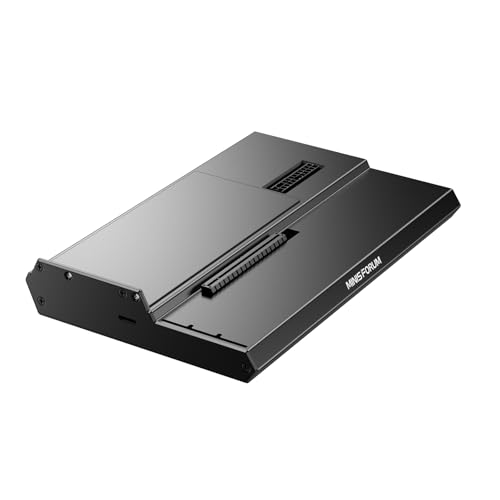
The MINISFORUM DEG1 is designed to deliver external GPU docking capabilities for high-end GPUs such as RTX 4090 or RX 7900 XTX. It supports ATX and SFX power supplies and uses an OCulink interface (PCIe 4.0 x4) to connect to the host. A notable feature is the power button with ForcePowerOn and dedicated LED indicators. The DEG1 is positioned for enthusiasts who want a compact yet capable enclosure with a clear power management profile. It’s important to note limitations about hot-plugging with OCulink and the need to power off the system before connecting.
Use-case fit: Users seeking a compact, high-performance eGPU solution where GPU upgrades and power flexibility matter. Compatibility with specific GPUs should be verified in advance, along with a suitable ATX/SFX power supply choice for stable operation.
ANQUORA ANQ-L336 Mini eGPU Enclosure

The ANQUORA ANQ-L336 is a versatile mini eGPU enclosure designed for Thunderbolt 3/4 and USB4, making it compatible with a wide range of laptops and desktop configurations, including Win, Linux, and macOS environments. It emphasizes broad GPU compatibility, including newer NVIDIA RTX 50 series and AMD RX 9000 series GPUs. With a daisy-chain capability and a robust JHL7440 controller, this dock aims to balance performance with expandability, providing a path for multi-GPU setups and efficient data transfer across PCIe lanes.
Practical notes: Confirm host compatibility with USB4/TB3/TB4, ensure the GPU model fits the enclosure dimensions, and verify power supply requirements for peak performance. The daisy-chain feature can enhance connectivity for users with multiple external devices, but always confirm device-specific power and bandwidth limits to avoid bottlenecks.
Buying Guide: Key Purchase Considerations For External GPU Enclosures
- Interface and bandwidth: Thunderbolt 3/4 and OCulink PCIe 4.0 x4 are common; choose based on your laptop’s ports and the GPU’s bandwidth needs. Higher bandwidth reduces bottlenecks for demanding games and professional workloads.
- GPU compatibility and upgrade path: Some enclosures ship with GPUs or specify supported series. Verify compatibility with your target GPU (NVIDIA/AMD generations) and whether the enclosure can accommodate the power and size of that GPU.
- Power supply requirements: External GPUs need adequate PSU capacity. Check whether the enclosure includes a sufficient power supply or if you must add your own ATX/SFX PSU to meet GPU power demands.
- Portability vs. capacity: Detachable or compact designs improve travel ease; larger enclosures may house more robust GPUs or multiple heat management features. Consider your usage pattern (stationary vs. mobile) before choosing.
- Display outputs and multi-monitor setups: Look for multiple HDMI/DP outputs to support multi-monitor configurations. Some enclosures offer up to four outputs, which is useful for professional workflows and gaming setups.
- Cooling and thermals: External GPUs generate heat; assess cooling solutions in the enclosure and whether additional PCIe fans or heatsinks are advisable for sustained workloads.
- Build quality and indicators: A sturdy chassis, gold-plated contacts, and LED indicators facilitate reliable performance and easier troubleshooting when monitoring connection status and throughput.
- Software and compatibility: Ensure drivers and firmware are compatible with your operating system (Windows, macOS, Linux) and that daisy-chain or USB4 features align with your peripheral setup if you rely on multiple devices.
- Future-proofing: Consider enclosures that support newer PCIe generations and GPUs, as this extends the life of your setup beyond today’s GPU lineup.
In sum, the best external GPU enclosure for your laptop depends on a balance of interface compatibility, GPU support, power delivery, and portability. Each option above provides a distinct combination of these elements, catering to different use cases—from on-the-go creators to high-end gaming rigs and workstation workloads. Always verify the exact GPU model you plan to use, your laptop’s port capabilities, and power requirements before purchase.