Looking to upgrade a laptop or compact PC with desktop graphics power? This guide reviews top external GPU (eGPU) docks that enable high-performance GPUs via OCuLink, USB4, or Thunderbolt connections. Each option supports PCIe 4.0 x4 lanes for substantial bandwidth and broad GPU compatibility. The selections below cover a range of power supplies, form factors, and compatibility notes to help you choose the right eGPU dock for gaming, creative work, or AI workloads.
Summary of chosen products:
| Product | Brand | Interface | Power | Notes |
|---|---|---|---|---|
| External GPU Dock with OCuLink | OwlTree | OCuLink PCIe 4.0 x4 | Power not included | Detachable design; gold-plated contacts |
| Razer Core X V2 | Razer | Thunderbolt 5/USB4 | PD via USB-C | 4-slot wide GPUs; broad compatibility |
| eGPU Dock with Thunderbolt 4/USB4 | OwlTree | Thunderbolt 4/USB4 | Power not included | JHL6340 controller; 22Gbps+ |
| MINISFORUM DEG1 | MINISFORUM | OCuLink 4i PCIe 4.0 x4 | ATX/SFX compatible | Up/Down link design |
| AOOSTAR AG02 | AOOSTAR | OCuLink + USB4 | 800W PSU | Open metal body; broad compatibility |
OCuLink External GPU Dock by OwlTree

This OwlTree eGPU dock emphasizes portability with a detachable design at both ends. It uses OCuLink SFF-8612/SFF-8611 interfaces and PCIe 4.0 x4 bandwidth (64Gbps). A compact enclosure supports ATX power supplies, enabling external graphics cards for laptops or mini PCs. The PCB features 10μ gold-plated contacts to improve conductivity and reduce oxidation, while multi-status LEDs provide real-time device monitoring. The inclusion of a flexible, low-profile SFF-8611 cable minimizes EMI and mechanical strain. GPU and power supply are not included, so users can select components to match their needs and budget.
Compatibility notes: This dock is designed for users who want a portable, modular eGPU setup with detachable ends for storage or travel. It suits PCIe desktop GPUs that fit within the enclosure’s form factor and require a compatible power arrangement. While drivers and system support vary by GPU and OS, this dock targets enthusiasts who value a balance of performance, flexibility, and portability.
Razer Core X V2 External Graphics Enclosure

The Razer Core X V2 is designed to expand a laptop or USB4/Thunderbolt 4/5 enabled device with desktop-grade graphics GPUs. It supports PCIe 4.0 up to 4-wide desktop cards (with GPU/power supply not included) and leverages Thunderbolt 5 bandwidth up to 80 Gbps for demanding workloads. The dock is known for broad compatibility across devices—ranging from laptops to desktop-class setups—making it a versatile choice for creative pros and gamers who require a seamless external GPU upgrade. Power delivery via USB-C is included as part of the ecosystem, with the caveat that the GPU itself must be supplied separately.
Usage considerations: Ideal for users who prioritize latest connectivity and cross-device compatibility. The Core X V2 eases integration with Thunderbolt-enabled systems and is particularly popular among creators needing reliable performance in mobile or mixed hardware environments.
OwlTree PCIe 3.0 x16 eGPU Dock

This OwlTree dock uses PCIe 3.0 x16 with a Thunderbolt 4 connection, rated for 22Gbps transfer speeds via the JHL6340 controller. It is compatible with a wide range of GPUs—NVIDIA and AMD—provided drivers are available on official sites. The design targets Windows systems, Linux, and compatible consoles with USB4, Thunderbolt 3/4 interfaces. It supports various power arrangements and emphasizes stability and broad GPU compatibility, making it a solid option for those who do not require the newest PCIe bandwidth but still want external graphics expansion for gaming or GPU-accelerated tasks.
Note: The dock specifies support for devices with Thunderbolt 3/4 and USB4 interfaces, and GPU compatibility is broad but driver-dependent. It offers a balance of compatibility and performance for varied setups.
MINISFORUM DEG1 External eGPU Dock

The MINISFORUM DEG1 Docking Station features OCuLink 4i (PCIe 4.0 x4) uplink and PCIe x16 (PCIe 4.0 x4) downlink, with both directions designed for OCuLink connections. It supports ATX and SFX power supplies, providing flexible power options for mini chassis. Noteworthy is the Up Link/Down Link configuration and the note that OCulink does not support hot plugging. This design emphasizes a compact footprint while maintaining PCIe 4.0 bandwidth for external GPUs, suitable for portable, compact rigs that require reliable data transfer and expandability.
Practical takeaway: This dock is a strong pick for users who want a compact solution with a fixed, robust PCIe path and flexible power compatibility for mini systems, including compact workstations and certain laptops with OCuLink support.
MINISFORUM DEG1 Docking Station (Second Model)
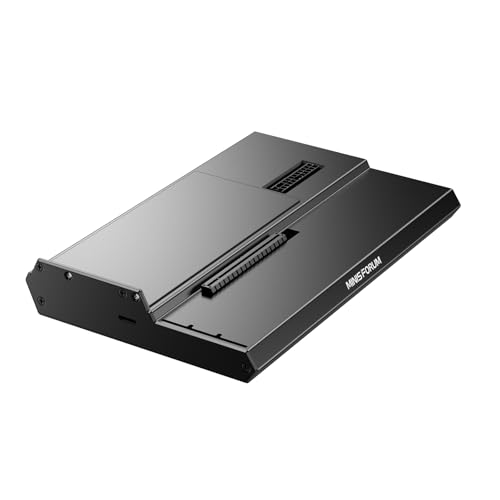
This version of the MINISFORUM DEG1 emphasizes OCuLink 4i uplink and PCIe x16 downlink, with the explicit note that only OCuLink is supported and that hot plugging is not available. It provides a forced power-on feature via an LED-illuminated button, offering a straightforward on/off control for power management in compact setups. The device is targeted at users who need a dependable OCuLink-based eGPU dock that fits into a tight space without sacrificing PCIe performance.
AOOSTAR AG01 External GPU Dock

The AOOSTAR AG01 eGPU dock includes an 800W internal power supply and is designed to support GPUs up to roughly 600W draw. It uses an OCuLink interface and TGX integration for robust bandwidth in PCIe 4.0 x4 lanes, with a metal open-frame construction for effective cooling. The dock is marketed toward compatibility with a broad range of NVIDIA and AMD GPUs, making it suitable for high-end gaming or GPU-accelerated workloads that demand reliable external graphics power. Hot-swapping is not supported on OCulink interfaces, so power and system shutdown considerations apply.
Buying Guide: Key Purchase Considerations for External GPU Docks
- Interface and bandwidth: PCIe 4.0 x4 via OCuLink or USB4/Thunderbolt 4/5 determines how well the GPU communicates with the host. Higher bandwidth helps with 4K gaming and GPU-heavy workloads.
- Power supply: Some docks include internal PSUs (e.g., 800W) while others rely on an external or user-supplied power solution. Ensure the GPU’s power requirements are within what the dock can safely supply.
- GPU compatibility and drivers: Most docks support NVIDIA and AMD desktop GPUs, but driver availability and OS compatibility can affect performance. Check official GPU driver support for your OS.
- Form factor and cooling: Open-frame or compact enclosures affect heat dissipation. Consider your GPU length, cooling needs, and whether the dock aligns with your travel or desk setup.
- Hot-plug capability: Some OCulink-based docks do not support hot plugging. If you need quick swap-ins, verify hot-plug support or plan for power cycling during changes.
- Device compatibility: Confirm that your laptop or mini PC has the correct interface (OCuLink, USB4, or Thunderbolt 4/5). Some systems require BIOS updates or specific kernel/driver configurations.
- Cable quality and EMI: Premium, thin cables can reduce interference and physical strain. Look for cables with shielding and low-profile connectors to protect ports on portable devices.
- Price-to-performance balance: Higher-end docks offer PCIe 4.0 x4 bandwidth and robust power, while more affordable options provide entry-level bandwidth for lighter workloads. Match to your expected usage and GPU model.