Explore top external floppy drives that bring 3.5-inch diskettes back to life on modern PCs. This guide highlights five reliable readers, their design quirks, compatibility notes, and usage tips to help you retrieve photos, manuscripts, and memories stored on vintage floppy media.
Product Quick Reference
| Product | Brand | Key Benefit | Link |
|---|---|---|---|
| Floppy Disk Reader, 3.5 inch External USB | Chuanganzhuo | Ultra-thin, portable, easy plug-and-play | View |
| Floppy Disk Reader 3.5 inch USB Floppy Drive (Brushed) | RAAYOO | Brushed texture, wide compatibility | View |
| CIpotZIZ Floppy Disk Reader 3.5 inch | CIpotZIZ | Compact, plug-and-play, Windows friendly | View |
| Chuanganzhuo Floppy Disk Reader (Brushed) | Chuanganzhuo | Brushed texture, USB Type A/C connectivity | View |
| YEY USB Floppy Drive (Ultra Slim) | YEY | Ultra-slim, easy portability | View |
Floppy Disk Reader, 3.5 Inch External USB (Chuanganzhuo)
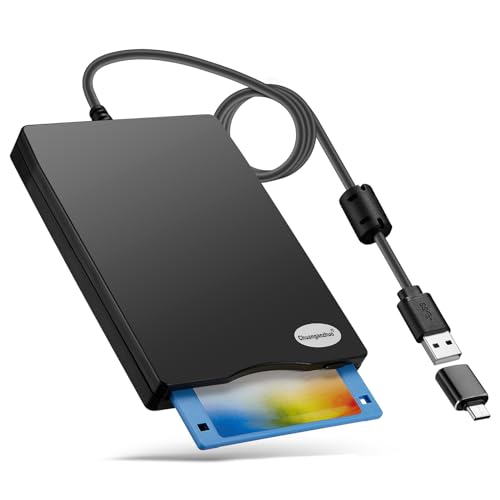
This 3.5-inch external USB floppy disk drive addresses the gap left by modern devices that lack internal floppy readers. It is designed for quick plug-and-play operation, letting you access files on legacy disks by connecting via USB Type A or C. The device aims to retrieve memories stored on old disks—wedding photos, childhood pictures, manuscripts, and songs—whether at home, in the office, or on the go. It emphasizes portability with a slim profile and lightweight footprint, making it a practical gift for users who still rely on older media.
Key features include a straightforward plug-and-play experience: insert a disk, connect to a computer, and access files through Windows File Explorer. It requires a power supply from the USB port, and users are advised to avoid USB hubs or long extensions to prevent power-related malfunctions. Its compact form-factor is positioned for convenient travel and storage, while compatibility notes indicate broad Windows support, with Mac and some Chrome OS systems not supported.
Floppy Disk Reader 3.5 Inch USB Floppy Drive (Brushed Texture)

The RAAYOO 3.5-inch external floppy drive offers a modern brushed texture and ultra-slim design for easy portability. It positions itself as a simple, no-fuss solution for accessing floppy disks on Windows systems, with compatibility spanning Windows 11/10/8.1/7/Vista/XP/2000. Some users may need to navigate minor Windows Explorer quirks in newer OS versions, particularly with drive naming and visibility, but the device emphasizes quick recognition and access to stored memories without requiring additional software.
With a compact build—approximately 0.67 inches thick and about 0.61 pounds—the drive is designed for travel or desk-side use. It is not compatible with macOS, which is a point to consider for users with multiple platforms. The packaging stresses that no driver installation is necessary; plug-and-play functionality is the main selling point, supported by a standard USB power connection. The device is marketed as a thoughtful way to salvage family archives, photos, and documents preserved on legacy disks.
CIpotZIZ Floppy Disk Reader (3.5 Inch, Frosted Texture)

CIpotZIZ presents a frosted-textured external reader designed for easy Windows 11/10/8.1/7/2000/XP compatibility. The device emphasizes plug-and-play simplicity, powered through the USB A/C connection, with no separate driver required. Its ultra-slim form and light weight make it highly portable for users who want to carry a disk-reading tool on errands or travel. The product description frames the reader as a convenient gateway to personal archives, including photos, essays, and music saved on older disks. Note that the vendor states Windows-oriented compatibility, with Mac support not included.
The emphasis is on straightforward file access via the standard Windows File Explorer workflow, where users can browse and copy files from floppy disks as if they were regular drives. The compact dimensions and simple setup are positioned for users who value quick retrieval of content without extra software or setup steps. The device is marketed as a helpful memory-preserving accessory for families and individuals with sizable floppy collections.
Chuanganzhuo Floppy Disk Reader (Brushed Texture, USB A/C)

This model from Chuanganzhuo emphasizes a brushed texture exterior and dual USB Type A/C connectivity, expanding compatibility across more devices that may be limited by older USB standards. The device is pitched as a highly portable, plug-and-play solution for users who want a quick method to read and write floppy disks on modern hardware. The product description guides users through Windows File Explorer steps to locate the A: drive and manage files, highlighting the user experience of treating a floppy disk as a standard folder on a PC. Compatibility notes reiterate Windows-only support, with Mac and Chrome OS not supported.
Its compact shape, lightweight build, and dual-connector design aim to ensure reliable power and data transfer. The brushed shell is presented as both a design and tactile feature, appealing to users who value aesthetics alongside function. The product is positioned as a practical option for archiving projects, memoirs, and media from a bygone era, with a straightforward setup intended for casual users and hobbyists alike.
YEY USB Floppy Drive (Ultra Slim)

YEY’s USB floppy drive emphasizes portability with an ultra-slim profile designed for easy transport alongside laptops and notebooks. The device supports data transfer from 3.5″ floppy disks and operates in a plug-and-play manner, requiring no drivers. It targets users who want a simple, reliable means to access nostalgic files on Windows systems, including XP through Windows 11. The compact form factor makes it a convenient addition to a travel kit or desk drawer, especially for individuals who accumulate memories on magnetic media and prefer a minimal setup process.
RAAYOO Floppy Disk Reader (USB C / A, Not Mac)

This RAAYOO model highlights USB Type C compatibility alongside the traditional USB A interface, allowing broader compatibility with newer laptops and desktops. The device maintains a no-driver, plug-and-play approach that appeals to Windows users who want to retrieve files quickly from floppy disks. It reiterates a focus on portability, with a slim profile and light weight, making it suitable for travel, storage, and quick demonstrations of how to access content stored on legacy media. Mac compatibility remains outside the supported list, which is a recurring constraint across these products.
Buying Guide: Key Purchase Considerations
- Operating System Compatibility: Most drives target Windows ecosystems (Windows 11/10/8/7/XP/2000/Vista). If you use macOS or Chrome OS, verify explicit compatibility before buying.
- Power and Connectivity: USB bus power is common; avoid hubs or long extensions to prevent under-powering. Consider USB Type A and Type C options for newer machines.
- Drive Recognition in Modern File Explorers: Some drives require navigating Windows Explorer differently or enabling hidden devices. Look for models that provide clear guidance on locating the A: drive.
- Portability vs. Durability: Ultra-slim designs maximize travel-friendly use, while brushed textures may increase durability and style. Choose based on how mobile your workflow is.
- Data Transfer Reliability: While plug-and-play is convenient, occasional compatibility quirks can occur with older disks. If you have large archives, consider a model with a proven track record for stable reads/writes.
- Disk Condition and Media Type: 1.44 MB disks are standard for 3.5-inch floppies. Ensure your disks are clean and free of physical damage to minimize read errors.
- Future-Proofing: If you anticipate needing to access disks regularly or for archiving, a drive with USB-C and USB-A compatibility provides broader system support.
When selecting an external floppy drive, consider the devices you own, your primary operating system, and how often you expect to retrieve files. The models above emphasize plug-and-play usability, portability, and Windows-focused compatibility. They are positioned as practical tools for nostalgia, memory preservation, and personal archiving tasks.