External DVD writers are compact, portable drives that let you read and burn CDs and DVDs on desktops, laptops, and some all-in-one systems. This guide highlights five reliable models that balance speed, compatibility, and ease of use for American consumers. Whether you need to back up data, install software, or enjoy disc media on the go, these drives offer plug-and-play convenience with USB interfaces and broad operating system support.
| Product | Brand | Key Feature |
|---|---|---|
| Amicool External DVD Drive USB 3.0 USB C | Amicool | Dual interface: USB 3.0 and USB-C |
| LG GP65NB60 8X USB 2.0 Ultra Slim | LG | Ultra slim, M-DISC support |
| Rioddas External CD/DVD Drive | Rioddas | USB 3.0, Plug & Play, back USB port power |
| ORIGBELIE External CD DVD Drive | ORIGBELIE | USB 3.0, Type-C, high-speed data |
| ASUS ZenDrive V1M External DVD Drive | ASUS | USB-C interface, built-in cable storage |
Amicool External DVD Drive—USB 3.0 & USB-C

The Amicool external drive offers dual interfaces, USB 3.0 and USB-C, for fast data transfer up to 5 Gbps. It supports common formats including DVD+R, DVD-R, CD-R, and CD-RW, with read speeds up to 8x for DVDs and 24x for CDs. It is designed for plug-and-play use on Windows, macOS, Linux, and popular laptop brands. For consistent performance, connect directly to a computer USB port (prefer rear desktop ports) rather than using hubs or long extensions. Note: Not compatible with Blu-ray discs or TV/game console playback.
LG GP65NB60 8X USB 2.0 Ultra Slim
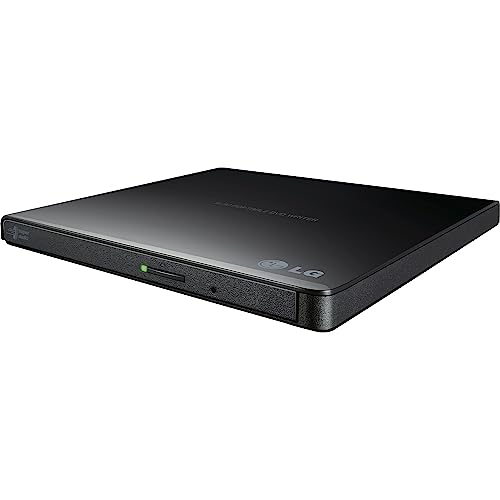
The LG GP65NB60 is an ultra-slim external drive with USB 2.0, compatible with USB 3.0 devices for added versatility. It supports up to 8x DVD write speeds and M-DISC compatibility for durable long-term storage. Its compact profile makes it ideal for travel or limited desk space, while maintaining broad OS compatibility for Windows, macOS, and Linux systems.
Rioddas External CD/DVD Drive

The Rioddas drive emphasizes plug-and-play use powered directly by USB without extra software. It is compatible with USB 3.0 (backwards compatible with USB 2.0) and delivers high-speed data transfer up to 5 Gbps. A notable feature is a physical eject button and copper mesh technology to promote stable data transmission, reducing disc read/write interruptions. It’s suitable for most desktops and laptops running Windows, macOS, or Linux, with direct port connections recommended for desktop systems.
ORIGBELIE External CD DVD Drive

The ORIGBELIE drive emphasizes USB 3.0 performance with backward compatibility to USB 2.0/1.1, delivering up to 8x DVD write and 24x CD write speeds. It supports Windows, macOS, and Linux, with clear guidance to connect to rear motherboard USB ports on desktops to avoid power constraints. The device emphasizes robust error correction, noise reduction, and low power consumption while offering broad device compatibility for everyday tasks.
ASUS ZenDrive Black 13mm External DVD Drive

The ASUS ZenDrive Black is an ultra-slim external burner that remains portable with a 13mm profile. It supports both Mac and Windows environments and includes M-Disc compatibility. The drive’s slim design and compatibility with common software make it suitable for media backups and software installations, especially for users who value a lightweight, travel-ready option.
ASUS ZenDrive V1M with Built-In Cable

The ASUS ZenDrive V1M focuses on convenience with a built-in 24 cm cable storage design and a USB-C interface, making it a good match for newer ultrabook laptops. It also supports M-DISC storage with compatibility across Windows and macOS. This model targets users who want a tidy, cable-managed setup without sacrificing modern USB-C connectivity.
Dell USB Slim DVD +/- RW Drive DW316

The Dell DW316 is a compact, low-power external drive designed for plug-and-play use with Windows systems. It is slim enough for travel and comes preloaded with optional CyberLink Media Suite to simplify playback and burning tasks. This option is suitable for users prioritizing a ready-to-use package with software support included.
Buying Guide: Key Purchase Considerations
- Interface and speed: Look for USB 3.0 or USB-C to maximize data transfer rates. If you use older laptops, ensure USB 2.0 compatibility and check write speeds up to 8x for DVDs and 24x for CDs.
- Compatibility: Verify operating system support (Windows, macOS, Linux) and whether the drive requires any extra software. If you rely on M-DISC, confirm its support with the model.
- Power and portability: Some drives are bus-powered via USB, while others may need more juice from a desktop’s rear USB port. Slim profiles save space for travel.
- Ease of use: Plug-and-play design, built-in cables, and physical eject buttons are beneficial for quick disc handling and setup.
- Durability and build quality: A sturdy chassis with reliable read/write performance reduces errors during burning and playback.
- Limitations: Note that many external drives do not support Blu-ray discs, Blu-ray playback, or non-standard formats. Always check format compatibility before purchase.
- Brand and support: Reputable brands often offer better after-sales support and firmware updates, which can improve long-term reliability.