External disc drives remain a practical solution for expanding your computer’s optical capabilities, whether you’re backing up data, watching discs, or archiving media. This guide highlights five reliable options, compares their connectivity, speed, and compatibility, and offers tips to choose the right model for your setup. All selections support common formats like CD-R, DVD±R, and RW, with USB 3.0 or USB-C interfaces for fast transfers. The following products are evaluated on ease of use, durability, and cross‑platform compatibility to help you decide with confidence.
| Product | Brand | Key Benefit | Interface |
|---|---|---|---|
| Amicool External DVD Drive | Amicool | Plug‑and‑play, dual USB 3.0 / Type‑C | USB 3.0, Type-C |
| Rioddas External CD/DVD Drive | Rioddas | Back‑of‑the‑ motherboard power optimization | USB 3.0 |
| LG GP65NB60 | LG | Ultra slim, portable with USB 2.0/3.0 compatibility | USB 2.0/3.0 |
| ORIGBELIE External CD/DVD Drive | ORIGBELIE | High‑speed USB 3.0 with broad OS support | USB 3.0 |
| ROOFULL External CD/DVD Drive | ROOFULL | Durable with carrying case and USB‑C/USB‑A | USB 3.0, USB-C |
Amicool External DVD Drive

The Amicool external DVD drive offers plug‑and‑play setup via USB or Type‑C, with a recommendation to connect directly to a computer port for reliable power. It supports DVD+R, DVD−R, CD−R, and CD−RW, with read/write speeds up to 8x for DVDs and 24x for CDs. The device is compatible with Windows, macOS, and Linux, but is not designed for TVs or standalone Blu‑ray players. Dual interfaces aim to provide flexible connectivity while maintaining broad OS support.
Rioddas External CD/DVD Drive

This Rioddas model emphasizes ease of use with USB plug‑and‑play operation and no external power adapter. For desktops, it’s recommended to connect to a rear motherboard USB port to ensure power. It supports USB 3.0 (backwards compatible with USB 2.0) and delivers up to 5Gbps data transfer. A notable feature is an eject button that works even if the host system doesn’t recognize the drive, along with copper mesh technology to stabilize transmission and reduce errors during burning and playback.
LG GP65NB60 8X DVD Writer
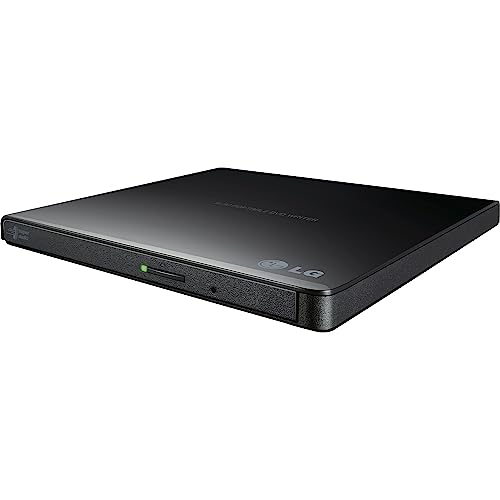
The LG GP65NB60 is a slim, portable DVD writer with USB 2.0 plus USB 3.0 compatibility, designed for mobile use. It supports up to 8x DVD write speeds and includes M‑Disc compatibility in a compact form factor. The drive aligns well with laptops or desktops needing a lightweight external option, though its USB 2.0 interface may limit peak transfer speeds on large burns compared to USB‑C solutions.
ORIGBELIE External CD DVD Drive

The ORIGBELIE external drive emphasizes USB 3.0 high‑speed data transmission with backward compatibility to USB 2.0/1.1 and fast read/write rates up to 8x for DVDs and 24x for CDs. It supports a wide range of formats, including CD±R/RW and DVD±R/RW, and is compatible with Windows, Linux, and macOS. It’s designed as a universal solution for laptops and desktops, with a note about Mac icon behavior when a disc is inserted.
BPAKDU External CD/DVD Drive

BPAKDU markets an 8‑in‑1 external drive with USB 3.0 power efficiency and a built‑in USB hub plus card readers. It is designed for quick plug‑and‑play use without internal drivers, though some Windows setups may require power or driver troubleshooting. It supports CD and DVD burning and reading, with both USB 3.0 and USB 2.0 compatibility. The device is positioned as a versatile accessory for mixed media tasks on laptops and desktops.
ROOFULL External CD/DVD Drive
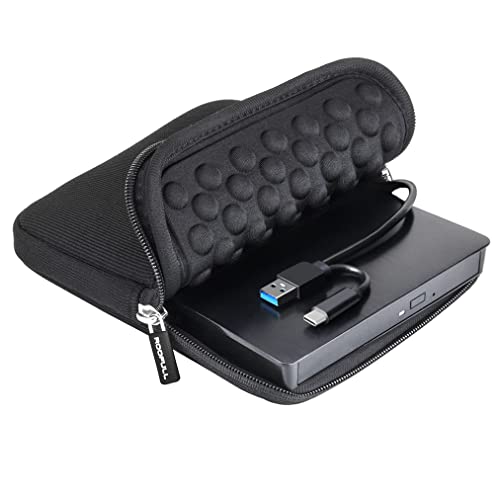
The ROOFULL drive highlights dual USB connectivity (USB‑A and USB‑C) with data transfer rates up to 5Gbps and fast DVD/CD read/write speeds. It ships with a carrying case, adding portability for travel or on‑the‑go use. Compatibility spans Windows, macOS, and Linux, and the drive supports most standard CD/DVD formats for reading, writing, or ripping. It emphasizes ease of use with a plug‑and‑play approach and durable construction for daily use.
Buying Guide
- Interface and power: USB 3.0 and USB-C offer faster transfers; ensure the port is powered adequately, especially on laptops. Some drives perform best when connected directly to a motherboard USB port rather than a hub.
- Compatibility: Look for broad OS support (Windows, macOS, Linux) and driver‑less operation where possible. Consider whether you need DVD writing (RW) or just reading, as some drives emphasize one function more than the other.
- Speed and durability: DVD read/write speeds (8x/24x typical) affect burn and read times. Ultra‑slim designs are portable but may sacrifice robustness; a carrying case helps for travel.
- Special features: Built‑in eject buttons, copper mesh tech for stability, USB hubs, and SD/TF card readers add value for multimedia workflows. Decide which extras matter for your use case.
- Power management: If you encounter recognition issues, try different USB ports or supply external power when available. Some models include troubleshooting guidance for power‑related problems.
When selecting an external disc drive, align the model with your primary tasks—media playback, burning, or data backup—and your device ecosystem. The options above cover a range of form factors, connector types, and OS compatibilities to fit most American households and workplaces. Always verify that your computer’s ports and operating system support the chosen drive’s interface and features before purchasing.