Answering your search for external cooling fans for PCs, this guide highlights five reliable options that keep hardware temperatures in check without adding clutter. Ideal for compact desktops, gaming consoles, routers, and external enclosures, these fans suit different setups and noise preferences. This quick overview helps buyers choose the right model for quiet operation, strong airflow, or flexible mounting.
| Product | Best For | Key Benefit |
|---|---|---|
| ELUTENG Dual USB 120mm | Dual-device cooling, quiet spaces | Two connected fans, multiple speed levels |
| AC Infinity MULTIFAN S3 | UL-certified, silent cooling | Ultra-quiet with long lifespan |
| GSCOLER X1 USB 120mm | Broad compatibility, strong airflow | High airflow with quiet operation |
| ELUTENG 80mm Dual Cooling | 13W compact cooling | Two 80mm fans, flexible placement |
| NewHail Quiet 120mm | AC-powered, adjustable speed | 3-speed controller, broad use cases |
ELUTENG Dual USB 120mm 2-in-1 Cooling Fan
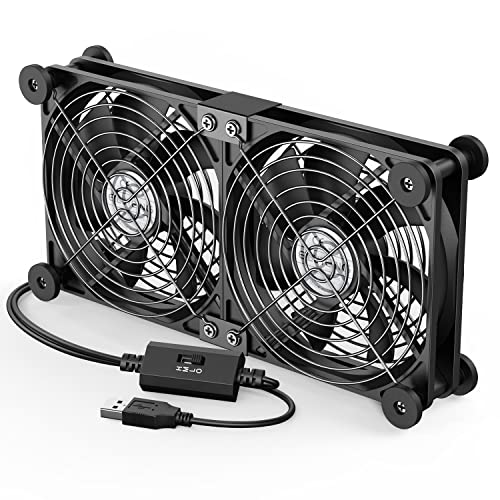
Best for: small to medium external enclosures, routers, gaming consoles, and laptops needing extra relief from heat. Why: dual-row design with two fans connected to a 5V USB port offers higher airflow than a single unit, with flexible horizontal or vertical mounting for tight spaces. The 3-speed controller lets you balance cooling with noise. Useful when you need fast cooling in a compact footprint. Caution: noise varies by speed; choose a lower setting for quiet environments.
AC Infinity MULTIFAN S3, Quiet USB Fan

Best for: media centers, receivers, DVRs, and compact PC cabinets needing a near-silent cooling solution. Why: UL-certified, designed for quiet operation with a multi-speed controller and durable dual-ball bearings. It can be laid flat or stood upright to fit various setups. Limitation: airflow varies with enclosure size; larger cases may require multiple units for optimal cooling.
GSCOLER X1 USB 120mm Cooling Fan

Best for: routers, mini PCs, consoles, and AV gear in need of quick, targeted cooling. Why: 120mm fan with 850RPM and 55.8 CFM provides strong airflow while maintaining low noise (about 18dB). The built-in universal compatibility makes it a versatile choice. Caution: performance may drop on very high-heat devices or in extremely dusty environments; regular cleaning helps maintain efficiency.
ELUTENG Dual Cooling Fan 80mm

Best for: compact routers, small AV receivers, or external drives where space is at a premium. Why: two 80mm fans paired together provide robust cooling despite a smaller footprint. Three-speed control allows tailoring airflow to a quiet study or a louder gaming environment. Limitation: the smaller size means lower maximum airflow compared with 120mm options, so it may be less effective for high-heat devices.
NewHail Quiet 120mm Router Fan Cooler

Best for: network gear, modems, and DVRs that need a flexible, adjustable cooling approach. Why: 120mm fan with a 3-speed controller offers quiet operation and broad applicability due to AC-powered versatility. The silicone feet help dampen vibrations, reducing surface noise. Caution: AC-powered setups require a convenient outlet and proper cable management to avoid clutter.
Buying Guide
What to consider when choosing an external PC cooling fan
- Size and mounting: Match the fan size (80mm vs 120mm) to the space around your device. Larger fans typically move more air at similar noise levels.
- Power source: USB-powered fans are simple for USB-equipped devices, while AC-powered fans offer steady performance for extended use and higher heat loads.
- Noise vs. airflow: Determine your tolerance for sound. Look for fans with dB ranges and adjustable speeds to balance noise and cooling.
- Durability and bearings: Hydraulics or dual-ball bearings extend life and smooth operation in constant use scenarios.
- Flexibility and orientation: Fans that can mount horizontally or vertically provide smarter placement in cramped spaces.
- Use-case alignment: Choose based on device type—routers and mediacenters benefit from quieter, compact fans; gaming PCs and external enclosures may need higher airflow.
Frequently Asked Questions
- What is the difference between USB-powered and AC-powered cooling fans? – USB fans are common for smaller devices and easy wiring; AC-powered fans handle higher load and longer runtimes but require a power outlet.
- How loud can these fans be in a quiet room? – Quiet models typically operate around 18–32 dB, depending on speed setting and load.
- Can external cooling fans improve performance for gaming consoles? – Yes, by reducing thermal throttling and maintaining steady performance, especially in compact setups.
- Is dual-fan or single-fan better for small enclosures? – Dual fans can provide more balanced airflow and redundancy, but a single high-CFM fan may suffice in some layouts.
- How important is bearing type? – Dual-ball or hydraulic bearings generally offer longer life and steadier airflow than sleeve bearings, especially in continuous use.
- Do these fans require any special maintenance? – Periodic cleaning of dust from grills and blades helps sustain airflow and reduces noise.
Summary: The five selected options provide a spectrum of sizes, power types, and noise profiles. For ultra-quiet living spaces, consider the AC Infinity MULTIFAN S3 or GSCOLER X1. For compact, USB-powered cooling, the ELUTENG 120mm Dual USB or ELUTENG 80mm model fits tightly space-constrained setups. If you need flexible mounting with AC power, NewHail Quiet 120mm is a solid choice.
Remember to measure available space, check power options, and define your noise tolerance before purchasing. The right external cooling fan can keep critical components cooler, extend device life, and maintain stable performance in everyday computing or entertainment hubs.