Answering the needs of anyone who needs to access, burn, or back up CDs and DVDs on a modern computer. This guide highlights five reliable external CD/DVD drives that work with Windows, macOS, Linux, and common PC brands. It’s ideal for creators, students, IT admins, and travelers who require portable, plug-and-play optical drives without fuss. Below you’ll find quick, direct comparisons, plus a Buying Guide and FAQs to help you choose confidently.
Overview Of Top 5 External CD/DVD Drives
- Amicool External DVD Drive — Best for versatile USB-C and USB 3.0 compatibility; great for mixed-device setups.
- Rioddas External CD/DVD Drive — Best for stable back-side desktop connections and reliable plug-and-play across OSes.
- Ziweo External CD/DVD Drive — Best for ultra-thin travel-friendly designs with dual ports.
- ORIGBELIE External CD/DVD Drive — Best for high speed and broad compatibility with Windows, Mac, and Linux.
- ROOFULL External CD DVD Drive — Best for proven long-term use and dual USB-C/USB-A connectivity with a protective case.
Amicool External DVD Drive: Slim, Dual-Interface Burner

The Amicool drive pairs USB 3.0 and Type-C interfaces for fast data transfer and broad compatibility. It’s designed as a plug-and-play solution that works with Windows, macOS, and Linux. The device is best for users who need simple setup and immediate recognition without extra drivers. A noted caveat is that some desktops benefit from direct USB port connections rather than hubs to maintain stable power and performance. It reads/writes DVD+R, DVD-R, CD-R, and CD-RW, with speeds up to 8x for DVD and 24x for CD, and does not support DVD-RAM or Blu-ray.
Best for: mixed-device environments where USB-C or USB-A are common, including students and home users needing quick, universal compatibility.
Why selected: It balances dual-ports with solid read/write performance and broad OS support in a slim chassis, making it a practical everyday drive.
Caution: For desktops, use rear motherboard USB ports to ensure enough power; avoid USB hubs where possible.
Rioddas External CD/DVD Drive: Reliable Plug-and-Play

The Rioddas drive emphasizes effortless setup with USB power and a practical back-panel port connection for desktops. It’s compatible with USB 3.0 (backward compatible with USB 2.0) and claims high-speed data transfer up to 5Gbps. The drive includes a copper mesh technology to improve stability and reduce errors during reading and burning. An integrated eject button helps retrieve discs even when the host PC stalls, promoting resilience in daily use.
Best for: Power users who value straightforward, dependable plug-and-play performance across Windows, macOS, and Linux, plus a robust physical eject feature.
Why selected: Its emphasis on stable connections and fault tolerance supports consistent burning and playback in office and travel scenarios.
Caution: If the drive isn’t recognized initially, switching to a different USB port often resolves recognition issues.
Ziweo External CD/DVD Drive: Ultra-Thin, Dual Ports

The Ziweo drive offers both USB 3.0 and USB-C, enabling direct plug-and-play on most modern laptops and desktops. It is designed for travel, with an ultra-thin profile that fits easily in bags. It supports up to 8x DVD read/write and 24x CD read/write, with data transfer speeds up to 5Gbps. The integrated cable is non-detachable to prevent loss, and it’s designed to work across Windows, macOS, and Linux. Notably, it’s not intended for use with TVs or tablets and excludes some Chromebook environments.
Best for: Frequent travelers and mobile workers who need a compact, dependable drive with dual ports for broad compatibility.
Why selected: The built-in dual connectors and slim form factor suit on-the-go usage without sacrificing performance.
Caution: The non-detachable cable means you’ll manage a fixed cable length; plan storage accordingly.
ORIGBELIE External CD/DVD Drive: High-Speed And Broad Support

The ORIGBELIE drive emphasizes USB 3.0 high-speed transmission with optional USB-C compatibility, delivering up to 8x DVD and 24x CD read/write speeds. It is designed for wide OS support, including Windows, macOS, and Linux distros, with a note about power stability when used with desktops via rear USB ports. The device is described as plug-and-play, avoiding driver installations. It is compatible with a broad set of devices but excludes certain platforms and devices such as cars, TVs, tablets, and specific Android environments.
Best for: Windows, Mac, and Linux users needing fast, broad compatibility in a single drive with minimal setup.
Why selected: It combines high-speed performance with wide OS support, appealing to mixed computer environments in both home and small office settings.
Caution: Not all Chromebooks or tablet setups are supported; ensure your host OS is listed in compatibility notes.
ROOFULL External CD DVD Drive: Time-Tested And Sturdy
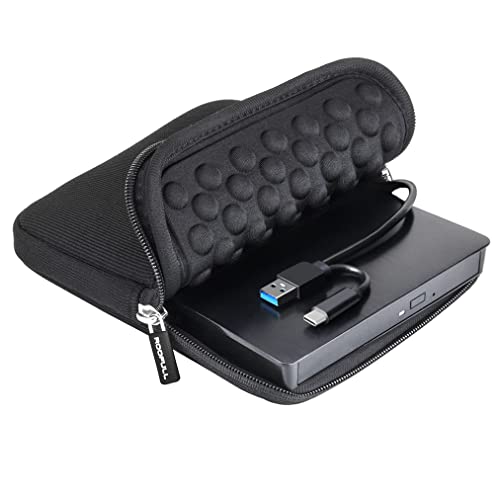
The ROOFULL drive is positioned as a time-tested option, with a protective carrying case and universal USB 3.0/Type-C connectivity. It supports standard CD/DVD formats with max read/write speeds of 8x for DVD and 24x for CD, and up to 5 Gbps data transfer. Its dual-connector approach reduces the need for adapters and aims for stability in long-term use. The case adds portability and protection for on-the-go tasks and backups.
Best for: Users requiring a durable, proven external drive with travel-ready protection and reliable cross-platform compatibility.
Why selected: The long-standing presence in the market and included carrying case makes it a dependable choice for daily backups and media playback.
Caution: As with most external drives, power stability from the host USB port is important; prefer rear-panel USB ports on desktops when possible.
Buying Guide: Key Considerations For Choosing An External CD/DVD Drive
- Interface And Power: Look for USB 3.0 or USB-C, ideally both. Dual ports provide flexibility, but ensure your computer can deliver enough power without hubs.
- Speed And Compatibility: Check max DVD read/write and CD read/write speeds (typical values are 8x and 24x respectively). Verify OS support (Windows 10/11, macOS, Linux) and whether any extra drivers are needed.
- Portability vs. Durability: Slim designs are portable but may be more susceptible to minor damage. A protective carrying case is a plus for travel.
- Use Case: If you primarily back up data, burn software, or play discs, consider drives marketed as reliable for reading and writing across common formats (DVD±R, CD-RW, etc.). If you only need occasional disc access, a basic drive can suffice.
- Power Stability: Desktop use often benefits from connecting to rear USB ports for stable power; avoid hubs when possible to minimize read/write interruptions.
- Limitations: Most drives do not support Blu-ray or 4K discs. Some devices may not work with certain TVs, tablets, or specific car systems; verify device compatibility before purchase.
Frequently Asked Questions
- Will these drives work with a Chromebook? Some drives may not support ChromeOS; check the product notes for specific Chromebook compatibility.
- Do I need drivers to use these drives? Most are Plug-and-Play and do not require drivers on Windows, macOS, or Linux. Some older systems may require minimal configuration.
- Can I use these drives to burn Blu-ray discs? No, most listed drives do not support Blu-ray or 4K media.
- Is a USB hub recommended? No, hubs can prevent stable power delivery; connect directly to a computer’s USB port when possible.
- What is the maximum data transfer speed? Many drives offer up to 5 Gbps with USB 3.0/USB-C; actual speeds depend on the disc and system.
- Are these drives suitable for desktop PCs only? They work with laptops and desktops, but power and port availability on desktops matter for reliable performance.
Summary Table Of The Five Selected Drives
| Product | Best For | Port Type(s) | Maximum DVD/CD Speeds | Notable Limitation |
|---|---|---|---|---|
| Amicool External DVD Drive | Mixed-device setups | USB 3.0 and USB-C | 8x DVD, 24x CD | Does not support Blu-ray |
| Rioddas External CD/DVD Drive | Stable desktop use | USB 3.0 (backward compatible) | 8x DVD, 24x CD (typical figures) | Requires direct USB connection for best performance |
| Ziweo External CD/DVD Drive | Travel and portability | USB 3.0 and USB-C | 8x DVD, 24x CD | Non-detachable cable |
| ORIGBELIE External CD/DVD Drive | Broad OS compatibility | USB 3.0 and USB-C | 8x DVD, 24x CD | Not all automotive or tablet setups supported |
| ROOFULL External CD/DVD Drive | Durability with travel case | USB 3.0 and Type-C | 8x DVD, 24x CD | Power stability still matters with desktops |
These drives provide practical, plug-and-play access to optical media across Windows, macOS, and Linux systems. When choosing, prioritize the interface you already use, the portability you need, and how you’ll power the device in your typical setup. For office tasks and media playback, a stable, USB-backpowered drive with reliable error correction offers the best value. For frequent travelers, a slim, dual-port option with a carrying case is often the most convenient.