Finding the right extended monitor for a laptop can amplify multitasking, travel efficiency, and collaboration. The following selection highlights 5 popular USB-C/HDMI-enabled screen extenders designed to add one, two, or three portable displays. Each option supports plug-and-play setup, varies in size from 14 to 15.6 inches, and offers different rotation and stand capabilities to fit your work style.
Summary Table
- KYY X90D – 15.6″ dual-screen with one-cable USB-C connection
- KEFEYA 14″ – 14″ dual-screen, driver-free with USB-C/HDMI
- QQH Z80A – 15.6″ ultra-slim triple-screen with one-cable option (driver needed)
- CIDETTY 14″ – Ultra-slim 14″ with built-in speakers, plug-and-play
- Funhill 14″ – 14″ dual-screen with broad connectivity and rotation
Product Overview and Buying Considerations
External monitor extenders vary in screen count, connectivity, and portability. When choosing, consider compatibility with your laptop’s ports, whether you prefer single-cable USB-C to power both displays, and if you need built-in speakers or a kickstand. Driver requirements can affect setup time, so a driver-free option may appeal to users seeking immediate use. Screen size, brightness, and color accuracy matter for tasks like design, video conferencing, or data review. Weight and folding angles influence travel readiness and desk space in various environments.
KYY 15.6″ Triple Screen Extender X90D

KYY’s X90D delivers two 15.6-inch FHD IPS panels for a full triple-screen setup in a portable package. It uses a single USB-C to USB-C connection to simplify installation, reducing cable clutter. The system supports cross-platform use, including Windows, macOS, Chrome OS, Android, and Linux, with drivers required for full functionality. A 178° viewing angle enhances collaborative meetings, while the included kickstand and 360° rotation provide flexible working angles for desks or on the go.
KEFEYA 14″ Dual Screen Extender

KEFEYA offers a 14″ FHD 1080P IPS display with a dual-screen layout designed to boost efficiency. The setup is plug-and-play, with USB-C and HDMI options and included cables for quick configuration. It emphasizes productivity, claiming up to 200% efficiency gains by supporting multiple windows simultaneously. The monitor features a 16:9 aspect ratio, 60Hz refresh, and a 300-nit brightness rating for clear visuals in varied lighting conditions. Users can adjust brightness and contrast through the display controls for comfortable viewing.
QQH 15.6” Triple Portable Monitor Z80A

QQH presents a slim 15.6-inch triple-screen extender designed for plug-and-play operation with Mac, Windows, and Android. A CNC aluminum alloy build adds durability, while the aluminum frame keeps the device lightweight. It supports a one-cable connection after driver installation and includes USB-C/USB-A and HDMI cables. The Z80A offers a 1920×1080 IPS panel, a wide viewing angle, and a built-in stand with 360° rotation, making it suitable for travel or shared workspaces. Note that a driver may be required for full functionality.
CIDETTY 14″ FHD Portable Monitor

Cidetty’s 14″ FHD IPS display emphasizes color accuracy and eye comfort with blue light filtering and anti-glare tech. It is compatible across Windows, macOS, Linux, and popular gaming consoles, though not compatible with certain Apple Silicon or Surface devices with single USB-C ports. The monitor is ultra-slim and lightweight, with built-in speakers and a protective case for easy portability—ideal for travelers who want a compact dual-monitor setup without adding bulk.
Funhill 14″ Dual Screen Extender

Funhill’s dual-screen extender provides up to a 200% efficiency boost by expanding a laptop into two screens. It supports 0–280° rotation for personalized viewing angles and a mix of extended, duplicate, or portrait modes. The 14″ 1080P IPS panel delivers solid color and clarity, with included cables covering USB-C, USB-A, DP/HDMI, and a power solution. A built-in back panel and top hook help stabilize the setup on the laptop, making it a practical option for frequent travelers and mobile workers.
Wixzet 14″ Triple Screen Extender

Wixzet’s 14-inch triple-screen extender aims to maximize on-the-go productivity with a lighter form factor and auto-adjust width. It supports MacOS/Windows/Chrome/Dex and comes with a one-button auto-stretch feature for quick setup across laptops from 13″ to 17″. The design includes a reinforced top hook and a sturdy rear stand, enabling stable multi-screen configurations while traveling. The triple-display setup can boost multitasking by providing independent brightness and display controls for each screen, enhancing comfort and efficiency.
Zerfis 14″ Ultra-Slim Portable Screen Extender
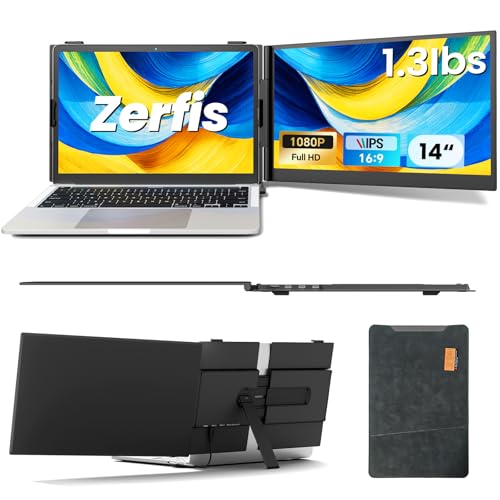
Zerfis emphasizes ultra-portability with a 6.5mm-thick, 1.3 lb design. The 14″ IPS display offers 1920x1080p resolution, 1000:1 contrast, 100% sRGB, and up to 300 nits brightness. It supports extended, mirrored, and portrait modes and includes a top hook and adjustable rear stand for versatile angles. The lightweight form factor makes it a convenient companion for travelers who need a compact dual-monitor setup without sacrificing performance.
ZUMWALT 14″ Triple Portable Monitor

ZUMWALT offers a triple-screen setup on a 14″ display platform, compatible with Mac, Windows, Chrome, and Android. It emphasizes wide compatibility and a 300% productivity boost by expanding a laptop into three screens with extended or duplicate modes. The device remains slim and portable for mobile workspaces, enabling users to manage data, design tools, and communications across multiple screens with ease. Note compatibility exclusions for older MacBook models.
Buying Guide: Key Purchase Considerations
- Ports and compatibility: Verify USB-C with power delivery and HDMI support, plus compatibility with your operating system. Driver requirements can affect setup time and features.
- Screen count and layout: Decide between dual or triple displays based on your multitasking needs. Consider whether a built-in stand or kickstand fits your workspace.
- Portability vs. performance: Lighter models are ideal for travel, while larger displays offer more workspace. Balance weight, thickness, and battery considerations if you plan to use away from power outlets.
- Color and brightness: For design or media tasks, prioritize IPS panels, high brightness (nits), and wide color gamut (sRGB/Adobe RGB coverage).
- Power and setup: One-cable USB-C connections simplify wiring, but ensure your laptop’s USB-C port provides power delivery and video output. Some models require driver installation for full functionality.
- Durability and protection: Look for durable shells, anti-glare coatings, and protective cases for travel, especially if you frequently move between locations.
- Speakers and audio: Built-in speakers are helpful for meetings and media when external audio isn’t available.
All listed products serve the core goal of expanding screen real estate for laptops. Readers should match features to their typical environments—home office, coworking spaces, or travel—while considering whether they prefer a quick, driver-free setup or are comfortable managing drivers for a triple-screen configuration.