For anyone spending long hours at a desk, a well-designed wireless ergonomic mouse can reduce strain, improve posture, and boost focus. This guide highlights five top options that blend comfort with reliable wireless performance, covering different hand sizes, connection methods, and DPI ranges. Each picks emphasizes a natural “handshake” grip, quiet operation, and smooth tracking to support daily work, coding, or design tasks.
| Product | Brand | Key Benefit |
|---|---|---|
| Logitech Lift Vertical Ergonomic Mouse | Logitech | Natural forearm posture, quiet clicks |
| TECKNET Ergonomic Mouse | TECKNET | Multi-device switching, high DPI, silent clicks |
| Anker 4-Button Vertical Ergonomic Mouse | Anker | Wide DPI range, smooth tracking |
| Logitech MX Vertical Wireless Mouse | Logitech | Reduced muscle strain, 57° vertical angle |
| ProtoArc EM11 NL Ergonomic Mouse | ProtoArc | Multi-device 3-way connectivity, rechargeable |
Logitech Lift Vertical Ergonomic Mouse

The Logitech Lift is designed to elevate your hand into a natural position for reduced forearm strain. Its compact profile fits many right-handed users with a softly textured grip and a dedicated thumb rest for prolonged comfort. The 57-degree forearm angle supports day-long productivity by encouraging a more ergonomic posture, while providing reliable wireless connectivity via Bluetooth or USB receiver options.
TECKNET Ergonomic Wireless Vertical Mouse

TECKNET’s vertical design supports a three-mode connection: Bluetooth 5.0/3.0 and a built-in 2.4GHz USB A receiver. This model favors flexibility, including seamless device switching and a high maximum DPI (up to 4800) with six adjustable levels. Silent left and right-click operation helps maintain focus in quiet environments, making it a strong option for shared desks or libraries.
Anker 2.4G Wireless Vertical Ergonomic Optical Mouse
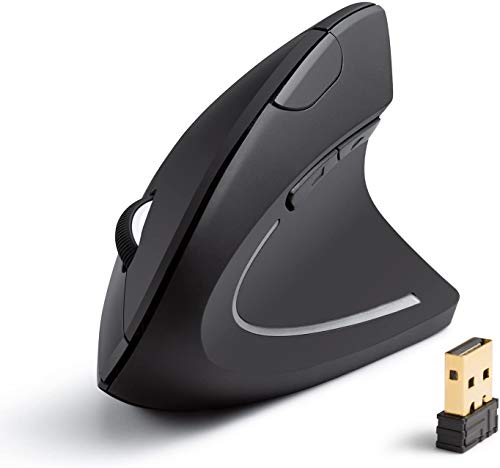
Anker’s vertical ergonomic mouse emphasizes a neutral handshake position to minimize wrist strain. It offers multiple DPI settings (800/1200/1600) for precision across surfaces, and additional back/forward buttons enhances web navigation. It’s a practical choice for users who need robust performance on varied work surfaces and longer sessions without fatigue.
Logitech MX Vertical Wireless Mouse

The MX Vertical focuses on reducing muscle strain with a natural handshake position and a distinctive 57° vertical angle. Its design supports improved wrist posture while preserving high performance for multi-computer work environments. This model is well-suited for users who value long-term comfort and are engaged in tasks requiring steady, precise cursor control.
ProtoArc EM11 NL Bluetooth Rechargeable Vertical Mouse

ProtoArc’s EM11 NL supports up to three devices via dual Bluetooth 5.0 and 2.4G USB-A connectivity, making it a flexible choice for those who switch between laptops, desktops, and tablets. A built-in rechargeable battery via USB-C keeps power management simple, while its vertical orientation supports a neutral wrist position for enhanced comfort during longer sessions.
Buying Guide: Key Purchase Considerations
- Ergonomic fit and orientation: Look for a vertical or “handshake” design that places the forearm in a natural position. Consider hand size and whether the mouse supports a snug thumb rest or palm-supported grip.
- Connection options: Wireless mice vary by Bluetooth, 2.4GHz USB, or dual-mode compatibility. If you frequently swap devices or work on-the-go, multi-device support and easy pairing are critical.
- Sensor and DPI range: Higher DPI enables finer cursor control, especially on high-resolution displays. Assess whether you need adjustable DPI (e.g., 800–4800) for tasks like design, gaming, or detailed editing.
- Click latency and silence: Quiet-click models reduce notifications to colleagues. For shared workspaces, consider models with silent left/right buttons.
- Battery life and charging: Rechargeable batteries are convenient, particularly with USB-C charging for fast top-ups. Check whether charging can occur while the mouse is in use.
- Durability and build quality: Materials, grip texture, and button longevity influence long-term comfort. A soft-grip surface typically benefits frequent users.
- Platform compatibility: Ensure the mouse supports your primary OS (Windows, macOS, Linux) and any specific productivity tools you rely on.
- Service and warranty: A solid return policy and a reliable warranty can help if comfort or fit isn’t right after extended use.
When selecting an ergonomic wireless mouse, prioritize long-term comfort, reliable connectivity, and a design that aligns with your daily workflow. The five models above offer varied combinations of grip style, DPI, and multi-device support to suit different work environments—from quiet libraries to bustling offices and creative studios.