For computer users who spend hours at a desk, an ergonomic wired mouse can reduce strain while preserving precision. This guide highlights five dependable options that prioritize neutral wrist posture, adjustable sensitivity, and reliable wired connections. Each option emphasizes comfort, precise tracking, and thoughtful button layouts to boost daily tasks, web browsing, and light gaming.
| Product | Brand | DPI Options |
|---|---|---|
| Anker USB Wired Vertical Mouse | Anker | 1000 / 1600 |
| KUNSI Wired Ergonomic Mouse | KUNSI | 800 / 1200 / 1600 |
| TECKNET Wired Mouse (4 DPI) | TECKNET | 1000 / 1600 / 3200 / 6400 |
| Nulea M504 Wireless Vertical Mouse | Nulea | 800 / 1200 / 2400 / 3200 |
| Perixx PERIMICE-513 | Perixx | 1000 / 1600 / 3200 / 6400 |
Anker USB Wired Vertical Mouse

The Anker USB Wired Vertical Mouse prioritizes ergonomic comfort with a natural handshake position designed to reduce wrist and forearm strain during long work sessions. The 1000/1600 DPI optical sensor delivers precise tracking on many surfaces, helping users navigate web pages and documents smoothly. Additional forward and back buttons support efficient browsing and workflow, making it suitable for office tasks, research, and extended computer use without sacrificing speed.
In daily use, the vertical design minimizes pronation of the forearm, aligning the hand in a comfortable posture. The wired connection ensures stable performance with minimal latency, which is beneficial for professionals who require dependable input during calls, presentations, or editing tasks. The device is compact enough for desk setups where space is at a premium, while offering enough grip width to accommodate different hand sizes.
KUNSI Wired Ergonomic Mouse
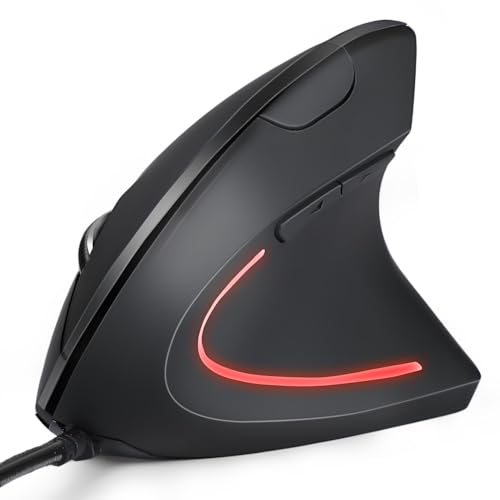
The KUNSI vertical mouse uses a true ergonomic vertical design to keep the arm and wrist in a natural handshake position. Its USB wired setup ensures immediate plug-and-play with no driver installation, while a 1.8-meter cable provides flexible desktop reach. With 800/1200/1600 adjustable DPI, it offers a good balance of sensitivity and control for precise cursor placement, making it well-suited for office work, document editing, and general productivity tasks.
The vertical orientation helps reduce wrist discomfort during long sessions, and the responsive scroll area and forward/back navigation buttons enhance workflow. This option is particularly appealing to users seeking a straightforward, comfortable alternative to traditional mice without wireless interference or battery concerns.
TECKNET Wired Mouse (4 DPI)

The TECKNET 4 DPI wired mouse features a vertical ergonomic design with four adjustable DPI levels (6400/3200/1600/1000) to tailor sensitivity for various tasks. An upgraded sensor delivers smooth, precise tracking across diverse surfaces, while a visual LED indicator confirms the selected DPI. The vertical posture helps reduce wrist strain, and the large back/forward buttons support efficient navigation in documents and browsers.
Best suited for medium to large hands, this model emphasizes a natural grip and stability. Its wired connection eliminates battery management concerns and ensures consistent performance during long workdays, gaming sessions, or multimedia editing where cursor precision matters.
TECKNET USB Wired Mouse (Gray)

The TECKNET USB wired mouse combines six buttons with four adjustable DPI levels, offering reliable productivity features in a compact form. Its ergonomic design includes soft rubber grips that help maintain a comfortable hold during long sessions. The 5-foot cable length provides ample reach for most desk configurations, and the five-button layout is crafted for efficient browsing and document handling.
Engineered for durability and everyday use, this model emphasizes longevity through tested buttons and sensor reliability. It’s a versatile option for students, home offices, and shared workspaces where a dependable wired device is preferred over wireless models.
Nulea M504 Wired Vertical Mouse (Grey)

The Nulea M504 vertical mouse emphasizes a 57-degree natural grip to promote a comfortable forearm posture, reducing wrist strain over long workdays. Four adjustable DPI levels (800/1200/2400/3200) let users adapt responsiveness for browsing, editing, or design tasks. Plug-and-play USB connectivity with a 5.9-foot cable keeps setup simple and portable, while the vertical design supports a natural hand position to improve posture during continuous computer use.
There is an optional RGB backlighting in some variants to provide visual appeal, but the core focus remains on ergonomic support, ease of use, and reliable wired performance. This model suits users who want a visually distinct option without sacrificing comfort or control.
Nulea M504 Wired Vertical Mouse (Pink)

The pink variant of the Nulea M504 carries the same ergonomic benefits as its grey counterpart, featuring a 57-degree natural grip and four adjustable DPIs (800/1200/2400/3200). The plug-and-play USB 2.0 interface and a 1.8-meter cable offer flexibility for desks with generous space. This option provides the same comfortable posture and precise tracking in a color that appeals to users seeking a personalized setup without compromising ergonomics.
Perixx PERIMICE-513
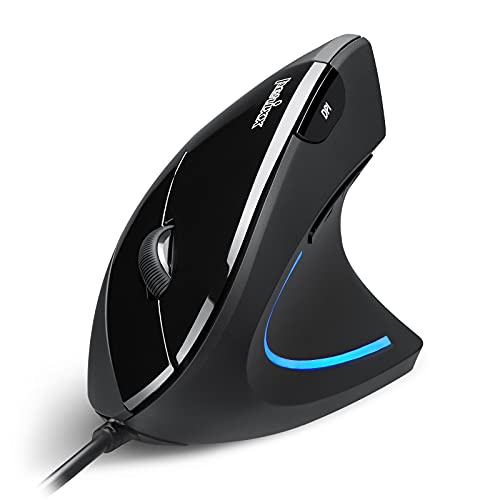
The Perixx PERIMICE-513 adopts a vertical design to keep the wrist in a neutral orientation, reducing strain during long sessions. It features six buttons and a range of DPI options (1000/1600/3200/6400) for tailored precision across tasks. Quiet left and right mouse buttons support a focused work environment, though the scroll wheel and back/forward buttons may produce some audible feedback. The vertical form factor requires an acclimation period but offers long-term benefits for repetitive tasks and extended computing sessions.
Logitech M500s

The Logitech M500s offers advanced corded performance with hyper-fast scrolling and tilt features for precise navigation through long documents. Customizable buttons and high-precision tracking, along with a USB plug-and-play interface, make it a versatile option for professionals who require efficient document editing, web browsing, and multi-application workflows. The ergonomic, full-size design provides palm support and comfortable grip for extended use, reducing fatigue during extended sessions.
Buying Guide: Key Purchase Considerations
- Ergonomic design and posture: Vertical mice encourage a neutral forearm position, reducing wrist and elbow strain. Consider whether you prefer a true vertical orientation or a slightly angled design for comfort.
- Grip style and hand size: Some models suit medium-to-large hands, while others work well for smaller hands. Try the width, button placement, and palm support to ensure a natural grip.
- DPI and sensor performance: Higher DPI offers finer cursor control, but practicality depends on your tasks. Ensure the DPI range covers your typical usage, from browsing to design work.
- Wired reliability: A wired connection eliminates battery management and wireless interference, making it ideal for productivity tasks and gaming alike.
- Buttons and customization: Extra buttons (forward/back, DPI toggles) can boost efficiency. Check whether the buttons are easy to reach and durable over time.
- Build quality and durability: Look for solid materials and tested button lifespans. A well-built mouse reduces wear and maintenance needs.
- Compatibility and plug-and-play: Most wired ergonomic mice work with Windows and macOS, often without drivers. Verify compatibility with your current system and peripherals.
- Adaptation period: Some vertical mice require a short acclimation period. A configurable DPI and comfortable grip can speed up the transition.
- Desk space and cable length: Ensure the cable length provides ample reach for your workstation and monitor setup, especially in compact spaces.
- Noise considerations: Silent buttons can be beneficial in quiet environments, though some click sounds may remain on the wheel or back/forward keys.