For students, professionals, and creative thinkers, digital notebooks blend the feel of writing with the power of instant digital access. Below is a curated guide featuring five leading options that emphasize real-time syncing, OCR text conversion, and seamless sharing. Each choice is evaluated for compatibility with common devices, note accuracy, and overall value for note taking in meetings, classes, and personal planning.
Summary Table
| Product | Key Benefit | Ideal For |
|---|---|---|
| XPPen 3 in 1 Color Digital Notebook 10.95″ | AG Nano-Etched LCD with TCL NXTpaper tech; 90Hz display | Color-coded notes, meetings, study sessions |
| Ophayapen Smart Sync Pen | Real-time sync, OCR conversion, cross-device search | Handwritten to digital, on-the-go capture |
| HUION Note 2-in-1 | Paper-like experience with vector capture to app | Handwritten notes plus drawing in meetings |
| OPHAYA Sync Smart Pen (5-Pack) | Multi-user sharing, instant sync, diverse export formats | Team projects, classroom use |
| Yuan Smart Pen Writing Set | Real-time sync, offline storage, vector capture | Remote work and brainstorming |
XPPen 3 in 1 Color Digital Notebook

XP-Pen presents a versatile digital notebook that blends traditional note taking with modern display tech. The 10.95-inch AG nano-etched LCD uses TCL NXTpaper 3.0 to reduce ambient glare and mimic a paper-like feel, without relying on an e-ink panel. It supports a 90Hz refresh rate for smooth writing and viewing, with 16.7 million color support and a brightness range suitable for reading and writing in various environments. The device offers three color modes—Monochrome LCD, Light Color, and Nature Color—providing flexible visual options for different tasks. This model adopts an Android platform and includes a magnetic folio setup for convenient writing and reading in meetings, classes, or study sessions. Note that it is not an e-ink tablet, but a regular Android device designed for digital note taking.
Key features include an AG etched glass texture for a tactile note-taking feel, a high-contrast display, and a form factor that supports quick switching between modes, which can help with visual organization in projects or class notes. For users who want a color-rich digital notebook with smooth performance and a paper-like display, this option combines reading, sketching, and annotation in one device. The included X-key enables fast mode switching, enhancing efficiency during brainstorming or classroom activities.
Ophayapen Smart Sync Pen for Note Taking

Ophayapen’s Smart Sync Pen pairs with a notebook and a companion app to deliver real-time digitization of handwritten notes and drawings. The Ophaya Pro+ app supports both iOS and Android devices, enabling instant syncing across smartphones and tablets. A standout feature is optical character recognition (OCR), which converts handwriting to digital text for easier editing, sharing, and archiving. The system also provides searchable handwriting notes, allowing users to locate content via keywords, tags, or timestamps. This setup is well-suited for students and professionals who need rapid digitization without sacrificing the tactile experience of writing on paper.
HUION Note 2-in-1 Digital Notebook

Huion’s Note combines a traditional A5 notepad with a digital notebook experience. The 2-in-1 approach preserves the tactile benefit of writing on paper while capturing your strokes digitally through a connected app. The Note app runs on both iOS and Android, enabling vector-based transfer of handwritten content to your device. An audio recording feature can be used to attach context to your notes, ensuring nothing is missed during lectures or meetings. This solution is particularly appealing for users who want a physical writing surface with seamless digital integration.
OPHAYA Sync Smart Pen (5-Pack)

This five-pack from Ophaya is designed for teams and classrooms that require multiple participants to digitize notes quickly. The Smart Pen pairs with Ophaya Pro+ and supports instant syncing across devices, enabling real-time collaboration and sharing. It emphasizes multi-format exporting, allowing notes to be saved as PDFs, Word documents, images, or even MP4 files. The product supports OCR and searchable notes, making it straightforward to locate specific ideas or references later. The multi-user capability makes it a strong choice for collaborative projects, group study, or training sessions.
Yuan Smart Pen Writing Set

The Yuan Smart Pen Writing Set delivers real-time vector capture of notes to iOS or Android devices via the Yuan app. The system emphasizes offline storage, allowing note capture even without an active network connection. This can be beneficial for classrooms or fieldwork where connectivity is unreliable. Users can store digital copies locally, with synchronization occurring when a connection is available. The setup focuses on a natural writing experience with quick access to stored content and easy retrieval through the app’s search features.
Mloas Smart Sync Pen for Note Taking

Mloas offers a comprehensive digital notebook experience with a dedicated app that enables real-time synchronization and offline storage. The device supports handwriting-to-text conversion via OCR, making it easy to export notes as Word documents. The ability to search handwriting by keywords enhances organization, while audio recording adds another layer of capture for meetings and brainstorming sessions. This solution targets users who want an all-in-one package with robust offline capabilities and reliable text conversion.
Smart Pen For Note Taking Set
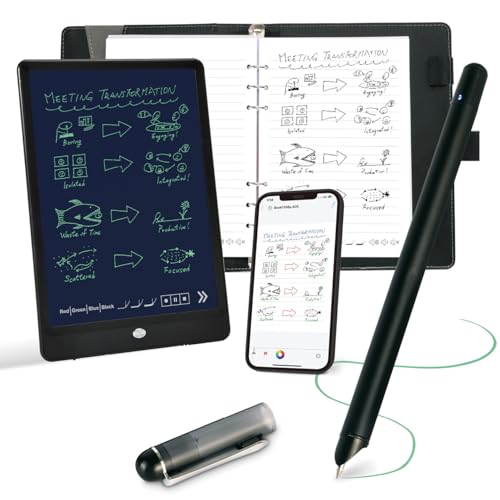
This Ophaya smart pen and notebook set emphasizes an all-in-one approach for paper-to-digital workflows. The kit combines a writing board, a notebook, and an app to enable instant digital copies, efficient saving, sharing, and searching. OCR converts handwriting to digital text, and the app links notes to audio recordings for context. The system targets users who want a tactile writing experience with strong searchability and integration with mobile devices.
inq Smart Writing Set
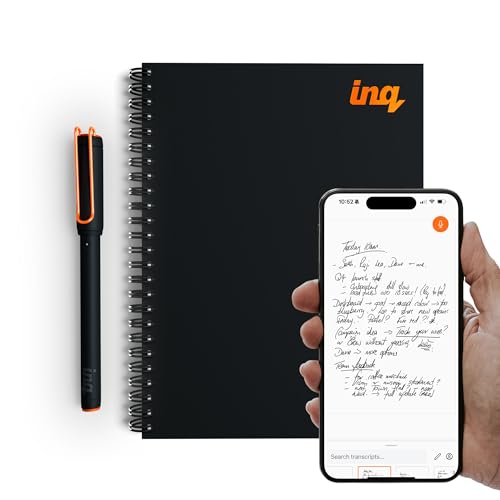
The inq smart writing set focuses on real ink on real paper with digital capture. The inq app for iPhone and Android enables syncing to a web app for extended access. Transcription features support converting handwriting to text, including cursive and diagrams, helping users digitize study notes, meetings, or planning documents. This option provides a familiar handwriting experience with cloud-based access and cross-device compatibility.
Buying Guide: Key Purchase Considerations
- Compatibility and ecosystem: Consider whether the device works well with your existing smartphone, tablet, or computer ecosystem, and whether it supports both iOS and Android if you rotate devices.
- Digitization accuracy: OCR capabilities and handwriting recognition accuracy determine how much editing is required after digitization. Look for models with reliable text conversion and keyword search.
- Real-time syncing: For collaborative work or study groups, real-time sync across devices can save time and prevent data loss during meetings or classes.
- Offline storage and connectivity: If you travel or work in environments with intermittent internet, offline storage and delay-free syncing are essential features.
- Note-taking modality: Decide between a digital display with a paper-like feel (LCD/NXTpaper) and traditional paper plus digital capture. Each offers a different writing experience and durability profile.
- Export formats: Check whether the system supports exporting to PDF, Word, or image formats for easy sharing, archiving, or collaboration.
- Multi-user support: If you need to share a notebook across a team or class, look for multi-user syncing and permissions controls to avoid confusion.
- Battery and power: Consider battery life or whether the device is battery-free, and how that affects daily use and portability.
- Form factor and feel: The texture of the writing surface and the ergonomics of the device impact comfort during long note-taking sessions.