Choosing the right electronic logging device (ELD) helps fleets stay compliant with FMCSA rules, streamline hours-of-service (HOS) reporting, and minimize downtime. The following selections focus on reliability, ease of installation, and broad compatibility with common truck models and OBD ports. Each entry includes core features, compatibility notes, and practical considerations to help you compare options quickly.
| Product | Brand |
|---|---|
| FLEX ELD PT30 ELD Device + 9-Pin Cable for Freightliner | Generic |
| ELD Mandate ELD | ELD Mandate |
| ELD Device PT30 +16-Pin Cable for Volvo/Mack | Generic |
| PT30 ELD Device + 16-Pin OBDII Cable | Generic |
| ELD Device PT30 Black Square Box | Generic |
FLEX ELD PT30 ELD Device For Freightliner

The FLEX ELD PT30 is a compact, portable device designed for quick installation in trucks with 9-pin connections commonly used by Freightliner models. Its small, sturdy casing includes mounting holes for secure placement in the cab. A clearly labeled display provides essential information such as serial number, MAC address, and FCC ID, aiding audits and maintenance checks. While primarily a transmitter/receiver, its streamlined design supports straightforward connectivity for data transfer between the truck’s ECU and ELD software.
Key considerations
- 9-pin compatibility with Freightliner and similar tractor configurations
- Portable form factor and secure mounting options
- Clear labeling for quick diagnostics and verification
ELD Mandate ELD

The ELD Mandate device emphasizes FMCSA-compliant electronic logging with a focus on ease of installation and robust support. It includes a one-year subscription option that covers logbook management and driver inspection reports, helping carriers maintain HOS compliance and improve vehicle safety. The device is designed for straightforward setup with guided steps and a demo option, making it suitable for fleets that want a turnkey solution with reliable customer service.
Key considerations
- FMCSA-certified ELD with included subscription options
- User-friendly installation and support infrastructure
- Logbook management and inspection reporting features
ELD Device PT30 +16-Pin Cable (Volvo/Mack)
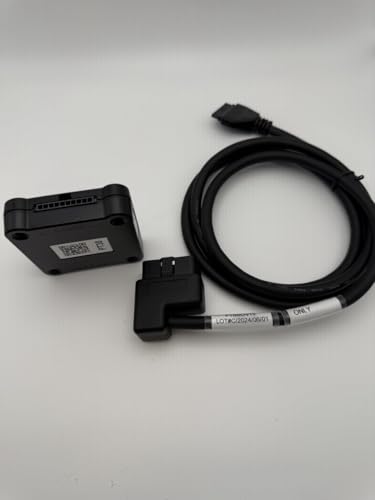
This PT30 model targets heavy-duty vehicles, offering a compact device paired with a 16-pin cable for Volvo and Mack applications. It highlights real-time monitoring features such as engine diagnostics and parameter readouts, alongside a clear display for identifying device information. The setup aims to provide quick integration with existing ELD software and robust data transfer to support ongoing compliance and fleet management.
Key considerations
- Specialized 16-pin cable compatibility for heavy-duty trucks
- Real-time engine and diagnostic data access
- Clear on-device labeling for easy verification
PT30 ELD Device + 16-Pin OBDII Cable
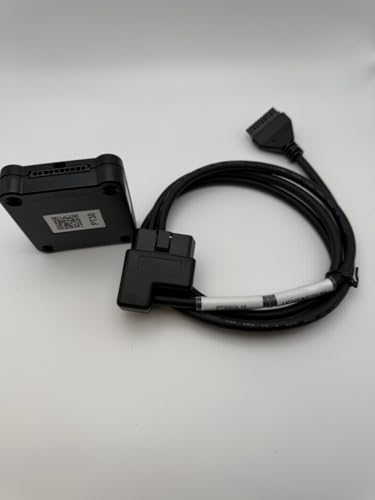
Designed for pickups and lighter-duty applications, this PT30 model uses a 16-pin OBDII cable to facilitate data logging and HOS tracking. It is advertised as compatible with any ELD/HOS app and Bluetooth-enabled devices, offering flexible integration with a range of mobile devices. Its emphasis on OBDII compatibility makes it a practical option for mixed fleets with both light and medium-duty trucks.
Key considerations
- 16-pin OBDII compatibility for light to medium trucks
- Works with various ELD/HOS applications and Bluetooth devices
- Portable, easy-to-install design
ELD Device PT30 Black Square Box (No Cable)

This PT30 square-box ELD emphasizes a compact, cable-free form factor designed for vehicles that already have compatible wiring. It retains a reference display with essential device identifiers and relies on wireless data transfer for ELD reporting. It suits fleets prioritizing a clean cab layout and rapid deployment, provided there is compatible wiring or an appropriate data interface in the vehicle.
Key considerations
- Cable-free installation option for streamlined cab setup
- Wireless data transfer with clear device labeling
- Compatibility with automotive wiring schemes and ELD software
Buying Guide
FMCSA compliance and reliability
Ensure the ELD meets FMCSA ELD Mandate requirements and offers verifiable records, secure data storage, and tamper-resistant features. Look for devices with reputable firmware updates and strong vendor support to maintain compliance over time.
Compatibility and wiring
Confirm port type (9-pin, 16-pin, OBDII) and whether a cable is included or optional. Heavy-duty trucks often require 16-pin connections, while lighter applications may use OBDII or 9-pin setups. A cable-free option can simplify installation but verify data interface compatibility with your fleet software.
Installation ease and mounting
Consider device size, mounting options (under-dash, dashboard, or dash mount), and whether the device ships with mounting hardware. A portable design can be advantageous for fleets with multiple vehicles or rental/trial needs, while a locked mounting solution may deter tampering.
Real-time data and diagnostics
Some ELDs offer live engine data, diagnostic trouble codes, and real-time status updates. If available, this can help with preventative maintenance and quicker diagnostics, but ensure the data is compatible with your ELD software and reporting workflow.
Subscription and pricing considerations
Some ELDs include a one-year or multi-year subscription for log management and safety reports. Review ongoing costs, what features are included, and any renewal terms. Compare with devices that offer one-time hardware purchases plus optional app subscriptions.
Support and user experience
Choose vendors with accessible support, clear documentation, and demonstration options. A responsive help desk and an active user community can reduce downtime during installation or when troubleshooting.